
Algorithmic Thinking & Flowcharts
Learning Objective
Understand the concept of algorithms as step-by-step instructions. Master conditional logic (IF-THEN-ELSE) through flowcharting, preparing for the creation of automation rules.
Theory: Thinking Like a Computer
What is an Algorithm?
An algorithm is a big word for a simple thing: a recipe, or a set of instructions. Computers are fast, but they are not smart on their own. They need exact, step-by-step instructions.
A cake recipe is an algorithm:
1. Mix flour and sugar.
2. Add eggs.
3. Bake at 180°C for 30 minutes.
Bake it for 3 hours and you get charcoal! An algorithm must be precise.
The Magic of IF-THEN-ELSE
Computers make decisions with IF-THEN-ELSE, just like you do:
THEN (Take an umbrella)
ELSE (Wear sunglasses)
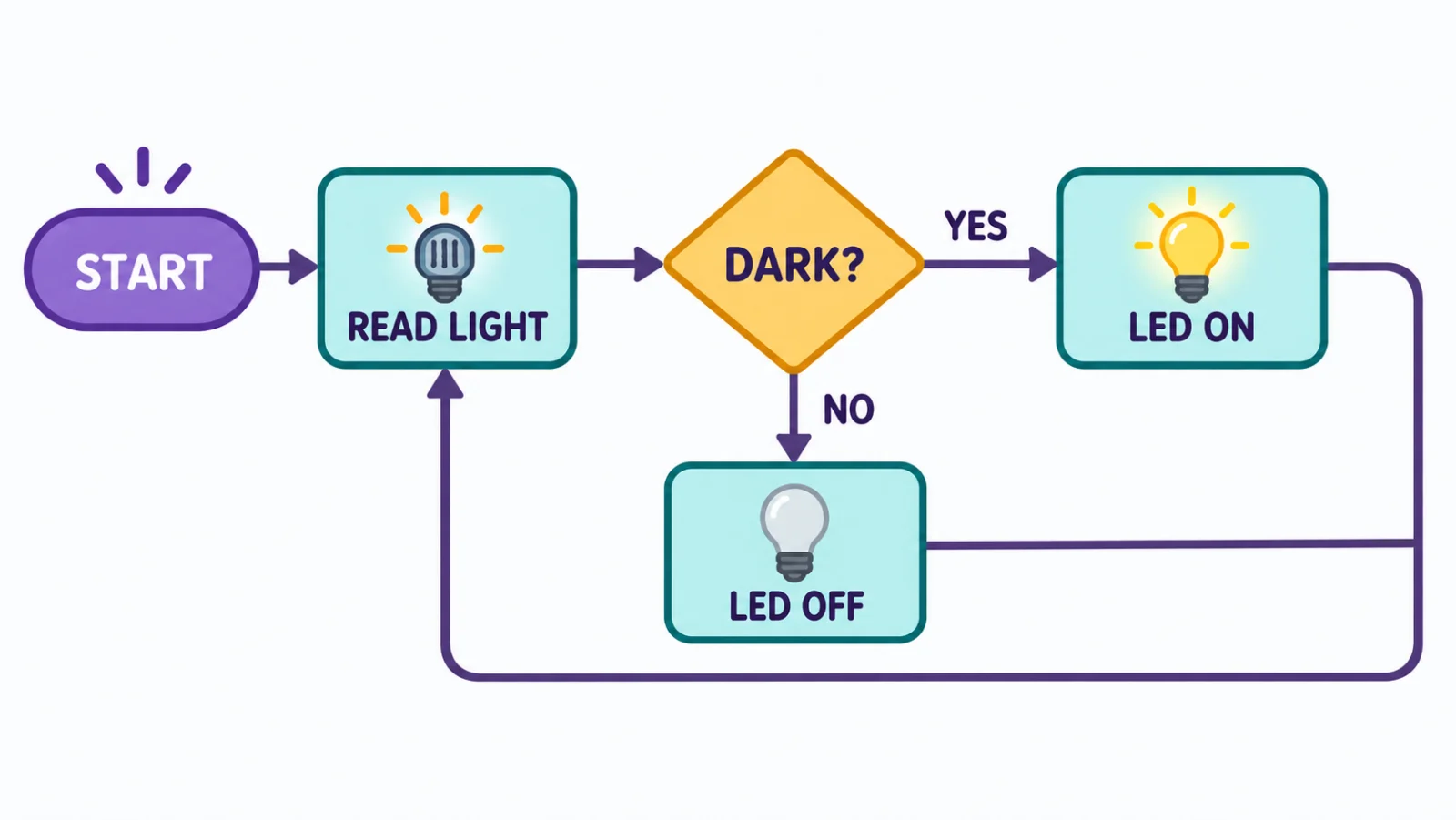
Follow the arrows: the diamond asks a yes-or-no question, each answer chooses an action, and the loop checks the light again.
For Teachers
Computational thinking is a key modern skill. Students move from turning a knob by hand to setting rules the MakerBuddy follows on its own.
Try It: Build a Flowchart, Then Run It
Interactive demo · no kit needed
Play with a pretend MakerBuddy board and its web page, right here.
Follow the steps one at a time. Got the kit? You can switch to the real board inside.
Activity: The Human Algorithm
Before we program the MakerBuddy, let's program a human! Draw a flowchart for a daily routine.
Materials Needed:
- Paper and pencils
- Or A whiteboard/blackboard
Step-by-Step Instructions:
- Choose a Routine: Pick a simple task like "Getting Ready for School".
- Identify the Start: Draw an oval labeled "START".
- List Actions: Write each step in a rectangle.
- Add Decisions: Add at least one diamond for a yes-or-no question (e.g. "Is it raining?").
- End the Flowchart: Finish with an oval labeled "END".
- "Run" the Program: A partner acts out the steps exactly as written!
Challenge: The Smart Home Architect
Design a Smart System
Now draw flowcharts for MakerBuddy IoT Kit parts. Be creative!
Scenario 1: The Smart Fan
Goal: Keep the room cool but save energy.
- Input: Temperature Sensor (DHT11)
- Output: Fan (the relay switching the kit's small low-voltage fan)
- Condition: If Temp > 28°C, Turn Fan ON. Else, Turn Fan OFF.
- Task: Draw the flowchart.
Rule Engine tip (you'll use this in Week 26): a MakerBuddy rule has no ELSE box. Each arrow out of a diamond becomes its own rule: 'Temperature > 28 → Relay On' and 'Temperature <= 28 → Relay Off'.
Scenario 2: The Security Light
Goal: Light up the porch only when someone is there AND it is dark.
- Inputs: Motion Sensor (PIR) and Light Sensor (LDR)
- Output: Light (LED)
- Task: Draw a flowchart with two decision diamonds and join them with AND. One Condition rule in the Rule Engine can hold both sensor tests. You will build this security light in Week 27.
Coming Up Next Week:
Week 21: The Rule Engine & The 4 Loop Modes
Key Takeaways
- An algorithm is a precise list of steps, done in order.
- Ovals mark start and end, rectangles show actions, diamonds show decisions, and arrows show the order.
- IF tests a condition, THEN handles the yes path, and ELSE handles the no path.
- Tracing a flowchart by hand helps find missing steps before you build a rule.
Learning Support
Use this quick guide to help every learner understand, practice and explain Algorithmic Thinking & Flowcharts.
For students
Try it in three steps
- Say it: explain the main idea in one simple sentence.
- Show it: Draw a flowchart for a daily routine with START, actions, at least one decision diamond and END, then have a partner act it out exactly.
- Stretch it: Flowchart a Smart Fan (temperature decides the fan) and a Security Light that needs two decisions joined with AND (dark AND someone there).
Checkpoint: What was your input, what decision or process happened, and what was the output?
For teachers & parents
Coach without taking over
- Before: ask the learner to predict what will happen and why.
- During: use prompts such as “What changed?” and “What could you test next?” instead of giving the answer.
- After: ask for a 30-second explanation, one piece of evidence and one improvement.
Look for: safe handling, correct vocabulary, a result the learner can demonstrate, and an explanation in their own words.
Did you get it?
Three quick questions. Pick an answer to see whether it is right, and why.
1What is an algorithm?
2What shape in a flowchart asks a yes-or-no question?
3In IF-THEN-ELSE, what does ELSE cover?