
Assessment Objective
Show your Term 1 understanding by controlling the embedded LED, RGB LED and buzzer from the dashboard.
Term 1 Assessment: The Traffic Light
See How the Buzzer Works
Read the picture from left to right: the command → what happens inside → the result.
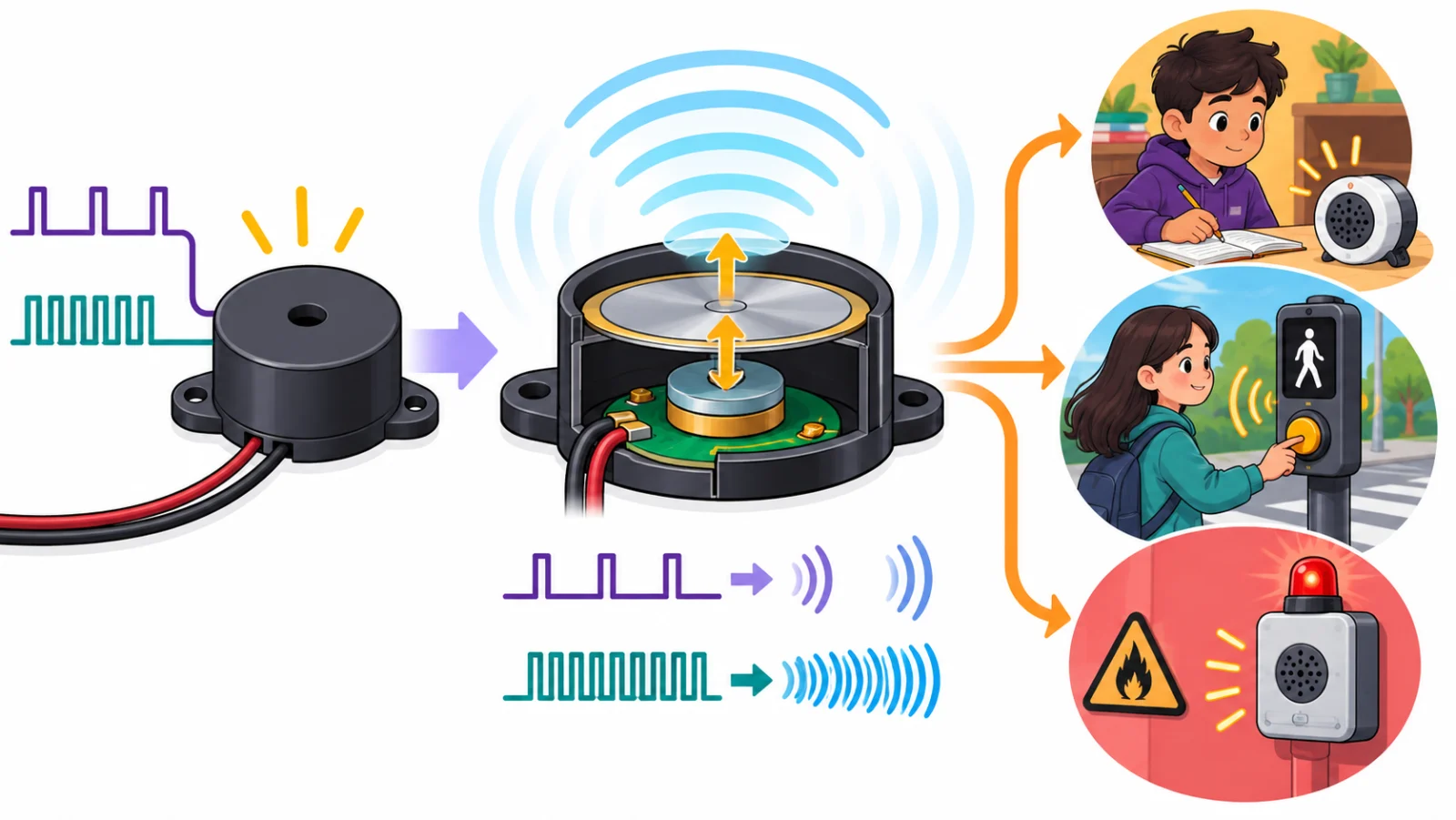
The picture draws the signal as pulses. MakerBuddy's buzzer needs only on or off: a tiny circuit inside it makes the disc vibrate.
1 · What it receives
An on or off signal from MakerBuddy: 🔊 Activate Buzzer switches it on for half a second.
2 · How it works
A tiny circuit makes a thin disc vibrate thousands of times a second, which makes sound. On-off patterns make beeps.
3 · Why it matters
Sound reaches people who are not looking, so it suits urgent alerts.
Where might we use it?
- Timers and reminders
- Accessible crossing signals
- Safety warnings
Student sentence: A buzzer turns an on signal into a vibration, and the vibration into sound.
Teacher/parent prompt: Ask, “What goes in on the left, what happens inside, and how does it help someone?”
What You Will Demonstrate
- Identify built-in parts and plug-in connector parts.
- Connect MakerBuddy to the dashboard and read a live input.
- Set single-LED brightness with the slider.
- Make red, yellow and green with the embedded RGB LED.
- Use the embedded buzzer as an alert. The buzzer is an output: it makes a sound you can hear.
- Explain Input → Process → Output in your own words.
Try It: Traffic Light Assessment
Interactive demo · no kit needed
Play with a pretend MakerBuddy board and its web page, right here.
Follow the steps one at a time. Got the kit? You can switch to the real board inside.
Practical Task: Traffic Light Sequence
The LED, RGB LED and buzzer are already embedded and connected on the MakerBuddy IoT Board. No wiring is required.
- On the RGB LED card, type 255, 0, 0 (red) and count three seconds.
- Type 255, 255, 0 (yellow) and press 🔊 Activate Buzzer once: it gives one half-second beep.
- Type 0, 255, 0 (green).
- Explain what each color tells a road user.
- On the LED Control card, switch LED On/Off on and set Brightness (PWM) to about half (PWM: 128).
- Hold the push button for about 3 seconds and show the Push Button card change to ✋ Pressed. Never hold it for more than 10 seconds: that erases the board's Wi-Fi settings.
- Point to one built-in part and one plug-in connector on your board.
Most countries show yellow before red to say “stop soon”. Some show yellow before green to say “get ready”.
Challenge
Plan a safe crossing sequence on paper. Include when the buzzer should sound and why a yellow light helps before the light changes.
Learning Support
Use this quick guide to help every learner understand, practice and explain Term 1 Assessment: The Traffic Light.
For students
Try it in three steps
- Say it: explain the main idea in one simple sentence.
- Show it: "The Traffic Light" Practical Exam using the LEDs and Buzzer.
- Stretch it: Design a safe pedestrian-crossing sequence on paper: the colours, how long each lasts and when the buzzer sounds.
Checkpoint: What was your input, what decision or process happened, and what was the output?
For teachers & parents
Coach without taking over
- Before: ask the learner to predict what will happen and why.
- During: use prompts such as “What changed?” and “What could you test next?” instead of giving the answer.
- After: ask for a 30-second explanation, one piece of evidence and one improvement.
Look for: safe handling, correct vocabulary, a result the learner can demonstrate, and an explanation in their own words.
Did you get it?
Three quick questions. Pick an answer to see whether it is right, and why.
1Does the Term 1 traffic-light task need any wiring?
2Which RGB values make the yellow light of the traffic light?
3In the Input, Process, Output cycle, what role does the buzzer play?