
Learning Objectives
- Explain how a circuit makes electricity useful
- Explain the Input → Process → Output cycle
- Describe what automation is
- Say what IoT adds to automation
- Sort devices into electronic, automated or IoT
From Electronics to Automation to IoT
Welcome to Week 1! Meet the three big ideas behind this course.
The Big Picture: Three Steps
Electronics, automation and IoT are three steps. Each one builds on the step before.
1. Electronics
Electricity flows around a circuit and makes something happen.
2. Automation
The circuit gets a rule and acts by itself. Nobody presses the switch.
3. IoT
The device joins a network, so you can watch and control it from anywhere.
Step 1: What is Electronics?
Electronics means making electricity do something useful, like lighting a torch (a flashlight).
Four words to know:
| Term | What it means |
|---|---|
| Voltage (V) | The “push” that moves electricity. MakerBuddy uses a safe 5 V and 3.3 V. A wall socket has 110–240 V. |
| Current (A) | How much electricity flows. Bigger parts, like a motor, need more. |
| Circuit | A complete loop for electricity. Break the loop and nothing works. |
| Component | A part with a job, like an LED (light) or a buzzer (sound). |
Components come in two families:
Sensors — the senses
They measure the world: light (LDR), temperature (DHT11), distance (HC-SR04), movement (PIR).
Actuators — the muscles
They act: an LED lights, a buzzer sounds, a servo turns, a relay switches.
The Pattern Behind Everything: Input → Process → Output
Every smart device follows the same three stages.
Input
Something is sensed or pressed, like a button or the light sensor (LDR).
Process
The brain (the ESP32 on your board) checks a rule and decides.
Output
Something happens: an LED lights, a buzzer sounds, a servo moves.
Example, a hallway light: a motion sensor spots you (input). The rule “if motion, light on for 30 seconds” decides (process). The light comes on (output).
Step 2: What is Automation?
Automation means giving the circuit a rule so it decides by itself. The human stops being the switch.
Compare the two:
| Manual (electronics only) | Automatic (automation) |
|---|---|
| You switch on the fan. | The fan turns on when the room passes 30 °C. |
| You water the plant when you remember. | The pump runs when the soil sensor reads “dry”. |
| You open the shop door. | The door opens when a sensor spots someone. |
Most rules have this shape:
Why it matters: automation is fast, never forgets and can sense things people can't, like a gas leak.
Step 3: What is IoT?
But an automated device works alone. You can't check it from another room.
The Internet of Things (IoT) connects everyday things to a network, so they can share data. In short: IoT = automation + connectivity (a network connection).
This adds three new powers:
Monitor
See live readings on a phone or dashboard.
Control
Switch things or change a rule without touching the device.
Alert & Record
Get warnings and keep a history of readings.
A full IoT system has four parts:
- Sensors / Devices: collect data, like a temperature sensor.
- Connectivity: sends data over Wi-Fi, Bluetooth or a cellular network.
- Data Processing: software decides what to do (too hot? turn on the AC).
- User Interface: an app, dashboard or website shows it to you.
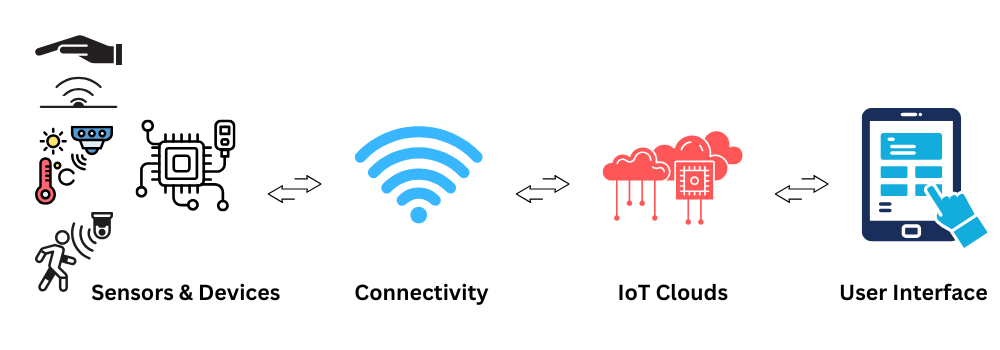
Basic IoT Architecture Flow
Telling Them Apart
Not sure which is which? Check this table.
| Question | Electronics | Automation | IoT |
|---|---|---|---|
| Does electricity do something useful? | Yes | Yes | Yes |
| Does it decide by itself? | No — a person decides | Yes — a rule decides | Yes — a rule decides |
| Can you reach it from far away? | No | No | Yes — over the network |
| Everyday example | A torch, a doorbell | A washing machine, an automatic gate | A smart bulb, a fitness band |
Where MakerBuddy Fits
MakerBuddy takes you through all three steps in one year:
- Term 1 — Foundations (electronics): meet the board, power it up, connect it to Wi-Fi and the dashboard, and use LEDs, buzzers, buttons and the light sensor.
- Term 2 — Sensing & Motion: measure temperature, distance and movement, then use motors and relays.
- Term 3 — Displays & Logic: sense gas and soil moisture, use a screen, and write your first rules.
- Term 4 — Automation & IoT: write the rules, then control the whole system from the dashboard.
The board's brain is an ESP32 (a tiny computer) with Wi-Fi built in. A free dashboard app, in your web browser or on a phone, talks to it over the same Wi-Fi network and shows its readings live.
Reaching the board from another city, or keeping a long history, needs an extra internet service that MakerBuddy doesn't use.
Try It: Electronics, Automation or IoT?
Interactive demo · no kit needed
Play with a pretend MakerBuddy board and its web page, right here.
Follow the steps one at a time. Got the kit? You can switch to the real board inside.
Activity: Sort the Devices
List six devices around you. Put each one in a group and say why:
- Electronics: a person works it every time.
- Automation: it follows a rule by itself, but stays offline.
- IoT: it follows a rule and you can check or control it from a phone.
Also name each device's input (what it senses) and output (what it does).
Weekly Challenge
Design Your Dream Smart Device!
Pick an object in your room and upgrade it through all three steps.
Requirements:
- Draw your device.
- Electronics: name one sensor (input) and one actuator (output).
- Automation: write its rule as one IF … THEN … sentence.
- IoT: say what your phone would show and one thing you could control from afar.
Key Takeaways
- Electronics makes electricity useful, with sensors (senses) and actuators (muscles).
- Every device follows Input → Process → Output.
- Automation adds a rule, IF this THEN that, so the device decides for itself.
- IoT adds a network, so you can monitor, control and get alerts.
- Each step builds on the last, and MakerBuddy covers all three.
Learning Support
Use this quick guide to help every learner understand, practice and explain Electronics, Automation & IoT.
For students
Try it in three steps
- Say it: explain the main idea in one simple sentence.
- Show it: Sort six everyday devices into electronics, automation or IoT, and name the input and output of each.
- Stretch it: Design a smart device and upgrade it through all three steps: sensor & actuator, an IF…THEN rule, then remote monitoring and control.
Checkpoint: What was your input, what decision or process happened, and what was the output?
For teachers & parents
Coach without taking over
- Before: ask the learner to predict what will happen and why.
- During: use prompts such as “What changed?” and “What could you test next?” instead of giving the answer.
- After: ask for a 30-second explanation, one piece of evidence and one improvement.
Look for: safe handling, correct vocabulary, a result the learner can demonstrate, and an explanation in their own words.
Did you get it?
Three quick questions. Pick an answer to see whether it is right, and why.
1What does automation add to a plain electronic device?
2Which list shows the pattern behind every smart device?
3What makes a device an IoT (Internet of Things) device rather than just automated?