
Learning Objective
Measure distance using ultrasonic sound waves.
Distance & Echolocation (HC-SR04)
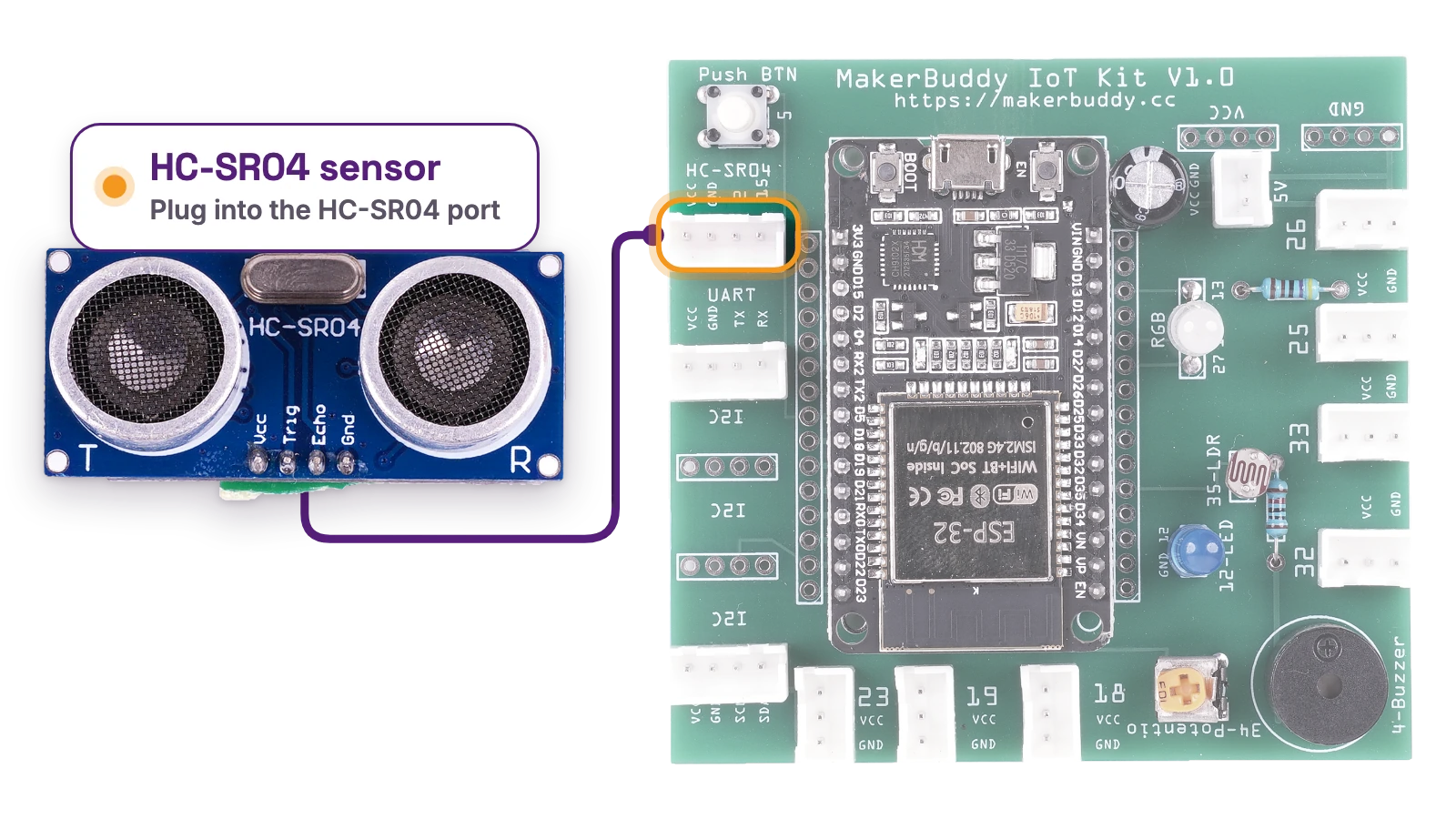
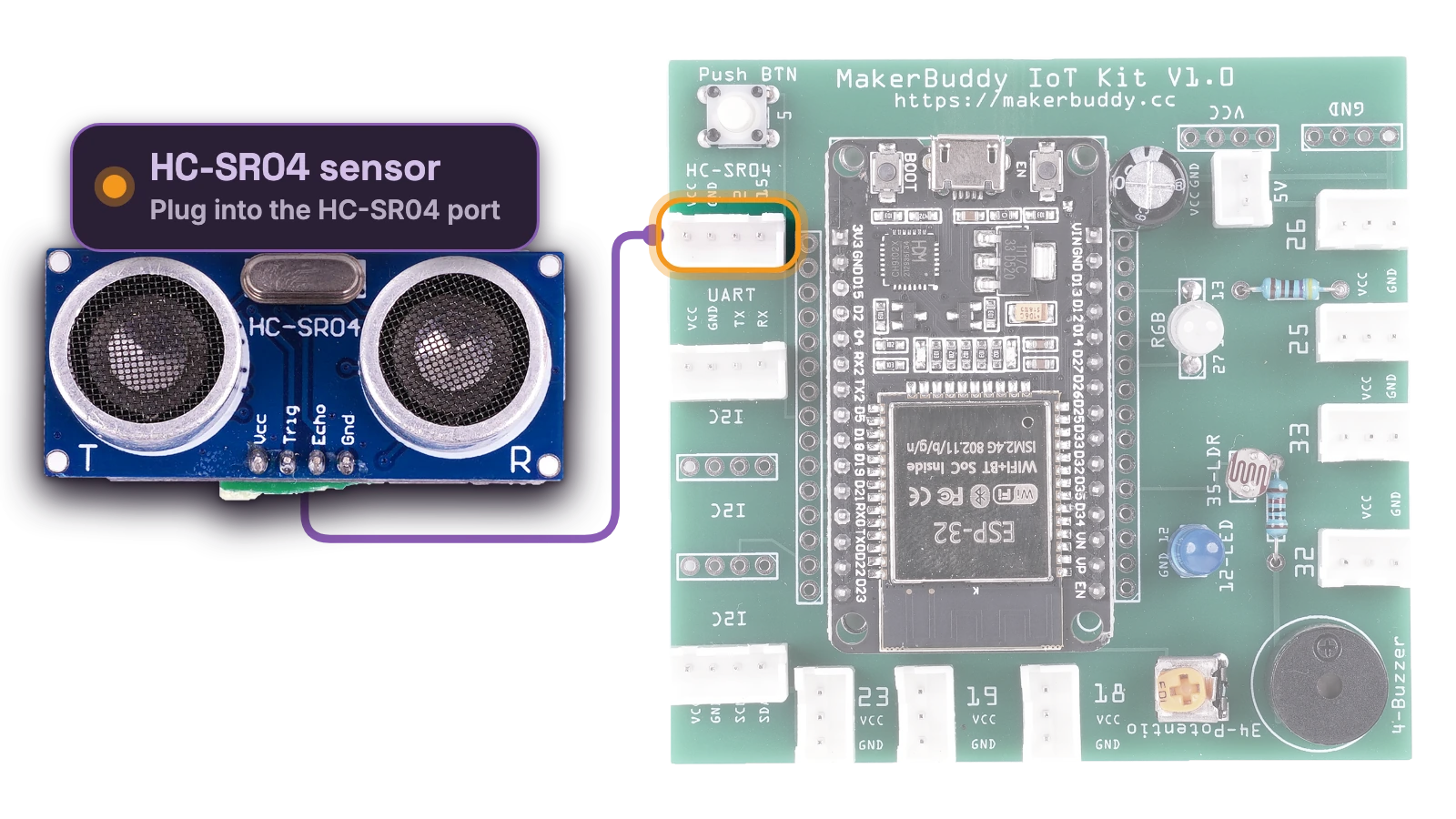
Hardware: HC-SR04 Ultrasonic Rangefinder
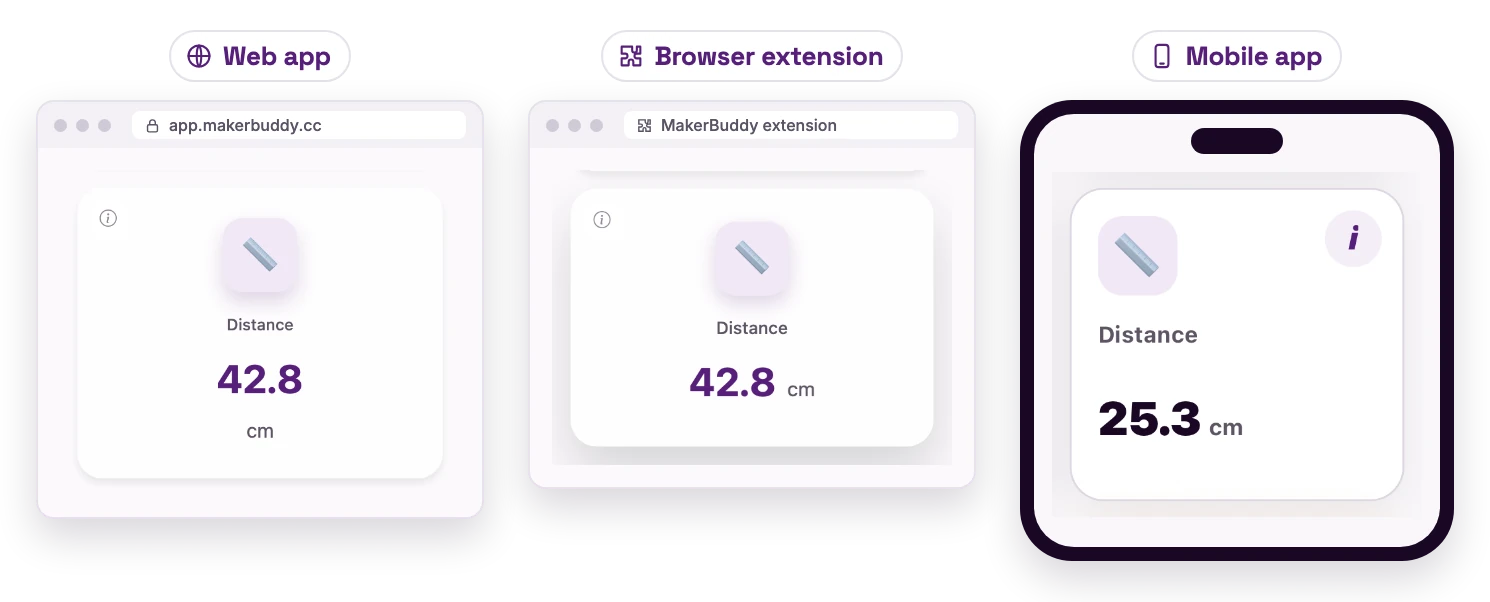
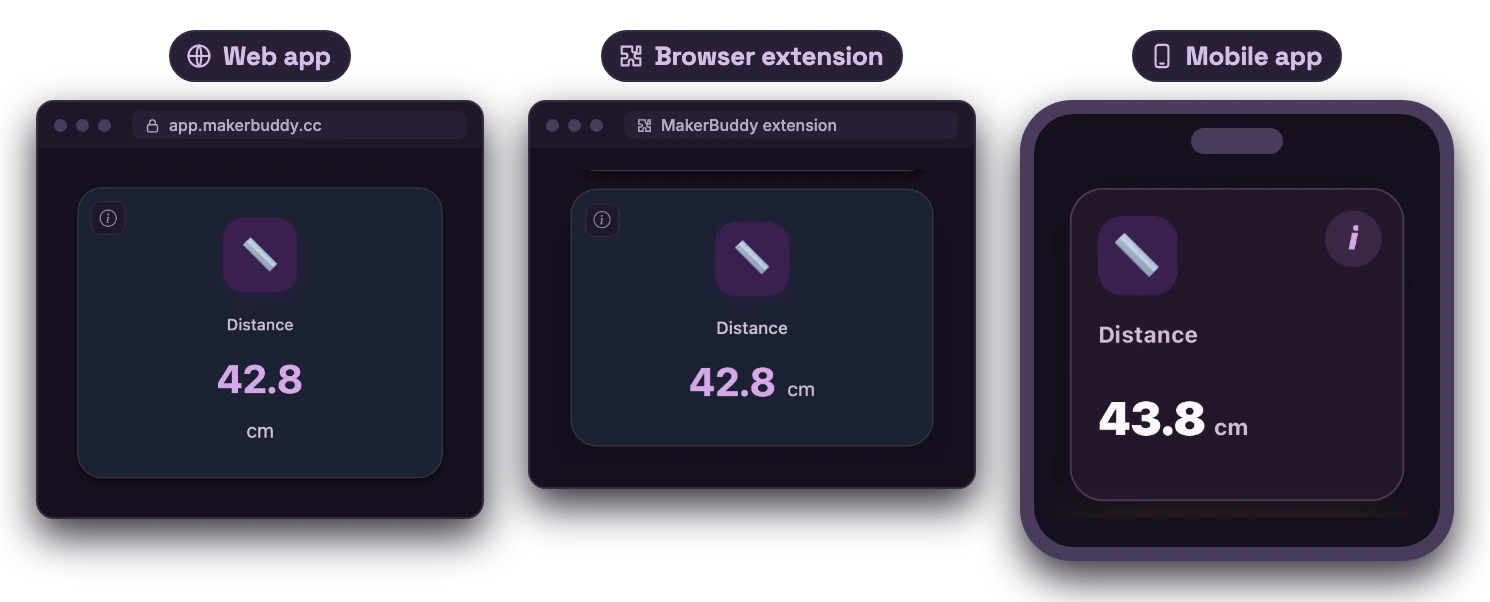
Dashboard: Ultrasonic Distance Reading Card
See How the Ultrasonic Distance Sensor Works
Read the picture from left to right: the change in the world → the sensor signal → a useful action.
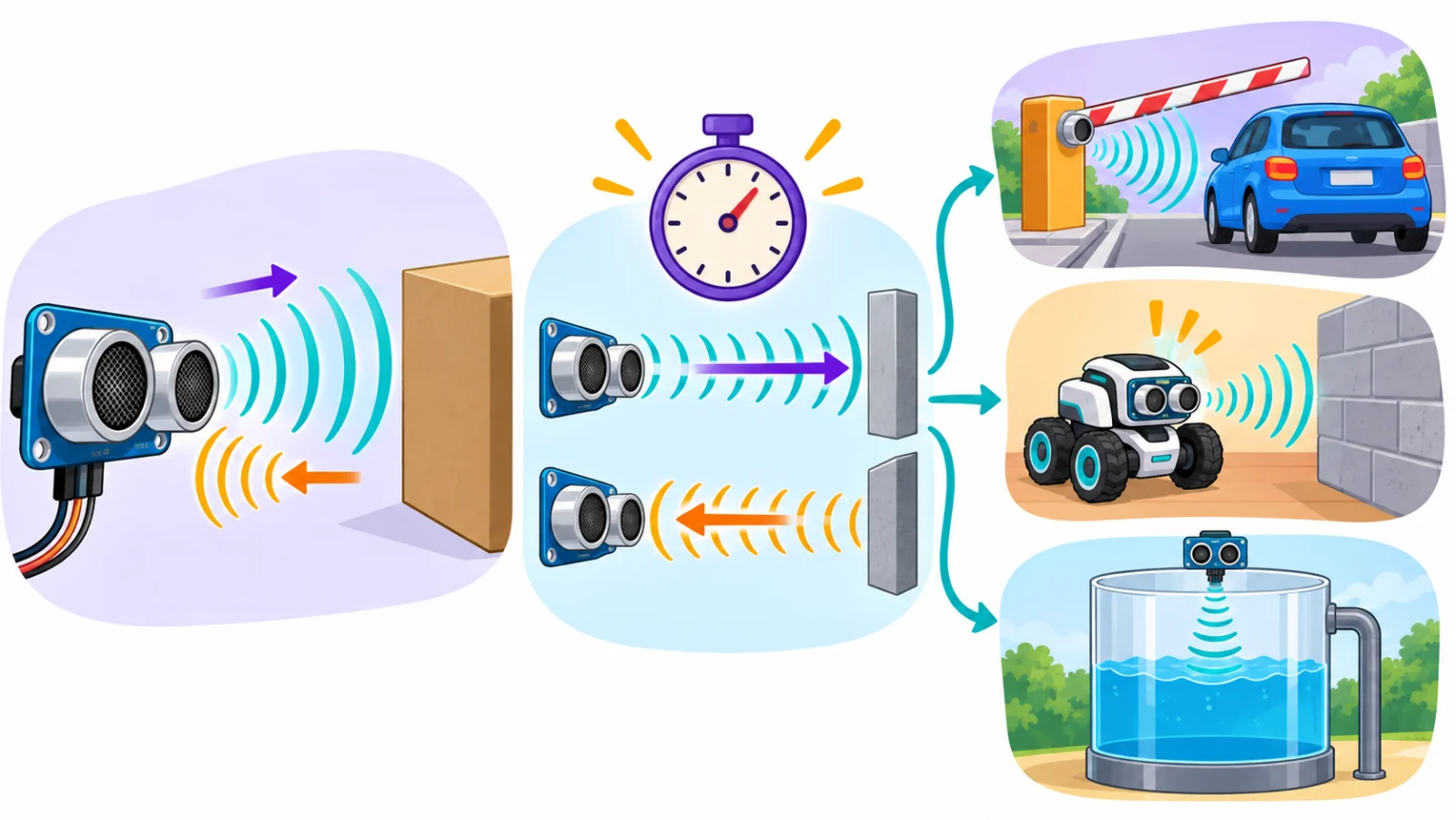
1 · What it notices
How far away something is, without touching it.
2 · How it works
It sends a sound pulse too high to hear, then times how long the echo takes to come back.
3 · Why it matters
Machines can stop or open in time, before a crash or an overflow.
Where might we use it?
- Parking gates
- Obstacle-avoiding robots
- Tank-level monitoring
Student sentence: An ultrasonic sensor estimates distance by timing a sound pulse out and back.
Teacher/parent prompt: Ask, “What changes on the left, what does the sensor turn it into, and what could happen next?”
Theory: Ultrasonic Distance Measurement
Seeing Without Light: Introduction to Echolocation
How can you measure distance without touching anything? With ultrasonic sensing, the trick bats use to fly in complete darkness. It is called echolocation: finding things by their echoes. The HC-SR04 uses sound too high for people to hear, and measures from 2 centimeters to 4 meters.
How Ultrasonic Sensors Work
The transmitter (the "T" eye) sends a burst of sound at 40 kHz (40,000 vibrations a second), far above the 20 kHz limit of human hearing. It travels at about 343 meters per second (the speed of sound) and bounces off an object. The receiver (the "R" eye) hears the echo. The round-trip time is the Time of Flight. Distance = (Speed of Sound × Time) ÷ 2. We divide by 2 because the sound went to the object AND back!
Technical Details: Range, Resolution and Limitations
The HC-SR04 measures 2cm to 400cm (0.8 inches to 13 feet). Its beam is a cone of about 15 degrees, not a laser-thin line. Large, flat, hard surfaces facing it straight on work best. Soft materials (like fabric or foam) absorb sound, angled surfaces bounce it away, and very small objects may not echo enough. Sound is a little faster in warm air. MakerBuddy always uses 0.034 cm per microsecond (about 340 m/s), and nothing corrects for the air temperature, so readings can be off by about 1 % (about 1 cm at 1 meter).
Real-World Applications
Car parking sensors beep faster as you get closer to something. Robots and drones use ultrasonic sensors to avoid obstacles. Water level monitors measure the distance down to the water in a tank.
For Teachers
Compare the speed of sound (343 m/s at 20°C) with light (300,000 km/s): at 10cm, sound travels 20cm there and back in about 580 microseconds. Move an object sideways to show the beam angle: the sensor "loses" it. This prepares students for servo control in Week 14 and the parking-barrier project in Weeks 29-30.
For Parents
Your child learns to measure distance with echoes, like parking sensors, robots, bats and dolphins do.
Try It: Measure with Echoes
Interactive demo · no kit needed
Play with a pretend MakerBuddy board and its web page, right here.
Follow the steps one at a time. Got the kit? You can switch to the real board inside.
Hands-On Activity: Distance Sensing
Activity Duration: 20-25 minutes
Connect the HC-SR04 and find where it works well and where it struggles.
Step-by-Step Instructions:
- Identify the Sensor: Find the HC-SR04: two round "eyes" (transmitter and receiver) and a 4-pin connection.
- Connect to MakerBuddy: Unplug the USB cable. Connect the HC-SR04 to the 4-pin connector marked HC-SR04 on the left edge of the board with the kit cable: VCC to VCC, GND to GND, Trig to 15 and Echo to 2. Then plug the USB cable back in.
- Open Dashboard: Find the Distance card (in cm). With nothing in front, it can show 999.0: no echo heard yet.
- Point at Wall: Aim at a flat wall about 50-100cm away. Note the reading.
- Move Closer: Move slowly toward the wall, as close as 5cm.
- Move Farther: Back away. How far can you go before the number stops changing? With no echo, the card keeps the last good distance (or 999.0 if it never had one).
- Test Different Materials: Try a smooth wall, fabric, your hand, a book and a curved surface. Which is most reliable?
- Test Angles: Tilt the sensor away from straight on. At what angle does it lose the wall?
What Students Should Observe:
- The board measures the distance once every second, and the Distance card updates about every 2 seconds.
- Smooth, hard, flat surfaces give the steadiest readings
- Under 2 cm, beyond about 4 m, or with soft or steeply angled surfaces, there is no usable echo, and the Distance card simply keeps the last good number.
- The sensor sees a cone, not a pinpoint beam
Challenge
Your Mission: Accuracy Verification Lab
You're a quality control engineer. Is the sensor as accurate as promised?
Challenge 1: Precision Testing
Use a ruler or measuring tape to test these distances:
- 10 cm from a flat object
- 20 cm from a flat object
- 50 cm from a flat object
- 100 cm from a flat object
Note the real distance, the reading and the error (the difference). Work out each percentage error. Which distance is most accurate?
Challenge 2: Material Testing
Hold the sensor exactly 30cm from each surface and note the reading:
- Smooth wall or whiteboard
- Textbook cover
- Your hand (palm flat)
- Fabric or clothing
- Cylindrical object (like a water bottle)
Which work best? Which don't, and why?
Discussion Questions:
- Why does the sensor divide the time by 2?
- How would temperature change the accuracy? (Hint: sound travels faster in warm air)
- Why is this sensor better than a laser for some robots, but worse for others?
- When would this sensor fail completely?
Bonus Challenge: At 343 m/s, how many microseconds does sound take to go 50cm and back? (Answer: about 2,900 microseconds, or 2.9 milliseconds. Check it!)
Key Takeaways
✓ Ultrasonic Waves
Ultrasonic sound is too high for people to hear (typically 40 kHz for the HC-SR04). It works in complete darkness and can even detect see-through objects.
✓ Time of Flight
Time of Flight (ToF) is how long an echo takes to return. Distance = (Speed of Sound × Time) ÷ 2, because the sound goes there and back.
✓ Echolocation
Finding objects by sending sounds and listening for echoes. The HC-SR04 copies bats and dolphins.
✓ Distance Measurement
Measuring without touching helps robots steer. Know the limits: range, beam angle and surface type.
Coming Up Next Week:
Week 13: Security Sensing (PIR Motion)
Learning Support
Use this quick guide to help every learner understand, practice and explain Distance & Echolocation (HC-SR04).
For students
Try it in three steps
- Say it: explain the main idea in one simple sentence.
- Show it: Connect HC-SR04 rangefinder. Measure distance of approach to the sensor.
- Stretch it: Compare the Distance card with a ruler at 10, 20, 50 and 100 cm and work out the sensor's average error (its offset).
Checkpoint: What was your input, what decision or process happened, and what was the output?
For teachers & parents
Coach without taking over
- Before: ask the learner to predict what will happen and why.
- During: use prompts such as “What changed?” and “What could you test next?” instead of giving the answer.
- After: ask for a 30-second explanation, one piece of evidence and one improvement.
Look for: safe handling, correct vocabulary, a result the learner can demonstrate, and an explanation in their own words.
Did you get it?
Three quick questions. Pick an answer to see whether it is right, and why.
1How does the HC-SR04 find the distance to an object?
2Why is the travel time divided by 2 in the distance formula?
3Which surface gives the most reliable distance reading?