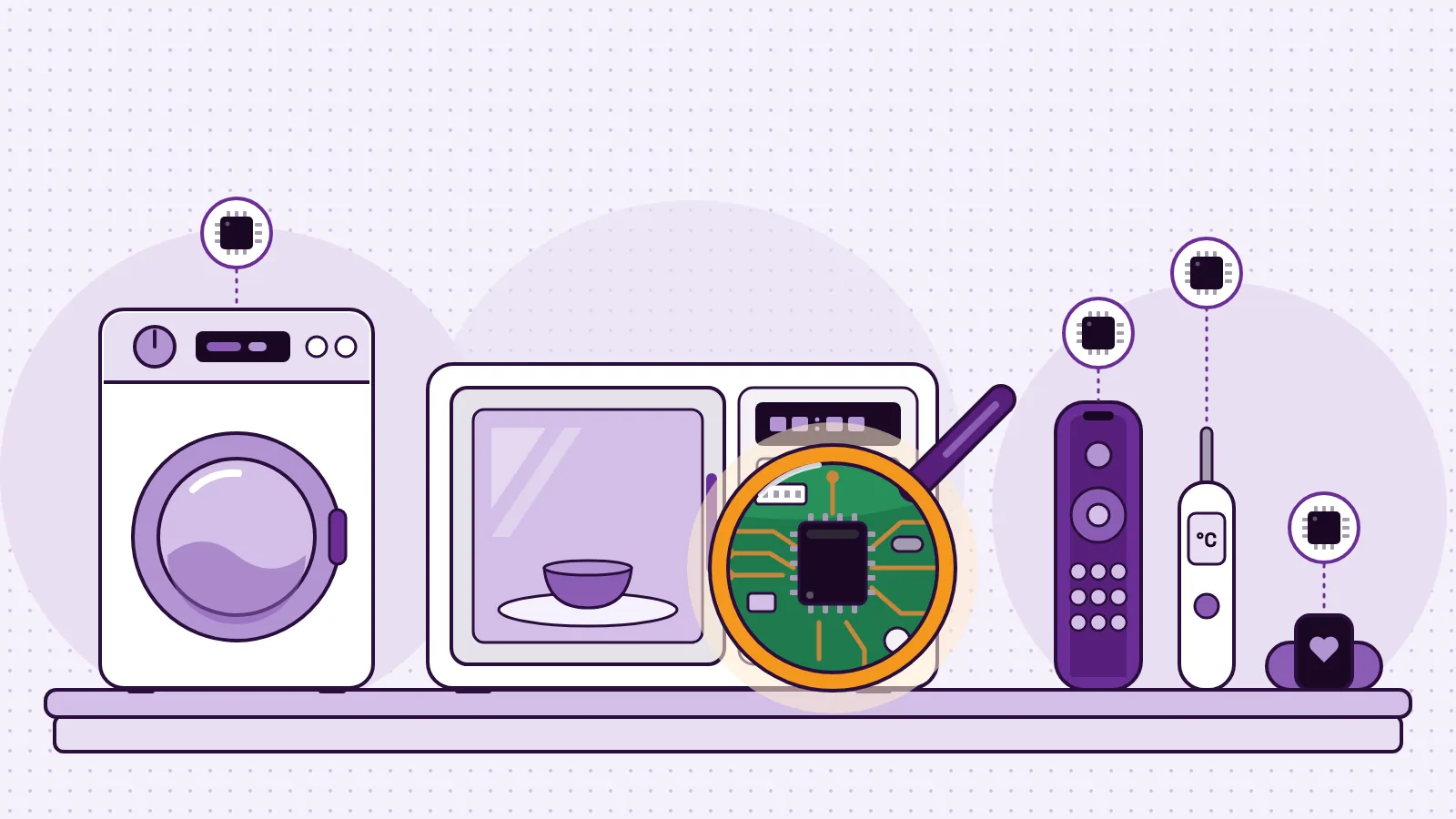
STEM education in Pakistan has a national push behind it and an uneven base under it. The National Curriculum of Pakistan 2022-23 for Computer Science (opens in a new tab) asks Class 7 students to write algorithms with conditions and loops. A federal project set out to build STEM labs in 50 higher secondary schools and cadet colleges (opens in a new tab). Yet only about 65 percent of public schools had electricity in 2023-24, according to the Pakistan Economic Survey 2025-26 (opens in a new tab). So most schools that want STEM will not get a funded lab. They can still start, with one class, one trained teacher, power at the tables, a few shared devices and a reusable kit.
Below are the official figures, the curriculum, the national programmes, a seven-step plan and a costed first year for a Lahore school. The kit examples use the MakerBuddy IoT Kit V1.0, made by OR97 in Lahore.
What STEM education means in a Pakistani school
STEM stands for science, technology, engineering and mathematics. Pakistani schools already teach all four, and the national curriculum includes computer science from Class 6 (Grade 6). STEM education joins them through projects: students measure something real, build a fix, test it and improve it.
Picture one period. In a textbook lesson, students copy the definition of a sensor. In a STEM lesson, a team measures how warm the classroom gets by the last period, picks a "too hot" number and makes a buzzer sound when the reading passes it. Then they defend their number.
You will also see STEAM, which adds the arts, as in the federal programme STEAM Pakistan (opens in a new tab). For parents, there is a plain guide to what STEM is and why it matters for your child. STEM does not replace your school system: the Pakistan Science Foundation says its project will complement the existing school education system (opens in a new tab).
Where STEM education in Pakistan stands: the numbers
These are the newest official and survey figures we found that shape a STEM plan. The school electricity figures are from Pakistan Education Statistics 2023-24, as reported in the survey.
| What is measured | Figure | Source |
|---|---|---|
| Literacy, age 10 and over | 63 percent in 2024-25 (male 73, female 54); Punjab 68 percent | Pakistan Economic Survey 2025-26 (opens in a new tab) |
| Children out of school | 28 percent in 2025, down from 38 percent in 2023 | Pakistan Economic Survey 2025-26 (opens in a new tab) |
| Public schools with electricity | About 65 percent: 59 percent of primary, 77 of middle, 92 of high and 95 of higher secondary schools | Pakistan Economic Survey 2025-26 (opens in a new tab), from Pakistan Education Statistics 2023-24 |
| Public schools with electricity, by area | Punjab 99, Islamabad 99, Khyber Pakhtunkhwa 77, Sindh 32 and Balochistan 21 percent | Pakistan Economic Survey 2025-26 (opens in a new tab) |
| Surveyed government high schools with a computer lab | 57 percent, and 43 percent have internet | ASER Pakistan 2025 (opens in a new tab) |
| Households with a smartphone, and with a computer | 45 percent and 13 percent | ASER Pakistan 2025 (opens in a new tab) |
| Class 5 children who can do two-digit division | 48 percent | ASER Pakistan 2025 (opens in a new tab) |
- What is measured
- Literacy, age 10 and over
- Figure
- 63 percent in 2024-25 (male 73, female 54); Punjab 68 percent
- What is measured
- Children out of school
- Figure
- 28 percent in 2025, down from 38 percent in 2023
- What is measured
- Public schools with electricity
- Figure
- About 65 percent: 59 percent of primary, 77 of middle, 92 of high and 95 of higher secondary schools
- Source
- Pakistan Economic Survey 2025-26 (opens in a new tab), from Pakistan Education Statistics 2023-24
- What is measured
- Public schools with electricity, by area
- Figure
- Punjab 99, Islamabad 99, Khyber Pakhtunkhwa 77, Sindh 32 and Balochistan 21 percent
- What is measured
- Surveyed government high schools with a computer lab
- Figure
- 57 percent, and 43 percent have internet
- What is measured
- Households with a smartphone, and with a computer
- Figure
- 45 percent and 13 percent
- What is measured
- Class 5 children who can do two-digit division
- Figure
- 48 percent
The two sources measure in different ways. ASER Pakistan 2025 (opens in a new tab) is a provisional household survey of rural and urban areas in 136 districts, run from October 2025 to February 2026, and it counts only 8.5 percent of children aged 6 to 16 as out of school. Do not set one figure against the other; ASER itself calls its 2025 round a new baseline.
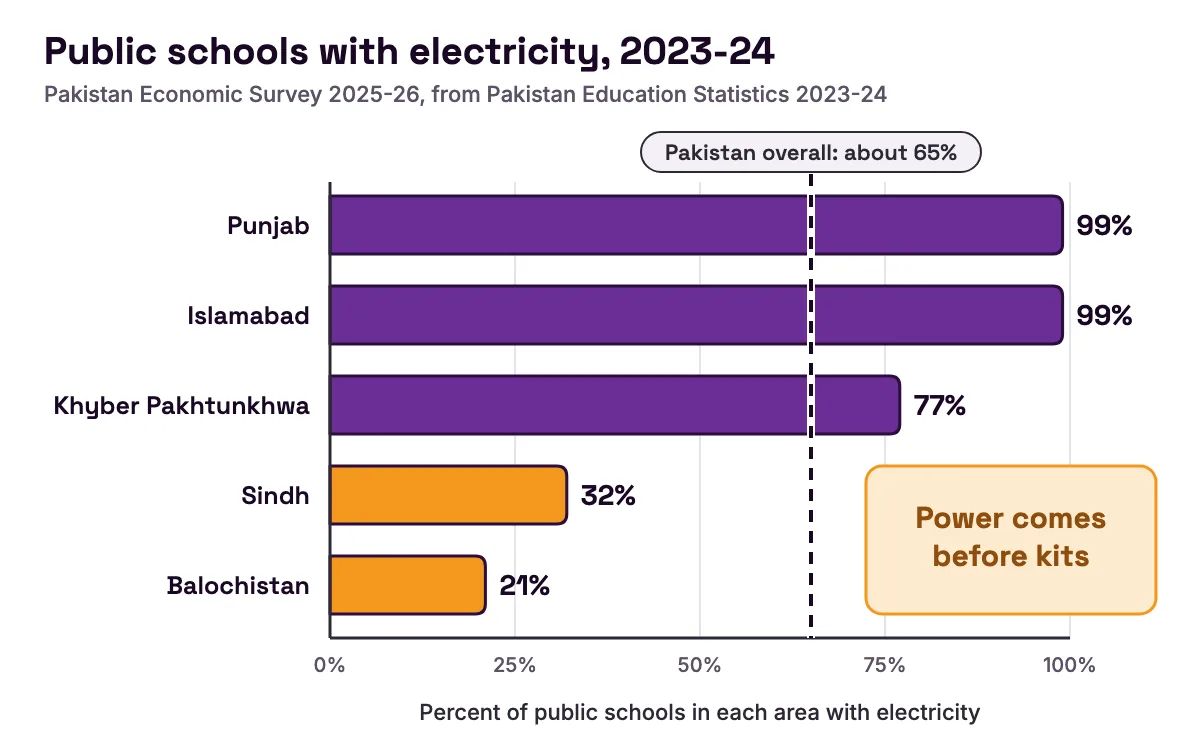
What the figures mean for your school:
- Power comes before kits. In Sindh and Balochistan, most public primary schools have no electricity (opens in a new tab), while almost every public school in Punjab and Islamabad does.
- Phones are common at home, computers are not. 45 percent of households had a smartphone but only 13 percent had a computer (opens in a new tab). Plan on school devices, not on students' phones.
- Number skills still need practice. Only 48 percent of Class 5 children could do two-digit division (opens in a new tab). Projects give number work a purpose: comparing readings, choosing a threshold, finding a range.
A 2025 study of 600 teachers, principals and administrators in 30 secondary schools in Multan (opens in a new tab) found that funding raised the resources schools had, and policy support and access to technology drove STEM forward.
What Pakistan's national curriculum asks for
The National Curriculum of Pakistan 2022-23 for Computer Science (opens in a new tab) covers Grades 6 to 12. The National Curriculum Council calls it the country's first core curriculum, and it aims to move classrooms from rote learning to concept-based learning. For Classes 6 to 8 its domains include algorithmic thinking and problem solving, programming, and ICT fundamentals.
Several of its student learning outcomes (SLOs) are easier to teach with something real to reason about. The table is our own reading of where the MakerBuddy lessons touch them, not an official alignment.
| SLO | What it asks students to do | MakerBuddy lesson that practises it |
|---|---|---|
| CS-06-A-03 (Class 6) | Identify basic hardware such as the processor, memory and storage | Lesson 2: board tour |
| CS-06-C-02 (Class 6) | Apply basic algorithmic thinking to problems | Lesson 20: algorithmic thinking and flowcharts |
| CS-07-A-01 (Class 7) | Identify uses of emerging technologies such as robotics | Lesson 14: the SG90 servo |
| CS-07-C-02 (Class 7) | Write algorithms with conditional statements and finite and infinite loops | Lesson 21: the rule engine, Lesson 23: forever loops, Lesson 26: condition loops |
| CS-08-A-02 (Class 8) | Identify a network and its core parts | Lesson 3: connectivity |
| CS-10-E-01 (Class 10) | Describe uses of technologies such as IoT | Lesson 1: electronics, automation and IoT |
| CS-12-E-01 (Class 12) | Design IoT application ideas relevant to Pakistan | Lesson 31: capstone project |
- SLO
- CS-06-A-03 (Class 6)
- What it asks students to do
- Identify basic hardware such as the processor, memory and storage
- MakerBuddy lesson that practises it
- Lesson 2: board tour
- SLO
- CS-06-C-02 (Class 6)
- What it asks students to do
- Apply basic algorithmic thinking to problems
- MakerBuddy lesson that practises it
- Lesson 20: algorithmic thinking and flowcharts
- SLO
- CS-07-A-01 (Class 7)
- What it asks students to do
- Identify uses of emerging technologies such as robotics
- MakerBuddy lesson that practises it
- Lesson 14: the SG90 servo
- SLO
- CS-07-C-02 (Class 7)
- What it asks students to do
- Write algorithms with conditional statements and finite and infinite loops
- MakerBuddy lesson that practises it
- Lesson 21: the rule engine, Lesson 23: forever loops, Lesson 26: condition loops
- SLO
- CS-08-A-02 (Class 8)
- What it asks students to do
- Identify a network and its core parts
- MakerBuddy lesson that practises it
- Lesson 3: connectivity
- SLO
- CS-10-E-01 (Class 10)
- What it asks students to do
- Describe uses of technologies such as IoT
- MakerBuddy lesson that practises it
- Lesson 1: electronics, automation and IoT
- SLO
- CS-12-E-01 (Class 12)
- What it asks students to do
- Design IoT application ideas relevant to Pakistan
- MakerBuddy lesson that practises it
- Lesson 31: capstone project
A worked rule for the Class 7 outcome
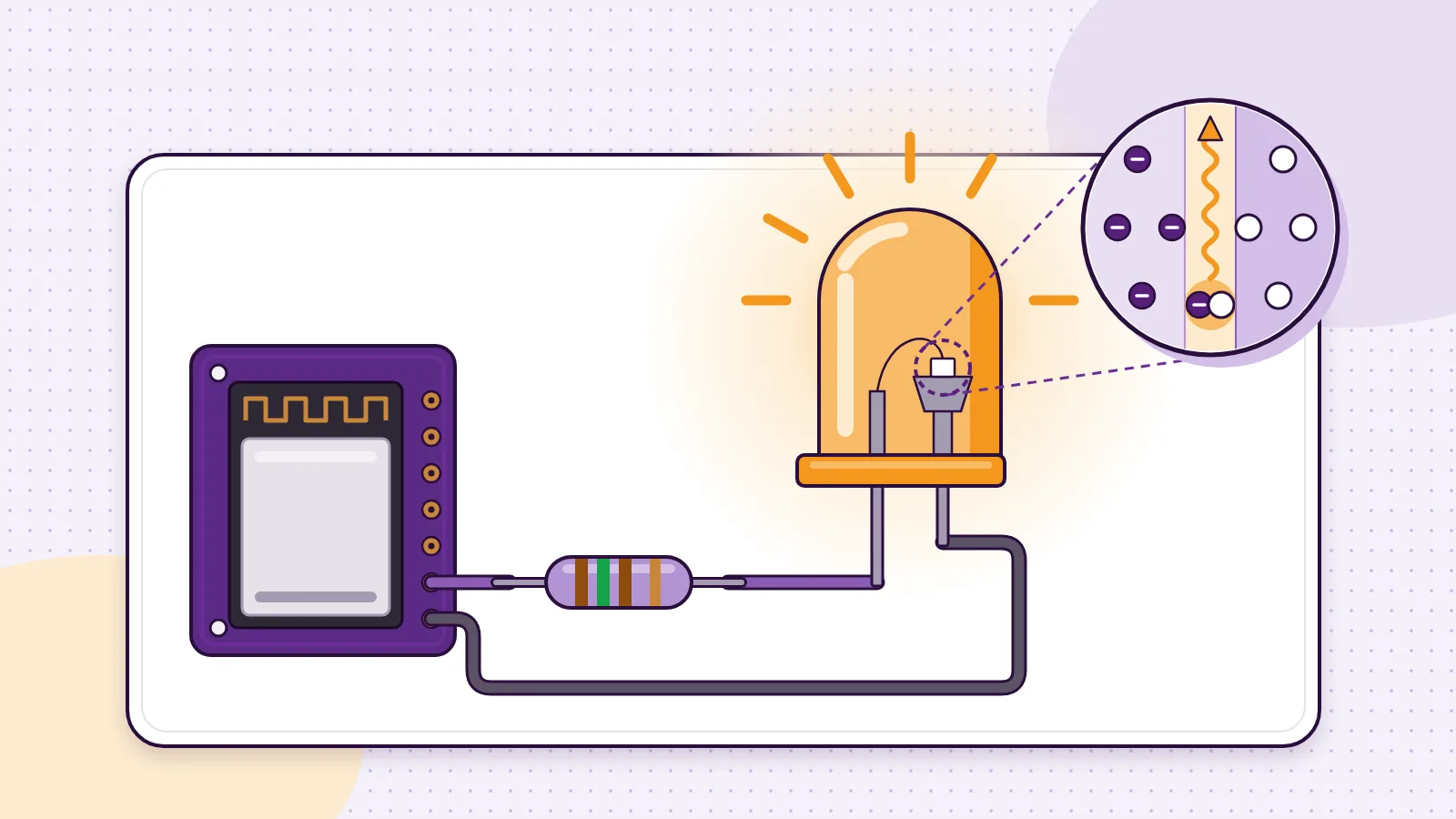
A MakerBuddy rule is an algorithm students can watch run. They pick one or two sensors, a comparison and a number, then up to 10 steps. The rule runs on the board, not in the browser. Here is the smart fan from the Lesson 26 challenge: a small fan goes on through the relay above 30 °C and off below 26 °C.
Rule 1: Fan on
  Mode:   Condition (the board checks the reading again and again)
  When:   Temperature (DHT11) > 30
  Steps:  1. Relay on
          2. Colour light red

Rule 2: Fan off
  Mode:   Condition
  When:   Temperature (DHT11) < 26
  Steps:  1. Relay off
          2. Colour light green
The "When" line is the conditional statement. The Condition mode is the loop: the board checks the reading about once a second, for as long as it runs. The gap between 30 and 26 stops the fan flicking on and off near one number. A Class 7 student who can explain that gap has practised CS-07-C-02 with real data.
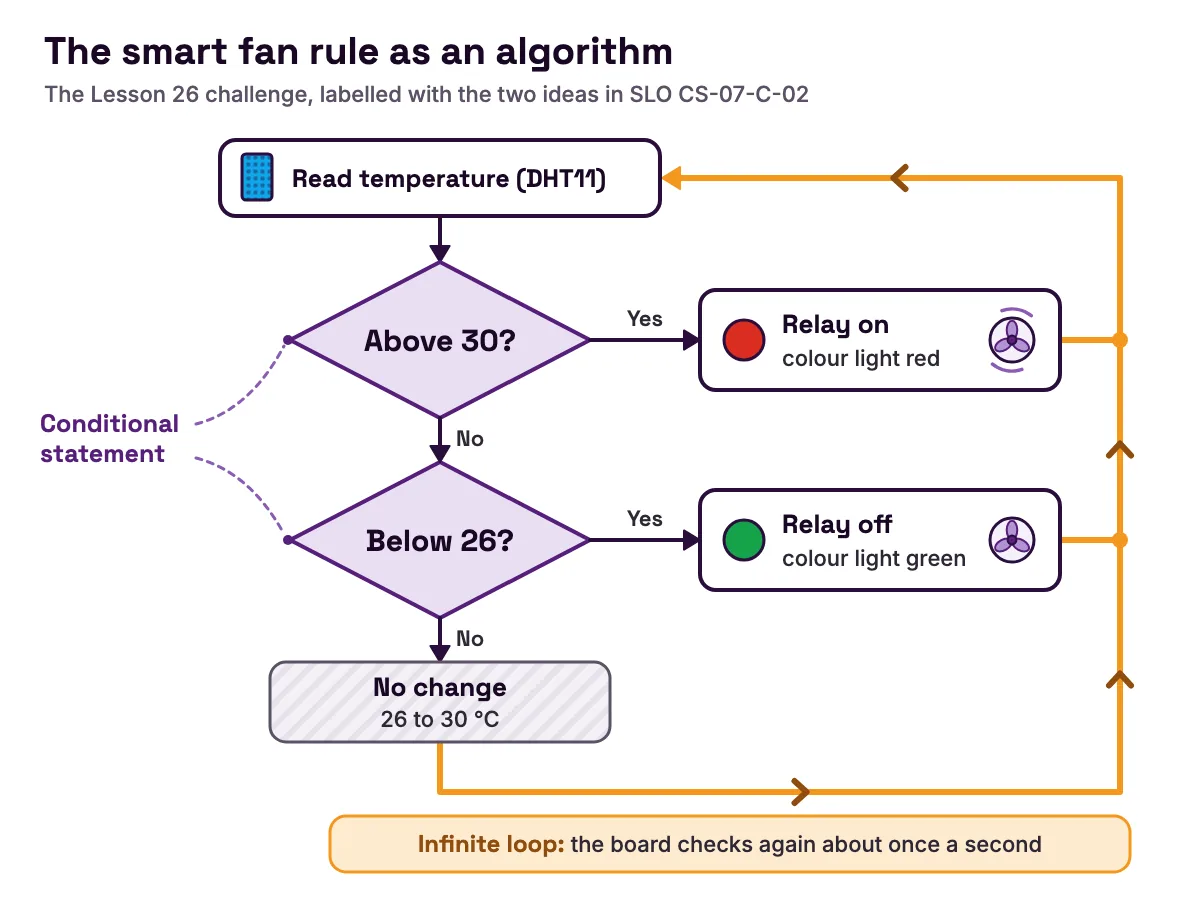
One gap: the Class 6 and 7 programming outcomes ask for sprite-based programs in a visual programming tool. MakerBuddy rules are built from menus, not blocks, so keep a block-based tool for those. The STEM curriculum guide for a full school year shows how to fit the 32 lessons around other work, and older classes can try science projects for Class 8, 9 and 10 with sensors.
National STEM programmes and STEM schools in Pakistan
Several public programmes support STEM in Pakistan. Each reaches selected schools or students, so check whether yours qualifies before you plan around it.
- Programme
- Launching of STEM in Pakistan, Phase-I
- Run by
- Pakistan Science Foundation
- Programme
- STEAM Pakistan
- Run by
- Federal education ministry, supported by Malala Fund
- What it does
- Links with eight universities, set up in 2022 with an aim to reach 100,000 children and 5,000 teachers (opens in a new tab), and maths circles and STEAM clubs with NED University (opens in a new tab)
- Who it reaches
- Partner government schools
- Programme
- STEM Careers Program
- Run by
- Higher Education Commission and PIEAS
- Who it reaches
- Pre-9th to Class 11, at least 60 percent in core subjects
- Programme
- Provincial programmes, 2025-26
- Run by
- Punjab, Sindh, Khyber Pakhtunkhwa
- Who it reaches
- Public schools
The Pakistan Science Foundation's list of its 50 STEM schools (opens in a new tab) runs from Islamabad and Lahore to Quetta, Gilgit and Muzaffarabad; in Lahore it names Govt Pilot Higher Secondary School in Wahdat Colony.
Notice what the funded labs put next to the equipment: teachers. At the 2022 cheque ceremony, the science minister asked officials to start training teachers on STEM as soon as possible (opens in a new tab). A 3D printer in a locked room teaches nothing; a trained teacher with a few shared kits teaches every week. Outside these lists, a school starts with its own budget, and students can look at digital and tech skills programmes in Pakistan.
What parents should ask a STEM school
A school may call itself a STEM school or advertise robotics, but the label alone tells you little. Ask:
- How often do students build something with their own hands: every week, or once a term?
- Do students share a kit in small teams, or watch the teacher?
- Do they record predictions and readings, and explain why a test failed?
- Has the teacher been trained on the kit?
Listen hardest to the third answer. A child who can explain a failed test has learned more than one who copied a working build. Families can also read MakerBuddy's guide for parents and what to look for in robotics and coding summer camps in Lahore.
Robotics in Pakistan's schools: start with sense, decide, act
Parents may ask about robotics first, and the curriculum names it too. Class 7 students identify robotics among the emerging technologies (opens in a new tab) used in daily life, and Class 10 students explain how AI is applied in areas such as robotics.
A robot is three things joined together. Sensors notice the world, a rule decides, and a motor moves. The MakerBuddy lessons build up to that in order. Lesson 12 measures distance with sound, and Lesson 14 calibrates a servo that turns from 0 to 180 degrees. Then Lesson 29, the parking gate, joins them: the distance sensor notices a car, a rule decides, and the servo lifts the barrier arm.
A robot car has a place too, because excitement helps a new club. But a car that runs ready-made code teaches assembly more than logic. Read robotics kits in Pakistan and how to choose one before you buy, and how to start a robotics club at school to run one.
How a school can start STEM in seven steps
Five ways to start, compared
There is no single right way to start STEM in Pakistan. The best route depends on your power, your devices and your teacher's time.
| Route | What you need first | Teacher skill to start | What students practise | Watch out for |
|---|---|---|---|---|
| Unplugged lessons | Paper and a board | Low | Flowcharts, if-then thinking | No real readings to test against |
| Block coding | A computer lab | Low to medium | Sequence, selection and loops on screen | No sensors or motors |
| Loose parts: board, breadboard, jumper wires | Parts, laptops, a teacher who can debug wiring and code | High | Wiring, C++ code, debugging | Class time goes on loose wires |
| Robot car kits | Kits, batteries, floor space | Medium | Assembly, motors, sometimes code | Ready-made code hides the logic |
| Plug-in sensor kit with no-code rules, such as MakerBuddy | Kits, a laptop or iPad per kit, 2.4 GHz Wi-Fi | Low to start | Live readings, thresholds, rules and loops; code later | Needs devices and Wi-Fi; no Android phones yet |
- Route
- Unplugged lessons
- What you need first
- Paper and a board
- Teacher skill to start
- Low
- What students practise
- Flowcharts, if-then thinking
- Watch out for
- No real readings to test against
- Route
- Block coding
- What you need first
- A computer lab
- Teacher skill to start
- Low to medium
- What students practise
- Sequence, selection and loops on screen
- Watch out for
- No sensors or motors
- Route
- Loose parts: board, breadboard, jumper wires
- What you need first
- Parts, laptops, a teacher who can debug wiring and code
- Teacher skill to start
- High
- What students practise
- Wiring, C++ code, debugging
- Watch out for
- Class time goes on loose wires
- Route
- Robot car kits
- What you need first
- Kits, batteries, floor space
- Teacher skill to start
- Medium
- What students practise
- Assembly, motors, sometimes code
- Watch out for
- Ready-made code hides the logic
- Route
- Plug-in sensor kit with no-code rules, such as MakerBuddy
- What you need first
- Kits, a laptop or iPad per kit, 2.4 GHz Wi-Fi
- Teacher skill to start
- Low to start
- What students practise
- Live readings, thresholds, rules and loops; code later
- Watch out for
- Needs devices and Wi-Fi; no Android phones yet
You can mix routes: unplugged lessons for power cuts, block coding for the sprite outcomes, a sensor kit for real data. For the loose-parts route, read where to buy electronic components in Lahore and the guide to ESP32 and Arduino prices in Pakistan.
The seven steps
- 1
Pick one class, one teacher and one goal.
For example: "By the end of the year, Class 7 can build an if-then rule and explain it." MakerBuddy's guide for schools suggests the same small start.
- 2
Check power, devices and Wi-Fi a week ahead.
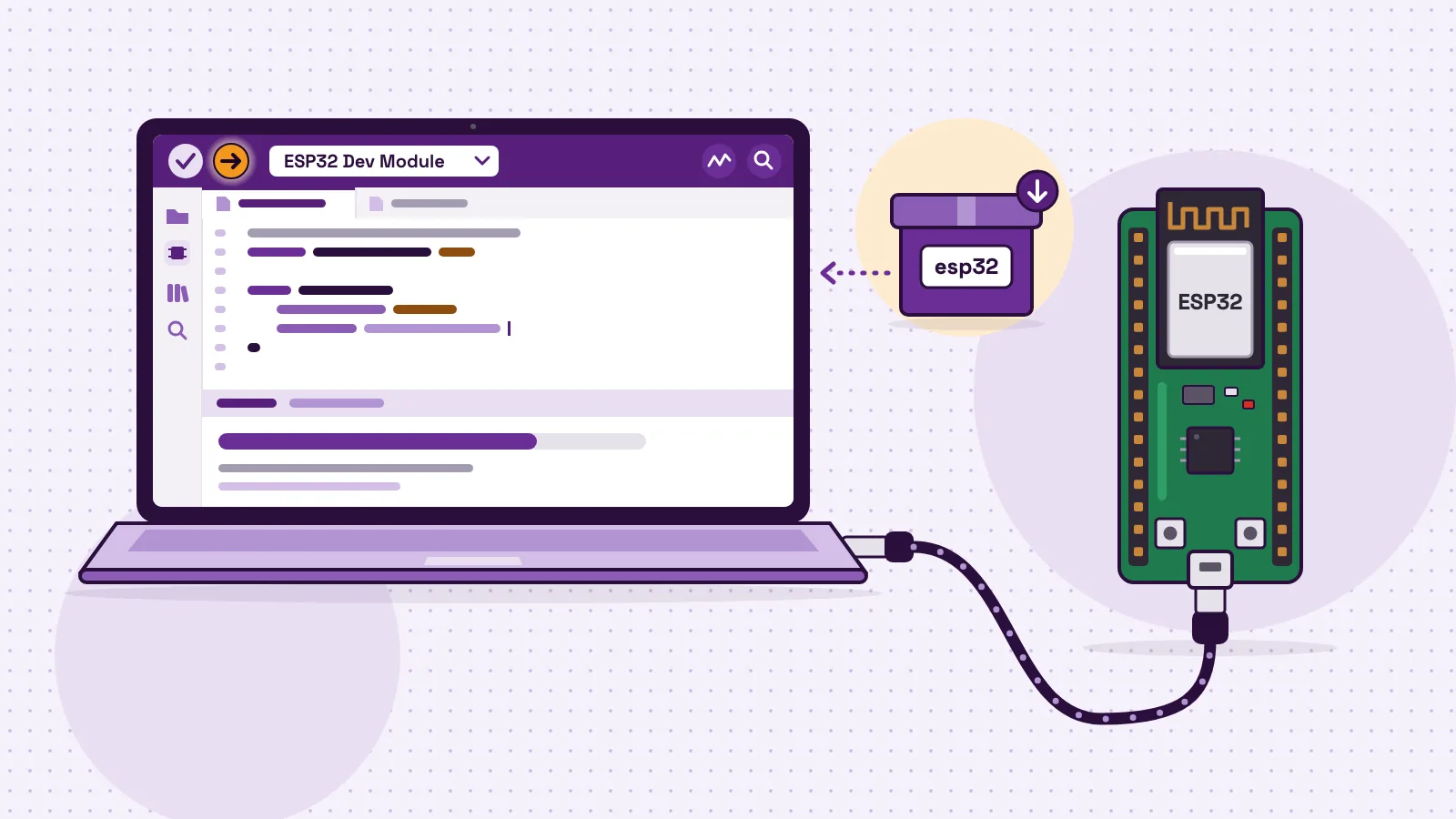
Use laptops, desktop PCs or iPads; Android phones cannot control the board yet. The board needs 2.4 GHz Wi-Fi that asks only for a name and a password, and a phone hotspot works. The before-class checklist for teachers lists every item.
- 3
Choose a reusable kit and a team size.
Plan one kit for every 2 or 3 students, plus a spare. One set serves every section.
- 4
Train the teacher on the real lessons.
Each lesson takes 45 to 60 minutes and has teacher notes. Typing
demoas the device name in the dashboard shows sample readings with no board. - 5
Put one period a week on the timetable.
The MakerBuddy curriculum runs 32 lessons in four terms of eight.
- 6
Assess, then show parents.
Terms 1 to 3 end with a task you can grade: the traffic light, the data logger and the term 3 assessment. Lesson 32 is an expo for families.
- 7
Review and grow.
Ask what worked, read the logbooks, then add a section, a club or a branch.
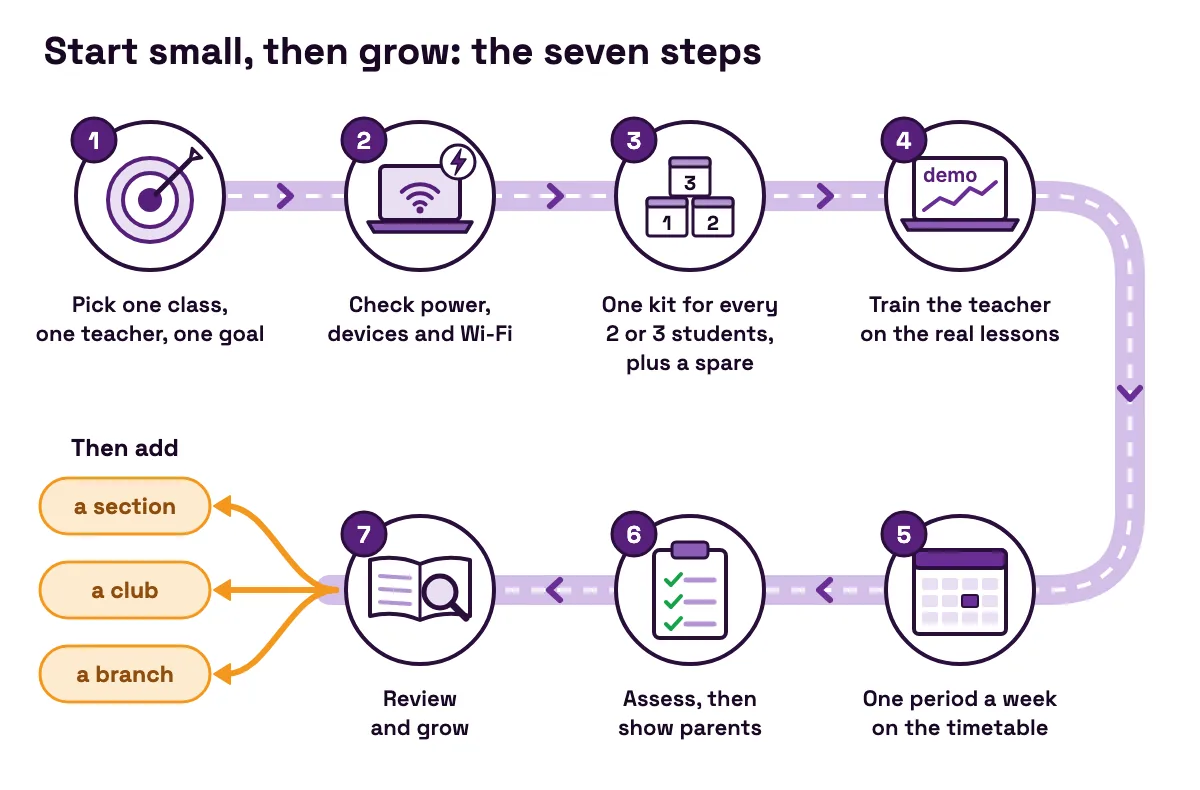
For the full room plan, read how to set up a STEM lab at school. The Pakistan version is setting up a STEM lab in a Pakistani school.
Worked example: a first STEM year for a school in Lahore
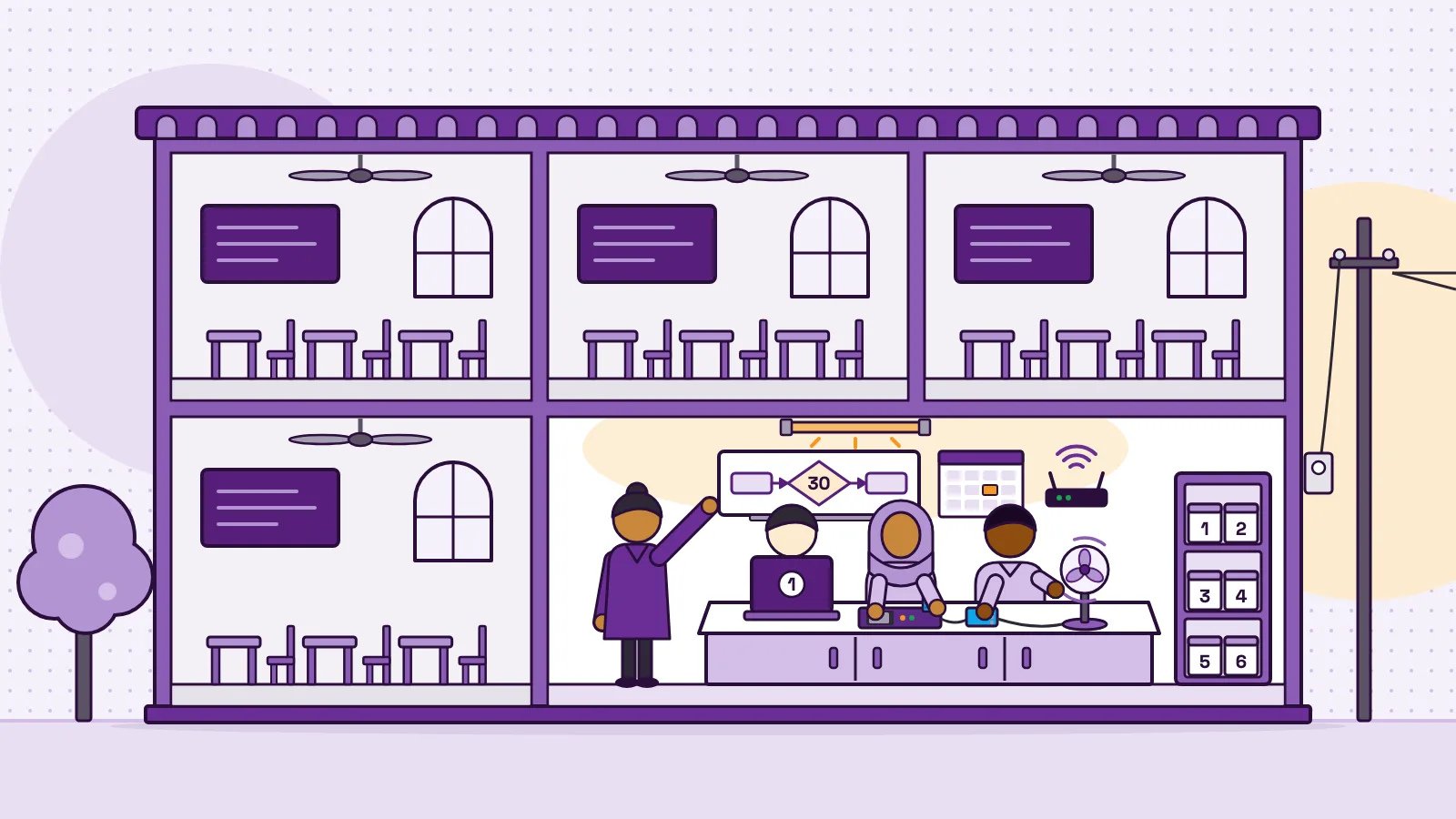
A private school in Lahore wants to start STEM with its two Class 7 sections of 30 students. It has one computer teacher, a lab with 20 desktop PCs and one lab period a week for each section.
- 1
Set the goal.
By the end of the year, every student can explain a rule they built: the sensor, the comparison, the number and the steps.
- 2
Work out the teams.
Teams of 3 give 30 ÷ 3 = 10 teams, plus 1 spare: 11 kits, shared by both sections on different days.
- 3
Price the kits.
In Pakistan a kit costs PKR 40,000. From 10 kits the order form takes PKR 800 off each, so 11 × PKR 39,200 = PKR 431,200. Pairs would need 15 + 1 = 16 kits, or PKR 627,200, which is PKR 196,000 more. The school chooses teams of 3 with rotating jobs: builder, reader and recorder.
- 4
Work out the cost per student.
PKR 431,200 ÷ 60 students = about PKR 7,187 each in year one. If next year's Class 7 reuses the kits, 120 students share them, about PKR 3,593 each before repairs.
- 5
Use the computer lab.
Ten PCs become team stations with the free MakerBuddy extension in Chrome or Edge. Each board runs from its PC's USB port, or a 5 V USB charger if a port cannot power it.
- 6
Set up the network.
A private 2.4 GHz network with only a name and a password, and "client isolation" off so the PCs can see the boards. Boards are named
makerbuddy-01tomakerbuddy-11to match their boxes. The security notes in the technical details explain why it must stay private. - 7
Plan for power cuts.
Without backup power, the PCs and router stop, so an unplugged flowchart task from Lesson 20 stays ready.
- 8
Choose capstone themes close to home.
A hot classroom becomes the smart fan rule. A dry rooftop plant becomes a soil moisture alert. A kitchen gas warning is built only as a practice model, as in Lesson 28. The project ideas library has more.
| Line | Quantity | Cost |
|---|---|---|
| MakerBuddy kits | 11 | PKR 431,200 |
| Desktop PCs as team stations | 10 | Already owned |
| Micro-USB cables and 5 V chargers | 11 | Ask whether they come with the order; if not, price locally |
| Numbered storage boxes | 11 | Price locally |
| Lessons, teacher notes and project ideas | 32 lessons, 50 ideas | Free |
- Line
- MakerBuddy kits
- Quantity
- 11
- Cost
- PKR 431,200
- Line
- Desktop PCs as team stations
- Quantity
- 10
- Cost
- Already owned
- Line
- Micro-USB cables and 5 V chargers
- Quantity
- 11
- Cost
- Ask whether they come with the order; if not, price locally
- Line
- Numbered storage boxes
- Quantity
- 11
- Cost
- Price locally
- Line
- Lessons, teacher notes and project ideas
- Quantity
- 32 lessons, 50 ideas
- Cost
- Free
The kit line is the only fixed price. Without a computer lab, devices would be the biggest new cost, so count them first. Ask whether a small fan or bulb for relay builds ships with your order; neither is promised.
Common mistakes when a school starts STEM
A STEM start can stall for ordinary reasons, and each has a plain fix.
| Symptom | Cause | Fix |
|---|---|---|
| Kits sit in a cupboard after the launch | No teacher time to learn them | One teacher, one class, each lesson tried first with the demo device |
| The first lesson is lost to Wi-Fi | A sign-in page, a 5 GHz-only network, or devices kept apart | 2.4 GHz, name and password only, client isolation off, tested a week before |
| The dashboard shows an install screen that will not close | Managed laptops block the extension | Ask IT to allow the free MakerBuddy extension for Chrome, Edge or Firefox |
| Parents call it a distraction from exams | Nobody showed them the curriculum link | Share the SLO table and term tasks, and invite them to the expo |
| A gas build is trusted as a real alarm | The MQ-2 is a classroom learning part | Label every gas build a practice model |
| The next class finds old rules running | Rules are saved on the board | Delete the last group's rules in the dashboard; switching off does not clear them |
- Symptom
- Kits sit in a cupboard after the launch
- Cause
- No teacher time to learn them
- Fix
- One teacher, one class, each lesson tried first with the
demodevice
- Symptom
- The first lesson is lost to Wi-Fi
- Cause
- A sign-in page, a 5 GHz-only network, or devices kept apart
- Fix
- 2.4 GHz, name and password only, client isolation off, tested a week before
- Symptom
- The dashboard shows an install screen that will not close
- Cause
- Managed laptops block the extension
- Fix
- Ask IT to allow the free MakerBuddy extension for Chrome, Edge or Firefox
- Symptom
- Parents call it a distraction from exams
- Cause
- Nobody showed them the curriculum link
- Fix
- Share the SLO table and term tasks, and invite them to the expo
- Symptom
- A gas build is trusted as a real alarm
- Cause
- The MQ-2 is a classroom learning part
- Fix
- Label every gas build a practice model
- Symptom
- The next class finds old rules running
- Cause
- Rules are saved on the board
- Fix
- Delete the last group's rules in the dashboard; switching off does not clear them
Where MakerBuddy fits, and where it does not
MakerBuddy is the STEM education brand of OR97, a company at 102 Q Block, Johar Town, Lahore. OR97 makes the kits, and the MakerBuddy team makes the lessons, guides and dashboard. Muhammad Afzal, an educator and engineer, founded MakerBuddy on 11 July 2025, after classroom IoT projects kept stalling on wiring. It is a young company, so the about page links every company fact for you to check.
What a school gets:
- One board per kit, with an ESP32, six built-in parts (two lights, a button, a light sensor, a buzzer and a knob) and nine plug-in parts: six sensors, a servo, a relay and a text screen. Purple and green boards are the same board.
- A free browser dashboard for live readings, outputs and no-code rules, with no student accounts. Readings stay on your network.
- Free lessons: 32 lessons, teacher notes and 50 project ideas, 43 of them with no code.
- Open files: the board software, the dashboard and the V1.0 board design are on GitHub.
In Pakistan you order online at PKR 40,000 a kit, with lower per-kit prices from 10, 25 and 50 kits, and pay by bank transfer to OR97. Other countries get a written quote. The MakerBuddy order page works out the total for your kit count.
Where it does not fit:
- No Android phones yet. Use Chrome, Edge or Firefox with the free extension, or Safari on a Mac, iPhone or iPad.
- A private 2.4 GHz network only. The board's local connection has no password, so never open it to the internet.
- No clock. A rule can repeat on a timer, but it cannot run "at 8 am".
- Low-voltage only. The relay must never switch mains, and gas builds are learning models.
- Code replaces the lesson software. Your own Arduino code replaces the MakerBuddy firmware until the firmware is put back.
More guides for schools and parents are on the MakerBuddy blog.
FAQ
What is STEM education in Pakistan?
STEM education in Pakistan means teaching science, technology, engineering and mathematics together through hands-on projects. The national curriculum supports it with computer science from Class 6, and programmes such as the Pakistan Science Foundation's STEM labs and STEAM Pakistan add labs and training in selected government schools.
Is STEM available in Pakistan?
Yes, but not everywhere. The federal government started funding STEM labs in 50 higher secondary schools and cadet colleges (opens in a new tab), and STEAM Pakistan works with partner government schools. Any school, public or private, can also start with one reusable kit for every two or three students and free lessons.
How is the education system in Pakistan doing?
It is improving slowly and unevenly. The Pakistan Economic Survey 2025-26 (opens in a new tab) puts literacy at 63 percent for people aged 10 and over, and says the share of children out of school fell from 38 percent in 2023 to 28 percent in 2025. Facilities differ sharply: in 2023-24, 99 percent of public schools in Punjab had electricity, against 21 percent in Balochistan.
Who is eligible for the STEM Careers Program?
According to the STEM Careers Program FAQ (opens in a new tab), students in Pre-9th, 9th, 10th or 11th (Matric, O Level, FSc Part I or AS Level) can take part. They need at least 60 percent in their core subjects in their last exam and must be under 20 on 30 June of the olympiad year. Schools can nominate students, or students can apply online.
Which subjects are required for STEM?
In school, STEM uses subjects you already teach: science, mathematics and computer science, joined through projects. For the STEM Careers Program, the core subjects are physics, chemistry, mathematics, and biology or computer (opens in a new tab).
Is STEM education free in Pakistan?
Partly. The STEM Careers Program says its preparation resources are free for all students (opens in a new tab), although registration costs Rs 1,000. All 32 MakerBuddy lessons are free to read online. Equipment is what costs money.
How much does it cost to start STEM in a Pakistani school?
It depends on the devices you already own. MakerBuddy kits cost PKR 40,000 each in Pakistan, or PKR 39,200 each from 10 kits. A class of 30 in teams of three needs 11 kits, PKR 431,200 in all, and the same kits serve every section.
Can a government school start STEM without a computer lab?
Yes, if it has electricity and a few devices. One laptop or iPad per team is enough, and each board runs from a laptop's USB port or a 5 V USB charger. Without electricity, start with unplugged work such as the flowcharts in Lesson 20 on algorithmic thinking.
Why is STEM education important for Pakistani students?
It turns facts into skills. The national curriculum aims to move teaching from rote learning to concept-based learning (opens in a new tab), and a STEM project does that by making students test an idea and explain the result. It also builds towards later outcomes, such as designing IoT ideas for Pakistan in Class 12.
Sources
- Finance Division: Pakistan Economic Survey 2025-26, Chapter 10, Education (opens in a new tab)
- Idara-e-Taleem-o-Aagahi: ASER Pakistan 2025, National (provisional), 26 March 2026 (opens in a new tab)
- National Curriculum Council: National Curriculum of Pakistan 2022-23, Computer Science Grades 6-12 (FBISE copy) (opens in a new tab)
- Pakistan Science Foundation: STEM Education in Pakistan, About the project (opens in a new tab)
- Pakistan Science Foundation: STEM Schools (opens in a new tab)
- PID Press Release No. 201, 26 October 2022: cheques for STEM FabLabs under Launching of STEM in Pakistan, Phase-1 (opens in a new tab)
- PID Press Release No. 46, 18 April 2022: MoFEPT signs MoUs with eight universities for STEAM education (opens in a new tab)
- PID Press Release No. 88, 15 May 2023: STEAM Pakistan signs MoU with NED University (opens in a new tab)
- STEM Careers Program (HEC and PIEAS): FAQs (opens in a new tab)
- Rehman et al., Assessing Pakistan's readiness for STEM education, Humanities and Social Sciences Communications, 2025 (opens in a new tab)