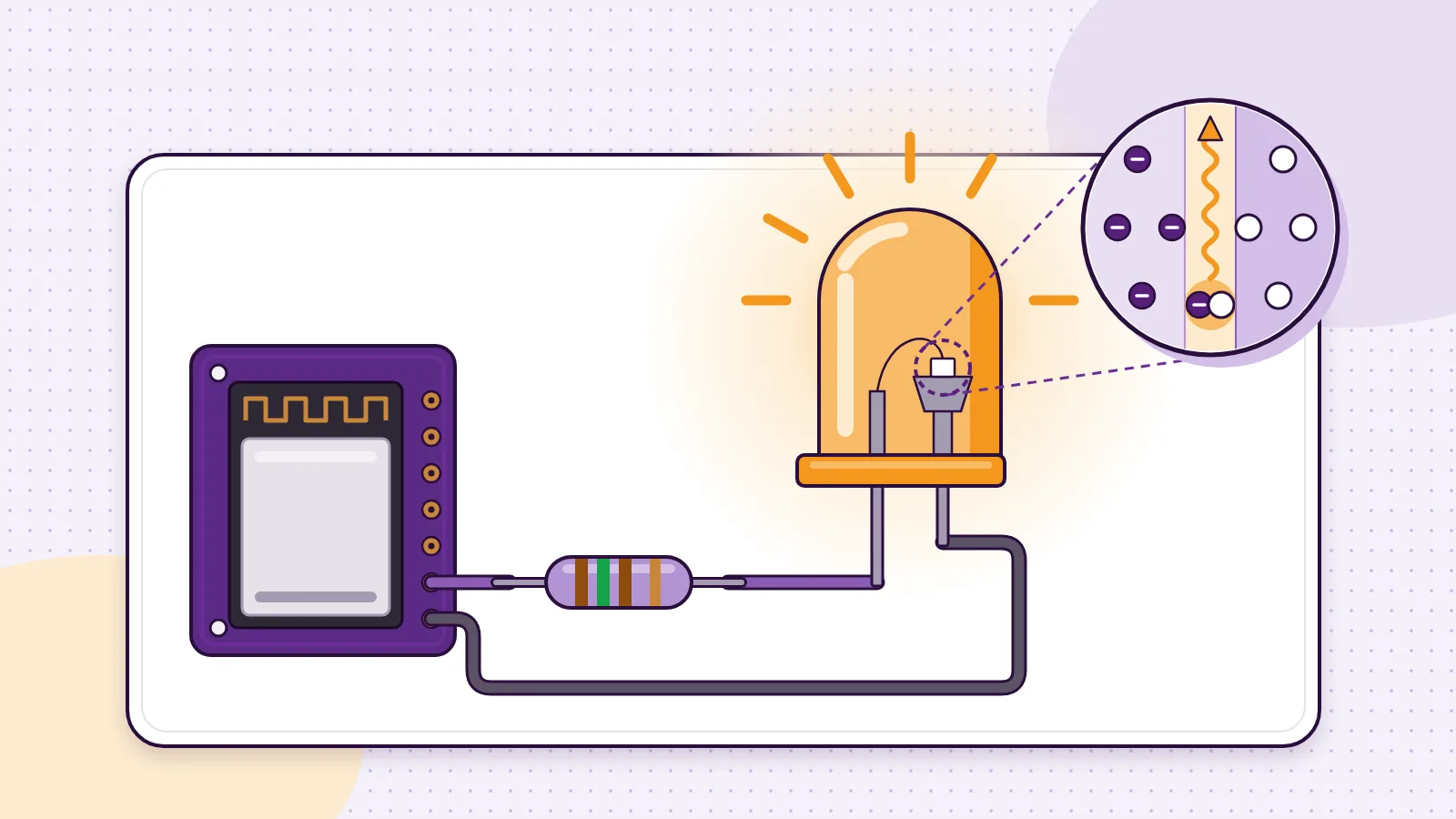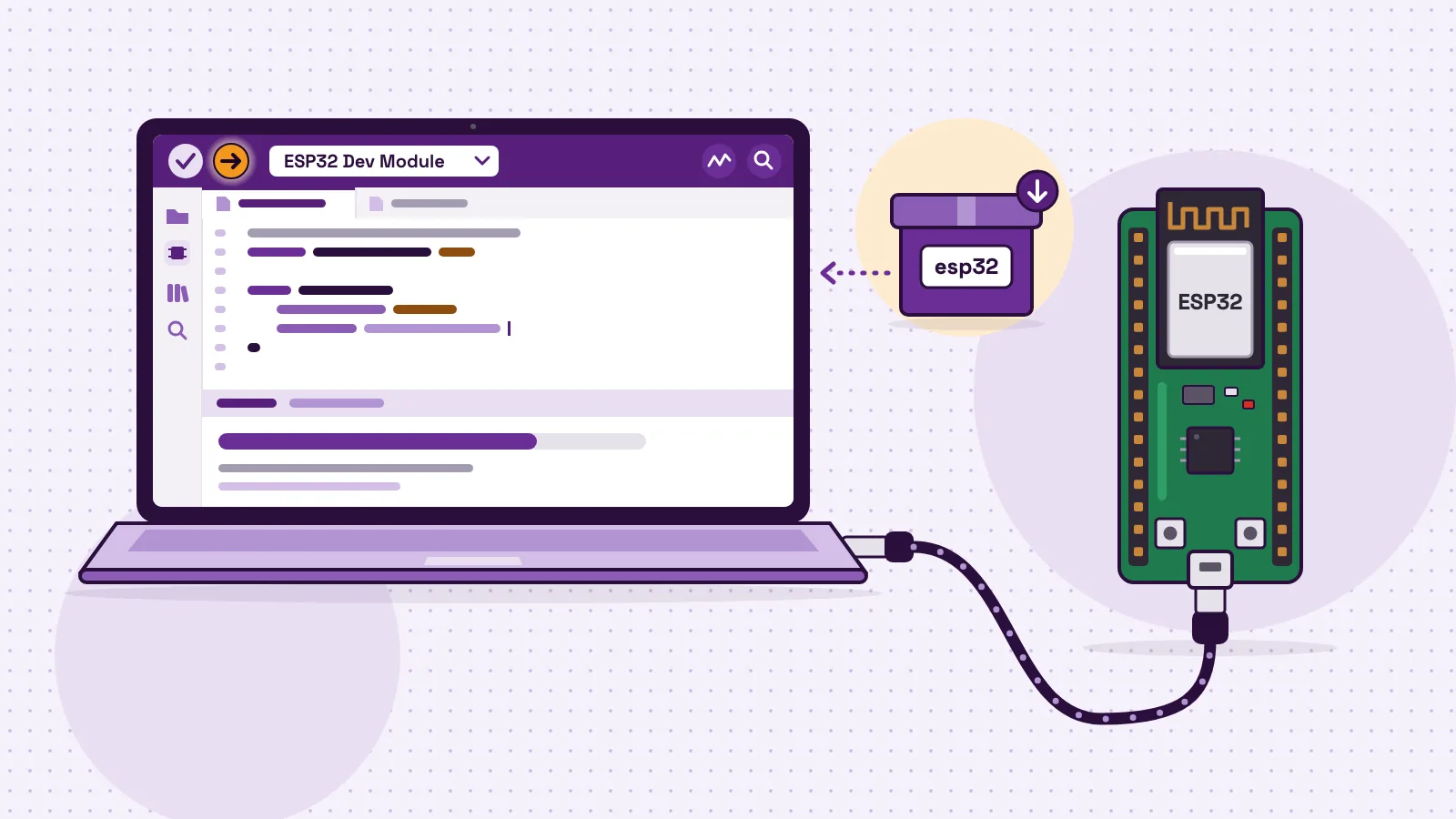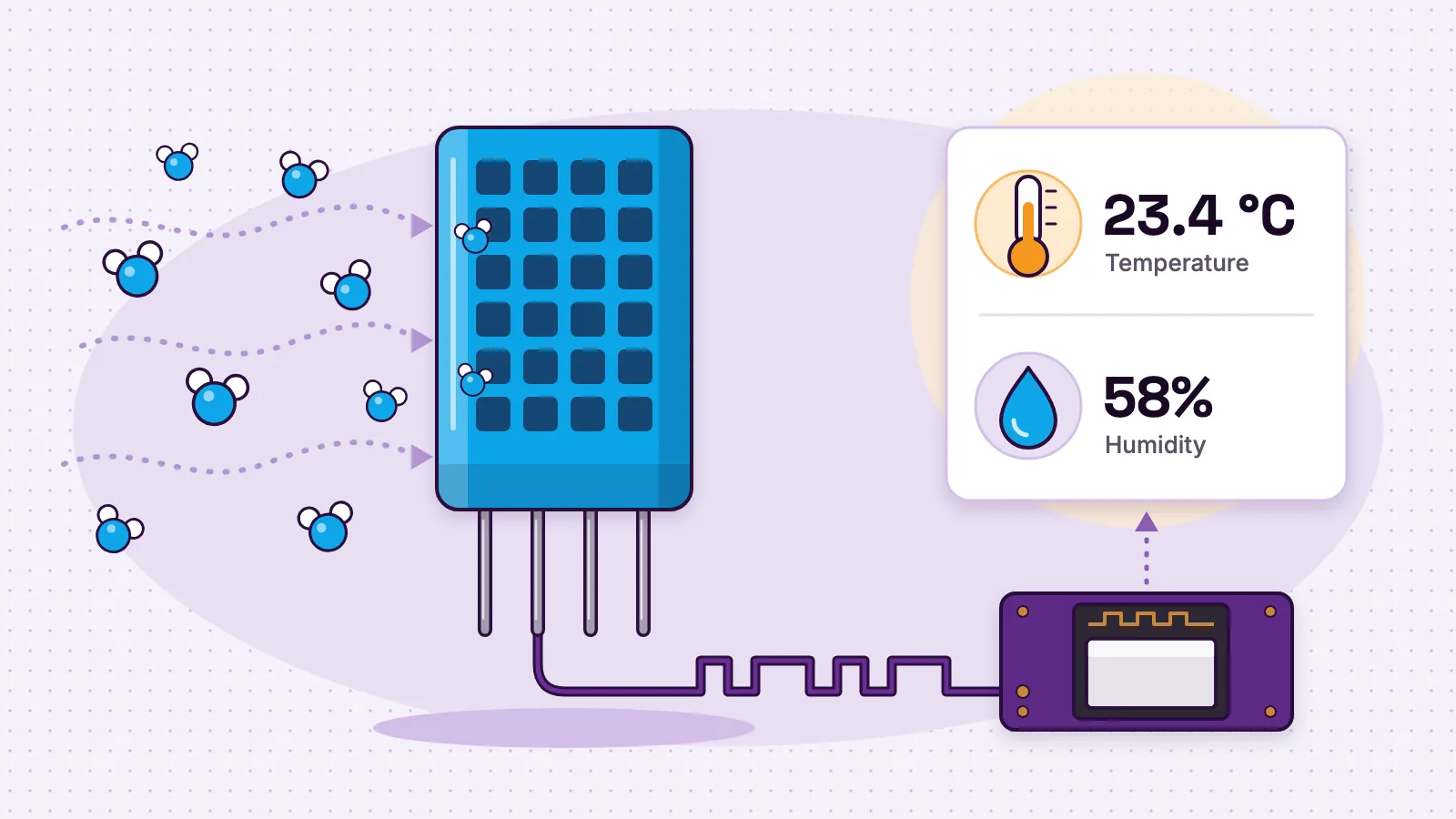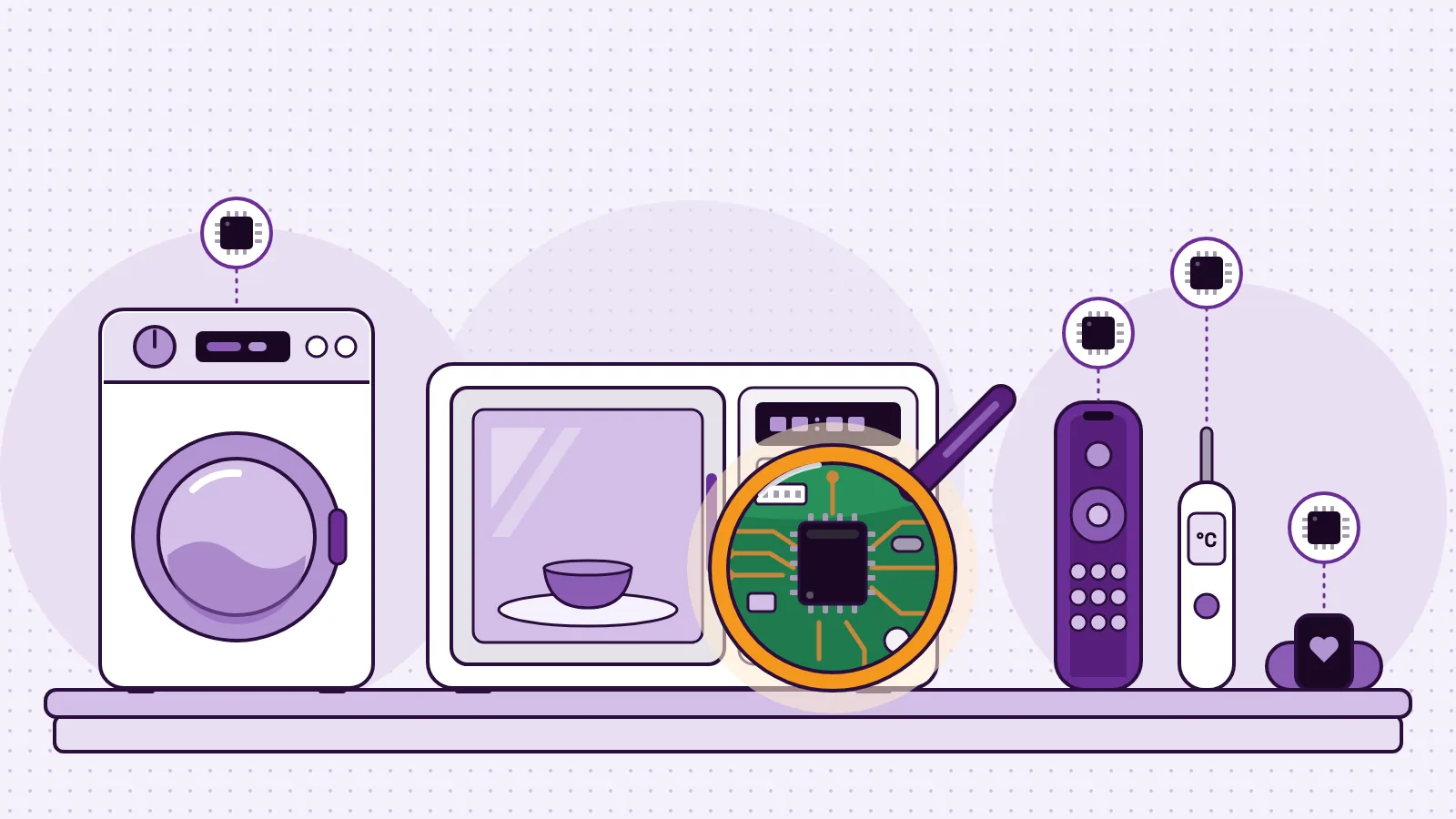
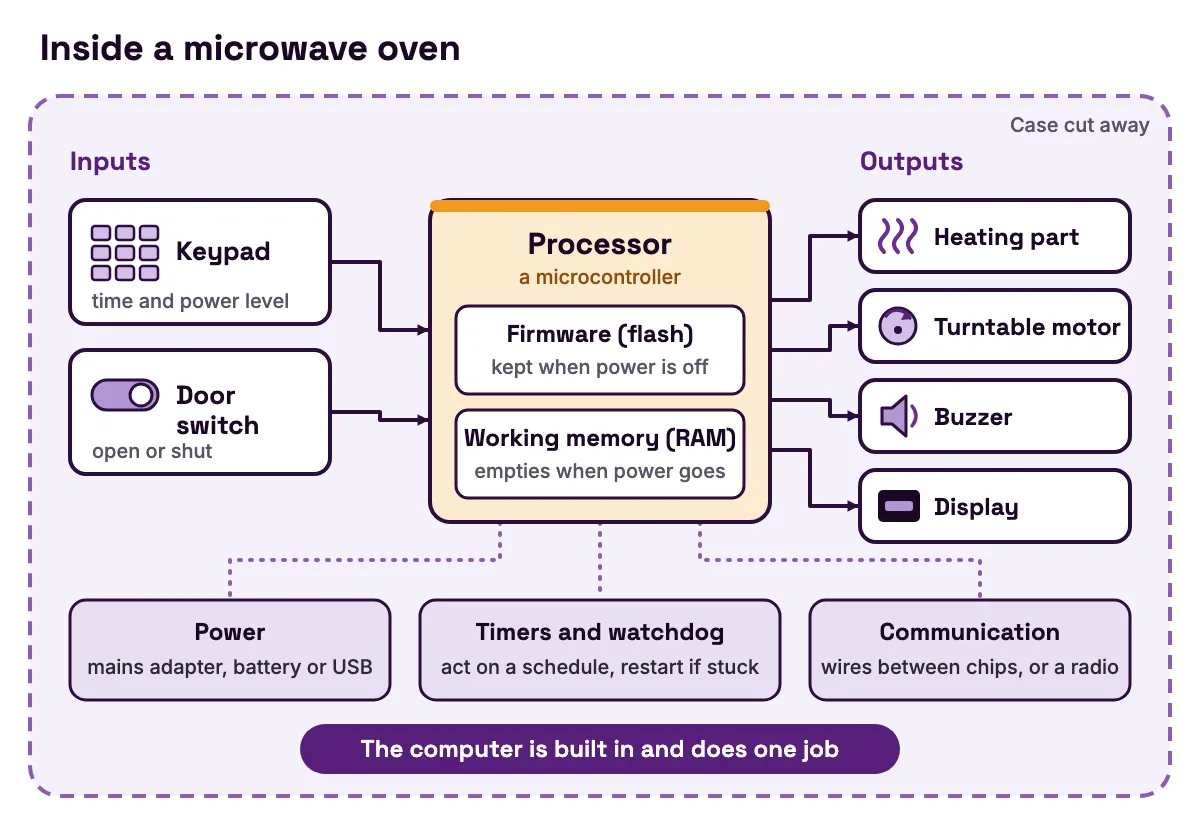
What is embedded systems? It is the area of engineering that builds embedded systems: small computers hidden inside a bigger product to do one job. A microwave oven, a TV remote, a digital thermometer and the anti-lock brakes in a car each have one. Every embedded system reads inputs, such as buttons and sensors, runs one program, called firmware, and drives outputs, such as motors, lights and screens.
You rarely see these computers, but once you know the signs, you find them everywhere. Below you get everyday examples, the parts inside, how the software runs and how it differs from a laptop. Then you inspect a real one, part by part and line by line: the MakerBuddy board, a school kit built around an ESP32 chip with open-source firmware. The last section covers the subjects, skills and jobs.
What "embedded" means, and why every rule has exceptions
Embedded means built in. The computer is part of the product, not a separate machine you sit at. Carnegie Mellon's embedded systems course notes (opens in a new tab) describe it as a computer "designed to perform a specific function within a larger system". The same notes add that the software is hidden from the user and fixed in the device's memory.
The course lists the usual features of an embedded system:
- It does one job, or a small set of related jobs.
- It is tightly limited in memory, power and processing speed, because every extra part costs money, space or battery.
- It must react in time. A late answer can be a wrong answer.
Then it adds an honest warning: there are exceptions to every one of these features. A smart TV runs apps. A games console plays many games. So treat the features as a guide, not a test.
An embedded system is hardware and software together. The chip designer Arm lists the pieces in its guide to embedded system design (opens in a new tab): a microcontroller or microprocessor, memory, input and output connections for sensors and actuators, power management, firmware (often on a real-time operating system) and the circuit board that joins them.
Where does the Internet of Things fit? An IoT device is an embedded system that also talks over a network. Lesson 1 of the MakerBuddy course builds the idea in three steps: electronics, then automation, then IoT. Our list of 25 everyday IoT devices shows the connected end of the family.
Embedded system examples you use every day
The quickest way to understand embedded systems is to spot them in things you already use.
| Device | What it senses (inputs) | Its one job | What it does (outputs) |
|---|---|---|---|
| Microwave oven | Keypad, door switch | Run the cooking time and power level | Switches the heating part, turns the turntable, beeps, shows the time |
| Washing machine | Buttons, water level, door lock | Run the wash programme you picked | Opens valves, spins the drum, heats water, shows time left |
| Digital thermometer | A temperature sensor | Turn a sensor signal into degrees | Shows the number, beeps when done |
| TV remote | Buttons | Send the right code for each button | Flashes an infrared light in a pattern |
| Car anti-lock brakes | Wheel-speed sensors | Stop the wheels locking in a hard stop | Pulses the brake pressure on and off |
| Smart thermostat | Temperature sensor, buttons, Wi-Fi | Keep the room at a set temperature | Switches heating or cooling, updates an app |
| Fitness band | Motion sensor, heart-rate sensor | Count steps and track heart rate | Shows data, vibrates, syncs with a phone |
| MakerBuddy board | Light, button, knob, plus plug-in sensors | Run your rules and send live readings to a dashboard | Lights, buzzer, servo, relay, text screen |
- Device
- Microwave oven
- What it senses (inputs)
- Keypad, door switch
- Its one job
- Run the cooking time and power level
- What it does (outputs)
- Switches the heating part, turns the turntable, beeps, shows the time
- Device
- Washing machine
- What it senses (inputs)
- Buttons, water level, door lock
- Its one job
- Run the wash programme you picked
- What it does (outputs)
- Opens valves, spins the drum, heats water, shows time left
- Device
- Digital thermometer
- What it senses (inputs)
- A temperature sensor
- Its one job
- Turn a sensor signal into degrees
- What it does (outputs)
- Shows the number, beeps when done
- Device
- TV remote
- What it senses (inputs)
- Buttons
- Its one job
- Send the right code for each button
- What it does (outputs)
- Flashes an infrared light in a pattern
- Device
- Car anti-lock brakes
- What it senses (inputs)
- Wheel-speed sensors
- Its one job
- Stop the wheels locking in a hard stop
- What it does (outputs)
- Pulses the brake pressure on and off
- Device
- Smart thermostat
- What it senses (inputs)
- Temperature sensor, buttons, Wi-Fi
- Its one job
- Keep the room at a set temperature
- What it does (outputs)
- Switches heating or cooling, updates an app
- Device
- Fitness band
- What it senses (inputs)
- Motion sensor, heart-rate sensor
- Its one job
- Count steps and track heart rate
- What it does (outputs)
- Shows data, vibrates, syncs with a phone
- Device
- MakerBuddy board
- What it senses (inputs)
- Light, button, knob, plus plug-in sensors
- Its one job
- Run your rules and send live readings to a dashboard
- What it does (outputs)
- Lights, buzzer, servo, relay, text screen
Do you see the pattern? Every row is input, then process, then output. The input side is covered in our visual guide to sensors, and the output side in our guide to actuators: motors, relays, buzzers and displays.
The parts inside every embedded system
Open any of the devices in the table and you find the same building blocks.
- A processor. In small devices this is usually a microcontroller: the Carnegie Mellon notes define it as a very small computer with all, or most, of a computer's parts on one chip. Our microcontroller guide explains how it differs from a laptop's processor.
- Program memory. Flash or ROM holds the firmware. It keeps its contents when the power is off.
- Working memory. RAM holds readings and settings while the program runs. It empties when the power goes.
- Inputs. Buttons, switches and sensors turn the real world into signals.
- Outputs. Lights, motors, relays, buzzers and screens act on the world.
- Timers and a watchdog. Timers let the program act on a schedule. A watchdog restarts the system when the program gets stuck; Espressif's watchdog guide (opens in a new tab) says that is how it recovers from software or hardware faults.
- Power. A battery, a mains adapter or a USB cable, plus the parts that turn it into the voltage the chip needs.
- Communication. Wires between chips, such as I2C, SPI and UART, and radios such as Wi-Fi or Bluetooth.
- Firmware. The one program that ties it all together.
Power is where embedded design gets clever. The ESP32 datasheet (opens in a new tab) lists five power modes. With its processor running at 240 MHz and the radio off, a dual-core ESP32 draws 30 to 68 mA. In Deep-sleep, with only a timer and a little memory awake, it draws 10 µA. That is thousands of times less. So a battery-powered sensor spends most of its life asleep: it wakes, measures, sends and goes back to sleep.
How embedded software runs: set up once, then loop forever
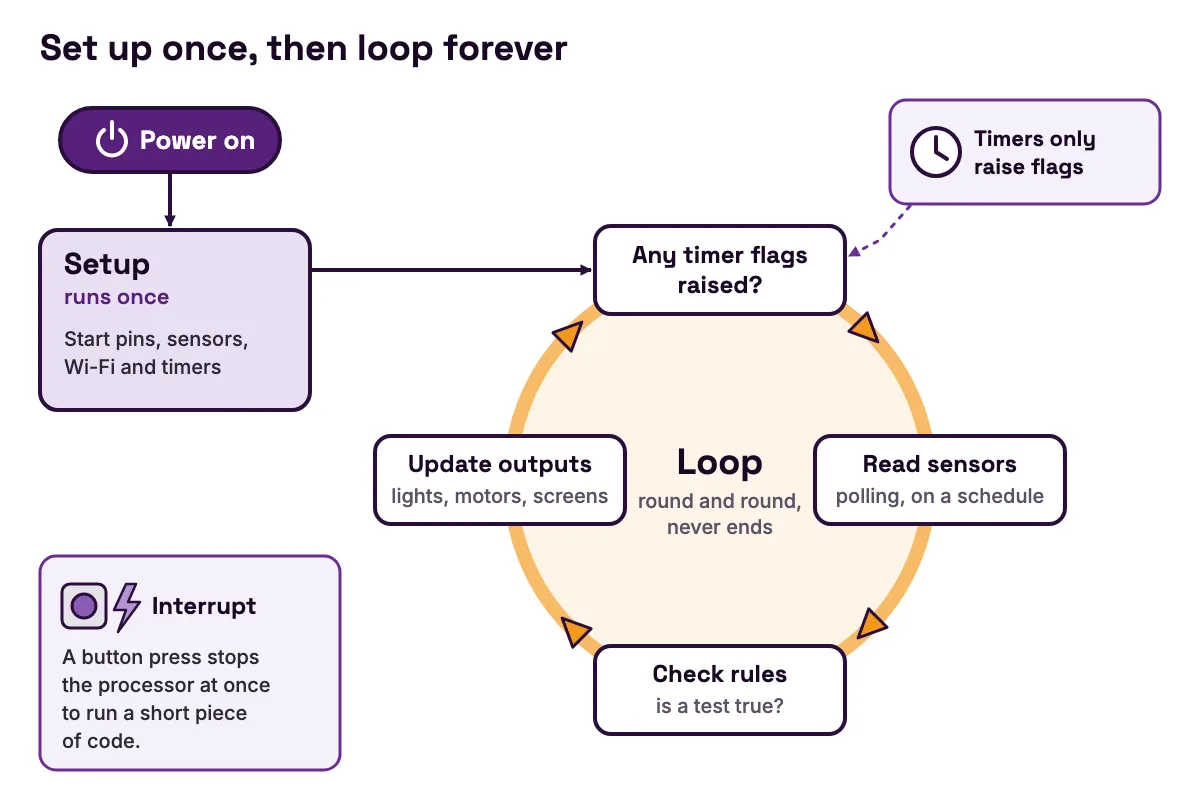
A laptop waits for you to open an app. An embedded system starts its one program as soon as it has power, and that program never ends.
A lot of small firmware has the same shape. Harvey Mudd College's lecture on real-time operating systems (opens in a new tab) calls it bare-metal programming: a setup part that runs once, then an infinite loop that runs continuously and handles the main tasks. Arduino gives the two parts names, setup() and loop(). If you have written an Arduino sketch, you have written the skeleton of an embedded program.
Inside the loop, the program has two ways to notice the world.
- 1
Polling.
The loop checks a sensor on a schedule, for example once a second. It is simple, but anything shorter than the gap between checks can be missed.
- 2
Interrupts.
The hardware stops the processor the moment something happens and runs a short piece of code. The same Harvey Mudd lecture gives catching button inputs as an example of where interrupts help.
As a program grows, one loop gets hard to keep on time. Then engineers add a real-time operating system, or RTOS, which splits the work into tasks and lets a scheduler pick which runs next. The lecture names FreeRTOS, Zephyr, NuttX and VxWorks. The ESP32 already has one. Espressif's FreeRTOS overview (opens in a new tab) says FreeRTOS is built into its ESP-IDF framework and starts automatically, and the Arduino-ESP32 FAQ (opens in a new tab) says Arduino-ESP32 is based on ESP-IDF. So an Arduino sketch on an ESP32 runs with FreeRTOS underneath it.
Embedded systems vs general-purpose computers
A general-purpose computer runs whatever you choose. An embedded system is built around one job. The table compares a laptop with three boards students often meet.
| Laptop | Raspberry Pi 5 | ESP32 (the chip on MakerBuddy) | Arduino UNO R3 | |
|---|---|---|---|---|
| Built for | Any job you open | General-purpose small computer | One program, built into a product | One sketch at a time |
| Processor | Varies by model | Quad-core 64-bit Arm Cortex-A76 at 2.4 GHz | Xtensa LX6, one or two cores, up to 240 MHz | ATmega328P at 16 MHz |
| Working memory | Varies by model | 1 GB to 16 GB | 520 KB SRAM | 2 kB SRAM |
| Operating system | A full desktop system | Raspberry Pi OS | FreeRTOS, built into ESP-IDF | None |
| How you change what it does | Install and open apps | Install software, like a small PC | Upload new firmware | Upload a new sketch |
- Built for
- Laptop
- Any job you open
- Raspberry Pi 5
- General-purpose small computer
- ESP32 (the chip on MakerBuddy)
- One program, built into a product
- Arduino UNO R3
- One sketch at a time
- Processor
- Laptop
- Varies by model
- Raspberry Pi 5
- Quad-core 64-bit Arm Cortex-A76 at 2.4 GHz
- ESP32 (the chip on MakerBuddy)
- Xtensa LX6, one or two cores, up to 240 MHz
- Arduino UNO R3
- ATmega328P at 16 MHz
- Working memory
- Laptop
- Varies by model
- Raspberry Pi 5
- 1 GB to 16 GB
- ESP32 (the chip on MakerBuddy)
- 520 KB SRAM
- Arduino UNO R3
- 2 kB SRAM
- Operating system
- Laptop
- A full desktop system
- Raspberry Pi 5
- Raspberry Pi OS
- ESP32 (the chip on MakerBuddy)
- FreeRTOS, built into ESP-IDF
- Arduino UNO R3
- None
- How you change what it does
- Laptop
- Install and open apps
- Raspberry Pi 5
- Install software, like a small PC
- ESP32 (the chip on MakerBuddy)
- Upload new firmware
- Arduino UNO R3
- Upload a new sketch
The figures come from Raspberry Pi's Raspberry Pi 5 page (opens in a new tab), Espressif's ESP32 datasheet (opens in a new tab) and Arduino's UNO R3 datasheet (opens in a new tab). The operating-system row follows the same Raspberry Pi page, Espressif's FreeRTOS overview (opens in a new tab) and the bare-metal setup-and-loop program in the Harvey Mudd lecture on real-time operating systems (opens in a new tab), which is how an UNO sketch runs. Look at the memory row. The smallest Raspberry Pi 5 has about 2,000 times the working memory of an ESP32, and the ESP32 has 260 times the working memory of an UNO R3. A smaller chip costs less and uses less power, so the job decides how much computer you need.
The line between the two kinds can blur. A Raspberry Pi 5 on your desk is a general-purpose computer. But Raspberry Pi sells its Compute Module 5 (opens in a new tab) for building into custom embedded systems. The same chip becomes embedded once it is built into a product to do one job. Our comparison of Arduino, Raspberry Pi and ESP32 helps you pick one for a project, and ESP32 vs Arduino UNO goes deeper on those two.
Types of embedded systems, from stand-alone to real-time
Engineers sort embedded systems in a few ways, and one device can be more than one type.
| Type | What makes it this type | Example | Is MakerBuddy this type? |
|---|---|---|---|
| Stand-alone | Works on its own, with no host computer | Digital thermometer, microwave oven | Yes. Its rules run on the board with no dashboard open |
| Networked | Talks to other devices over a network | Smart thermostat, Wi-Fi router | Yes. It joins 2.4 GHz Wi-Fi, and dashboards talk to it over your local network |
| Mobile | Carried around, runs from a battery | Fitness band, handheld game | Not as sold. It runs on 5 V USB power, and battery use is not confirmed |
| Soft real-time | Deadlines matter, but a late answer does not make it useless | A video call that stutters | Closest fit, though it is not built for tight timing. It reads sensors once a second, so it reacts in about a second |
| Hard real-time | Missing a deadline means the system has failed | Airbag, braking system | No. Never use it for safety decisions |
- Type
- Stand-alone
- What makes it this type
- Works on its own, with no host computer
- Example
- Digital thermometer, microwave oven
- Is MakerBuddy this type?
- Yes. Its rules run on the board with no dashboard open
- Type
- Networked
- What makes it this type
- Talks to other devices over a network
- Example
- Smart thermostat, Wi-Fi router
- Is MakerBuddy this type?
- Yes. It joins 2.4 GHz Wi-Fi, and dashboards talk to it over your local network
- Type
- Mobile
- What makes it this type
- Carried around, runs from a battery
- Example
- Fitness band, handheld game
- Is MakerBuddy this type?
- Not as sold. It runs on 5 V USB power, and battery use is not confirmed
- Type
- Soft real-time
- What makes it this type
- Deadlines matter, but a late answer does not make it useless
- Example
- A video call that stutters
- Is MakerBuddy this type?
- Closest fit, though it is not built for tight timing. It reads sensors once a second, so it reacts in about a second
- Type
- Hard real-time
- What makes it this type
- Missing a deadline means the system has failed
- Example
- Airbag, braking system
- Is MakerBuddy this type?
- No. Never use it for safety decisions
The soft and hard definitions come from the Harvey Mudd lecture on real-time systems (opens in a new tab), which lists a car's airbag response and braking system among its multitasking scenarios. The board's own guide to safe use on a school network says never to use its readings or controls for life-critical or safety decisions.
Worked example: inspect the MakerBuddy board as an embedded system
The embedded systems in your home are sealed in cases. MakerBuddy is the opposite. It is a learning board, the MakerBuddy IoT Kit V1.0, that carries a 30-pin ESP32 DevKit, six built-in parts and sockets for nine plug-in parts. It comes in purple or green, and both colours are the same board. Its firmware is open source, so you can check every claim below for yourself.
Step 1: match each building block to a real part
| Building block | On the MakerBuddy board |
|---|---|
| Processor | The ESP32 on a 30-pin ESP32 DevKit |
| Program memory | Firmware 2.10, one Arduino sketch of about 4,000 lines, 1,284,130 bytes once compiled |
| Saved settings | The ESP32's own storage, under the name iot-kit: Wi-Fi details, board name, rules and calibration |
| Built-in inputs | Push button (GPIO 5), light sensor (GPIO 35), turning knob (GPIO 34) |
| Plug-in inputs | DHT11 (GPIO 25), waterproof DS18B20 probe (GPIO 26), HC-SR04 distance sensor (trigger 15, echo 2), PIR motion sensor (GPIO 18), MQ-2 gas sensor (GPIO 33), capacitive soil sensor (GPIO 32) |
| Outputs | Blue light (GPIO 12), colour light (GPIO 13, 14 and 27), buzzer (GPIO 4), SG90 servo (GPIO 19), relay for low-voltage things (GPIO 23), 16 × 2 text screen (I2C on GPIO 21 and 22) |
| Timers | Read the sensors every second, refresh the screen every 100 ms, blink the light every 500 ms |
| Communication | 2.4 GHz Wi-Fi, web requests and a live WebSocket link on port 80, I2C for the screen, 1-Wire for the probe |
| Power | 5 V through the DevKit's micro-USB port, turned into 3.3 V for the chip |
- Building block
- Processor
- On the MakerBuddy board
- The ESP32 on a 30-pin ESP32 DevKit
- Building block
- Program memory
- On the MakerBuddy board
- Firmware 2.10, one Arduino sketch of about 4,000 lines, 1,284,130 bytes once compiled
- Building block
- Saved settings
- On the MakerBuddy board
- The ESP32's own storage, under the name
iot-kit: Wi-Fi details, board name, rules and calibration
- Building block
- Built-in inputs
- On the MakerBuddy board
- Push button (GPIO 5), light sensor (GPIO 35), turning knob (GPIO 34)
- Building block
- Plug-in inputs
- On the MakerBuddy board
- DHT11 (GPIO 25), waterproof DS18B20 probe (GPIO 26), HC-SR04 distance sensor (trigger 15, echo 2), PIR motion sensor (GPIO 18), MQ-2 gas sensor (GPIO 33), capacitive soil sensor (GPIO 32)
- Building block
- Outputs
- On the MakerBuddy board
- Blue light (GPIO 12), colour light (GPIO 13, 14 and 27), buzzer (GPIO 4), SG90 servo (GPIO 19), relay for low-voltage things (GPIO 23), 16 × 2 text screen (I2C on GPIO 21 and 22)
- Building block
- Timers
- On the MakerBuddy board
- Read the sensors every second, refresh the screen every 100 ms, blink the light every 500 ms
- Building block
- Communication
- On the MakerBuddy board
- 2.4 GHz Wi-Fi, web requests and a live WebSocket link on port 80, I2C for the screen, 1-Wire for the probe
- Building block
- Power
- On the MakerBuddy board
- 5 V through the DevKit's micro-USB port, turned into 3.3 V for the chip
Every row comes from the technical details page and the firmware source on GitHub (opens in a new tab). The compiled firmware fills about 97% of its program space, so there is little room for extra code. That is a normal embedded problem: the product grew until the memory was nearly full.
Step 2: read the main loop
Here is the heart of the firmware, shortened. Lines are left out where you see // ..., and the comments are rewritten for this guide.
void setup() {
  // ... pins, sensors, Wi-Fi and the web server start here
  sensorTicker.attach(1.0, sensorTimerCallback);   // every 1 second
  lcdTicker.attach(0.1, lcdTimerCallback);         // every 100 ms
}

void sensorTimerCallback() { readSensorsFlag = true; }   // only raises a flag

void loop() {
  // ...
  checkWiFiResetButton();          // a 10-second hold clears the saved Wi-Fi

  if (readSensorsFlag) {           // raised by the 1-second timer
    readSensorsFlag = false;
    readSensors();                 // read every sensor once
  }

  if (updateLCDFlag) {             // raised every 100 ms
    updateLCDFlag = false;
    updateLCD();
  }

  if (!saveSequencesFlag) {
    processSequences();            // check the rules and run their steps
  }
  processServoMotion();            // move the servo a small step
  // ...
}
What to notice:
- 1
The timers do almost nothing.
Each timer callback only sets a flag, so it never holds up the program. The loop checks each flag, does any work that is due, and goes round again, forever.
- 2
Rules are checked on every pass.
processSequences()runs the board's rules, up to 10 of them with up to 10 steps each, on the board itself. That is why a rule keeps working when no dashboard is open. - 3
The watchdog is real.
A comment in the full code says rules are saved inside the loop to prevent a stack overflow or a watchdog reset. That is the watchdog from the parts list, at work in a real product.
Step 3: trace one button press through the system
Say you made a rule: when the button is pressed, sound the buzzer. Here is what the firmware does.
- 1
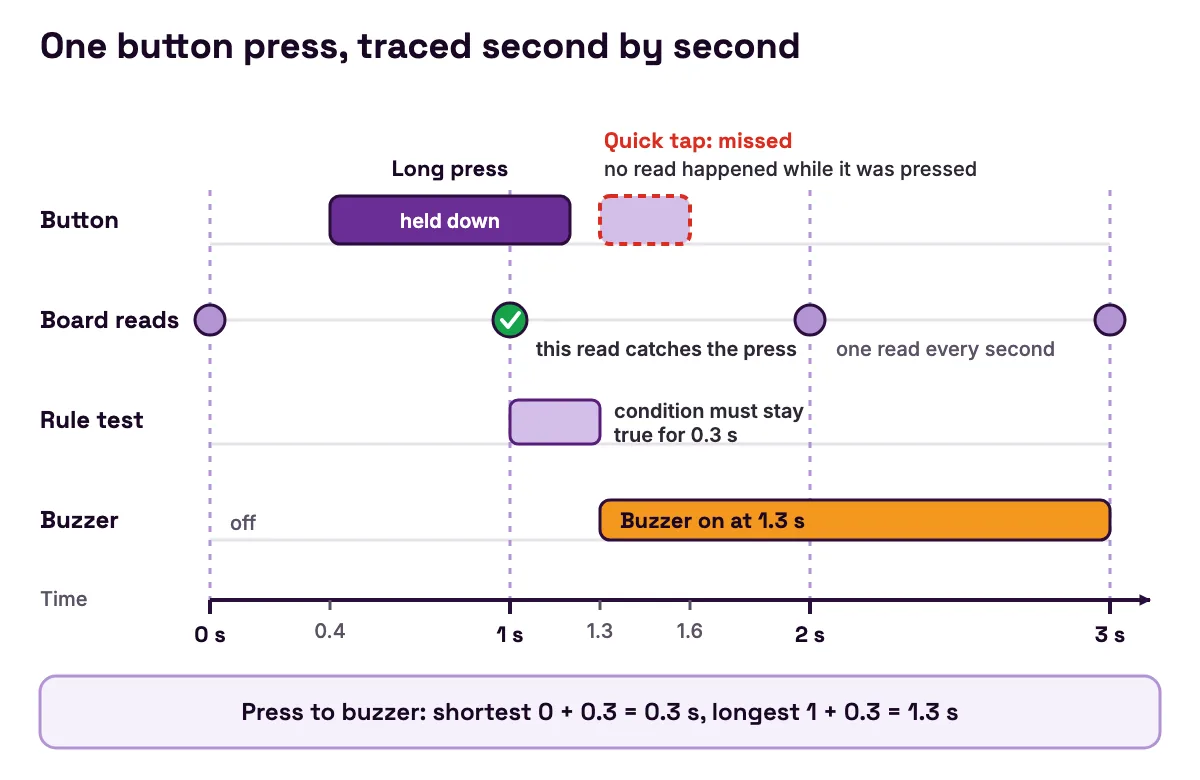
You press the button. The firmware turns on a pull-up resistor inside the chip for GPIO 5, so the pin reads high until you press, and pressing pulls it low.
- 2
Nothing happens yet. The board only reads the button inside
readSensors(), once a second. - 3
At the next 1-second tick, between 0 and 1 second after your press, the board stores "pressed".
- 4
The rule's test is now true. A Condition rule waits until its test has stayed true for 0.3 seconds, so a flicker cannot start it.
- 5
The rule starts, and its first step switches GPIO 4 on. The buzzer sounds.
Now the calculation. The shortest wait is 0 + 0.3 = 0.3 seconds. The longest is 1 + 0.3 = 1.3 seconds. And if you tap and let go between two reads, the board never sees the press at all.
Lesson 6 on the push button turns this into an experiment: try a quick tap, a one-second hold and several fast taps, and explain which ones are missed. The rule engine lesson shows how the board's four loop types use these readings.
Common mistakes in a first embedded project
The rule ignores a quick tap
Symptom: You tap the button and nothing happens. A longer press works.
Cause: The board polls its inputs once a second, as the button trace above shows.
Fix: Hold the button for a second or two. In your own designs, pick inputs that last longer than the gap between reads, or read faster.
An analog sensor stops working when Wi-Fi is on
Symptom: A sensor on your own ESP32 circuit reads fine until Wi-Fi starts, then fails.
Cause: Espressif's GPIO guide (opens in a new tab) says ADC2 pins cannot be used when Wi-Fi is used.
Fix: Use ADC1 pins. MakerBuddy puts its four analog inputs on GPIO 32 to 35, which are all on ADC1, so they keep working with Wi-Fi on.
The board will not start or take an upload after you add a part
Symptom: You wire something new to the board, and now it hangs at power-on or the upload fails.
Cause: The part sits on a strapping pin. Espressif's GPIO guide (opens in a new tab) lists GPIO 0, 2, 5, 12 and 15, and the ESP32 datasheet (opens in a new tab) explains that these pins need certain levels at start-up because they choose how the chip boots.
Fix: Move the part to another pin. To force an upload, Espressif's esptool troubleshooting guide (opens in a new tab) says to hold BOOT and press EN.
The dashboard stops working after you upload your own sketch
Symptom: Your sketch runs, but the dashboard cannot find the board and the rules stop running.
Cause: An embedded system runs one program at a time. Uploading your own Arduino sketch replaces the MakerBuddy firmware until you upload it again.
Fix: Reinstall the firmware by USB, with the steps in updating the board's software.
Your program freezes while it waits
Symptom: While a light blinks, the buttons and the screen stop responding.
Cause: A long delay() stops the whole loop. Nothing else runs until it ends.
Fix: Use the pattern from the MakerBuddy loop: let a timer or a time check raise a flag, and let the loop do the work. Then one slow job never blocks the others.
Embedded systems careers: subjects, skills and pay
Embedded engineers sit between electronics and programming. Some design circuit boards and chips, others write firmware, and many do both. The US Bureau of Labor Statistics does not list embedded engineering as its own job. These are the three groups it tracks that come closest.
| BLS job group | What the group does | Median pay, May 2025 | Projected growth, 2025 to 2035 | Typical entry education |
|---|---|---|---|---|
| Computer hardware engineers (opens in a new tab) | Research, design and test computers and parts such as processors, circuit boards and memory | $161,740 a year | 9% | Bachelor's degree |
| Electrical and electronics engineers (opens in a new tab) | Design, develop and test electrical and electronic equipment and parts | $125,040 a year | 8% | Bachelor's degree |
| Software developers (opens in a new tab) | Create the programs that run computers and devices | $135,980 a year | 10% (with testers) | Bachelor's degree |
- BLS job group
- Computer hardware engineers (opens in a new tab)
- What the group does
- Research, design and test computers and parts such as processors, circuit boards and memory
- Median pay, May 2025
- $161,740 a year
- Projected growth, 2025 to 2035
- 9%
- Typical entry education
- Bachelor's degree
- BLS job group
- Electrical and electronics engineers (opens in a new tab)
- What the group does
- Design, develop and test electrical and electronic equipment and parts
- Median pay, May 2025
- $125,040 a year
- Projected growth, 2025 to 2035
- 8%
- Typical entry education
- Bachelor's degree
- BLS job group
- Software developers (opens in a new tab)
- What the group does
- Create the programs that run computers and devices
- Median pay, May 2025
- $135,980 a year
- Projected growth, 2025 to 2035
- 10% (with testers)
- Typical entry education
- Bachelor's degree
These figures are for the United States only. Pay and job titles differ in Canada and Pakistan.
What can you learn now, at school? You can practise each of these skills on a kit like MakerBuddy.
- Electronics basics: voltage, current, circuits and why a 3.3 V chip needs care with 5 V parts.
- One programming language: C or C++ is the usual start. Carnegie Mellon's embedded course expects working knowledge of C. Our MicroPython vs Arduino C guide compares the two options on an ESP32.
- Reading datasheets: most of the chip numbers in this guide came from one.
- Timing: polling, interrupts and why a loop must never block.
- Debugging: reading the Serial Monitor, testing one change at a time and writing down what happened.
On MakerBuddy you go from no code to real firmware. The 32 free lessons start with the dashboard and rules, and Lesson 31's capstone project has you design and troubleshoot your own system. University students can then call the board from their own code, over the local REST and WebSocket API for developers, or rebuild the firmware with the Arduino development notes. If the ESP32 is new to you, start with our ESP32 guide for beginners.
To plan further, read our roadmap to becoming an embedded systems engineer, compare electrical and computer engineering degrees, and pick student engineering portfolio projects that show your skills. Every guide in the series is on the MakerBuddy blog.
FAQ
What is an embedded system in simple words?
An embedded system is a small computer built inside a product to do one job. It reads inputs such as buttons and sensors, runs one program called firmware, and controls outputs such as lights, motors and screens.
What are 5 examples of embedded systems?
A microwave oven, a washing machine, a digital thermometer, a TV remote and a car's anti-lock brakes. Each one has a hidden computer that runs a single program. Smart thermostats and fitness bands are embedded systems too.
Is a TV an embedded system?
A TV contains embedded systems, and its remote is a simple one. A smart TV sits near the line, because it runs apps like a small computer. Every feature of an embedded system has exceptions.
Is Arduino an embedded system?
An Arduino board is a tool for building embedded systems. Once you upload one sketch and build the board into a project, such as a plant monitor, the project is an embedded system. The UNO R3 is a classic example: its datasheet (opens in a new tab) lists a 16 MHz microcontroller with 2 kB of working memory.
Is the Raspberry Pi an embedded system?
A Raspberry Pi 5 on a desk is a general-purpose computer that runs Raspberry Pi OS and any software you install. Built into a product to do one job, it becomes the brain of an embedded system. Raspberry Pi sells its Compute Module 5 (opens in a new tab) for exactly that.
Which OS is used in embedded systems?
Many small embedded systems have no operating system: one program sets up once, then loops forever. Bigger ones use a real-time operating system such as FreeRTOS or Zephyr, and the largest run a full operating system. The ESP32 runs FreeRTOS underneath its programs, as Espressif's FreeRTOS overview (opens in a new tab) explains.
Is Python or C++ better for embedded systems?
C and C++ are the usual languages, because they run fast on small chips and give close control of memory and timing. Python can run on bigger microcontrollers such as the ESP32, through MicroPython, which has its own ESP32 quick reference (opens in a new tab). The MakerBuddy firmware is written in Arduino C++.
Do embedded engineers get paid well?
In the United States, the closest job groups have six-figure medians. The Bureau of Labor Statistics gives a May 2025 median of $161,740 a year for computer hardware engineers (opens in a new tab) and $125,040 for electrical and electronics engineers (opens in a new tab). Pay in Canada and Pakistan is different, so check local sources too.
Sources
- Carnegie Mellon University in Qatar: 15-348 Embedded Systems, Lecture 1 (PDF) (opens in a new tab)
- Harvey Mudd College: E155 Lecture 23, Introduction to Real-time Operating Systems (PDF) (opens in a new tab)
- Arm: What Is Embedded System Design? (opens in a new tab)
- Espressif: ESP32 Series Datasheet (PDF) (opens in a new tab)
- Espressif: ESP-IDF FreeRTOS Overview (opens in a new tab)
- Espressif: ESP-IDF Watchdogs (opens in a new tab)
- Espressif: Arduino-ESP32 FAQ (opens in a new tab)
- Espressif: ESP-IDF GPIO and RTC GPIO (opens in a new tab)
- Espressif: esptool troubleshooting (opens in a new tab)
- Arduino: UNO R3 datasheet (PDF) (opens in a new tab)
- Raspberry Pi: Raspberry Pi 5 (opens in a new tab)
- Raspberry Pi: Compute Module 5 (opens in a new tab)
- MicroPython: Quick reference for the ESP32 (opens in a new tab)
- U.S. Bureau of Labor Statistics: Computer Hardware Engineers (opens in a new tab)
- U.S. Bureau of Labor Statistics: Electrical and Electronics Engineers (opens in a new tab)
- U.S. Bureau of Labor Statistics: Software Developers, Quality Assurance Analysts, and Testers (opens in a new tab)
- MakerBuddy firmware source, MakerBuddy.ino (GitHub) (opens in a new tab)