What is voltage? Voltage is the push that makes electric charge move around a circuit. It is the difference in electrical energy between two points, and it is measured in volts (V). The bigger the voltage, the harder the push. SparkFun's guide to voltage, current and resistance (opens in a new tab) defines one volt as the difference that gives one joule of energy to each coulomb of charge.
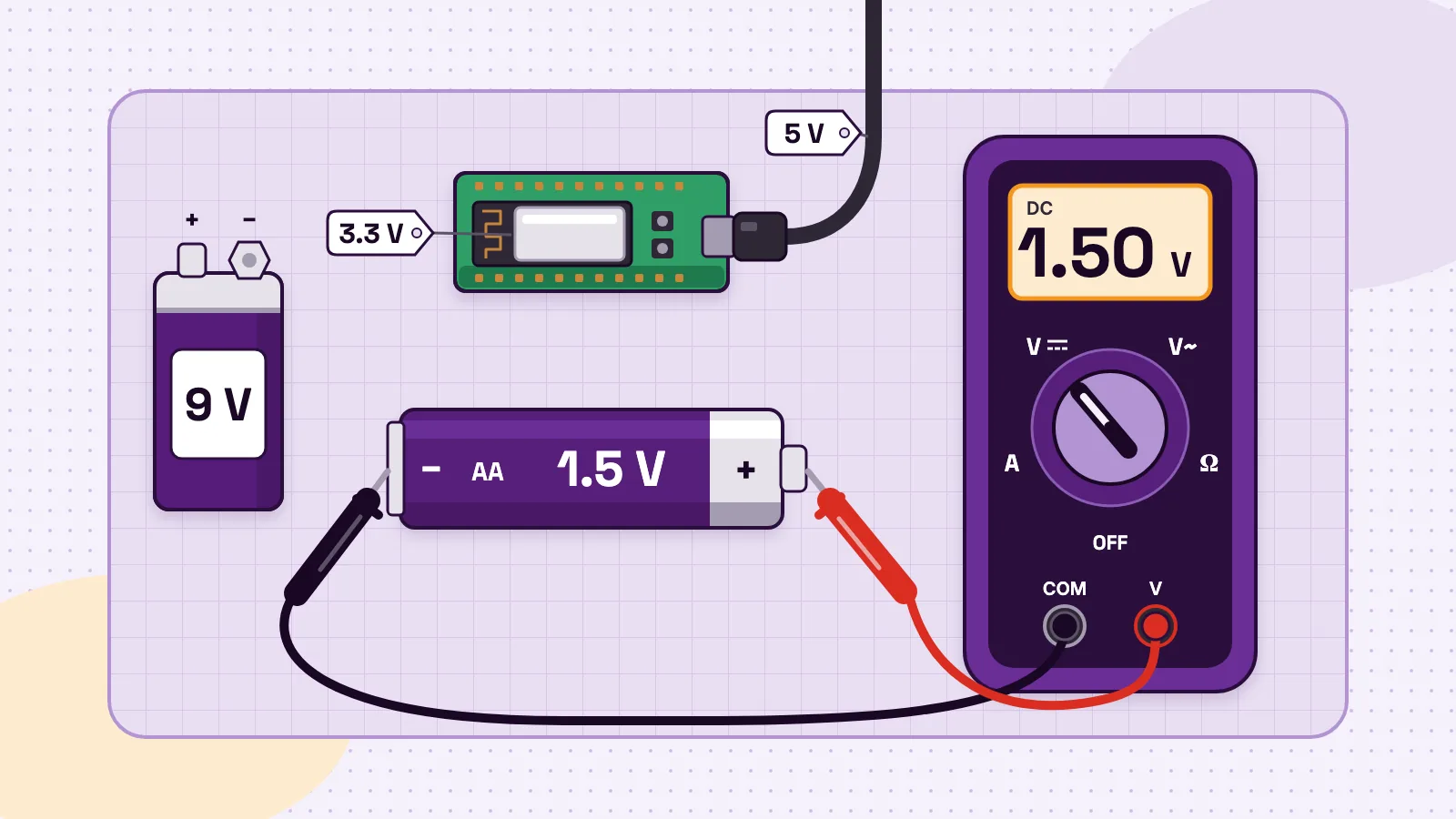
You meet voltage every day. Fluke's guide to voltage (opens in a new tab) gives two examples: a AA alkaline battery offers 1.5 V, and a typical US wall socket offers 120 V. A student learning board sits at the safe end. The MakerBuddy IoT Kit takes 5 V from a USB cable and runs its ESP32 chip on 3.3 V.
Below you get the water-pressure picture, voltage vs current, common voltages, four worked sums and a safe way to measure voltage. New to electronics? Start with the 12 ideas you need before your first circuit.
Voltage definition: what voltage means in simple words
Voltage always compares two points. A battery has a + end and a − end, and its voltage is the difference between them. One point on its own has no voltage, just as a step has no height until you ask "height above what?".
In electronics the second point is usually ground, marked GND: the 0 V point that other voltages are measured from. A multimeter compares its red probe with its black one, so swap them on a battery and the screen shows a minus number. SparkFun's multimeter tutorial (opens in a new tab) says nothing bad happens. Only the point you compare against has changed.
The Wikipedia article on voltage (opens in a new tab) gives other names for it: potential difference, electric pressure and electric tension.
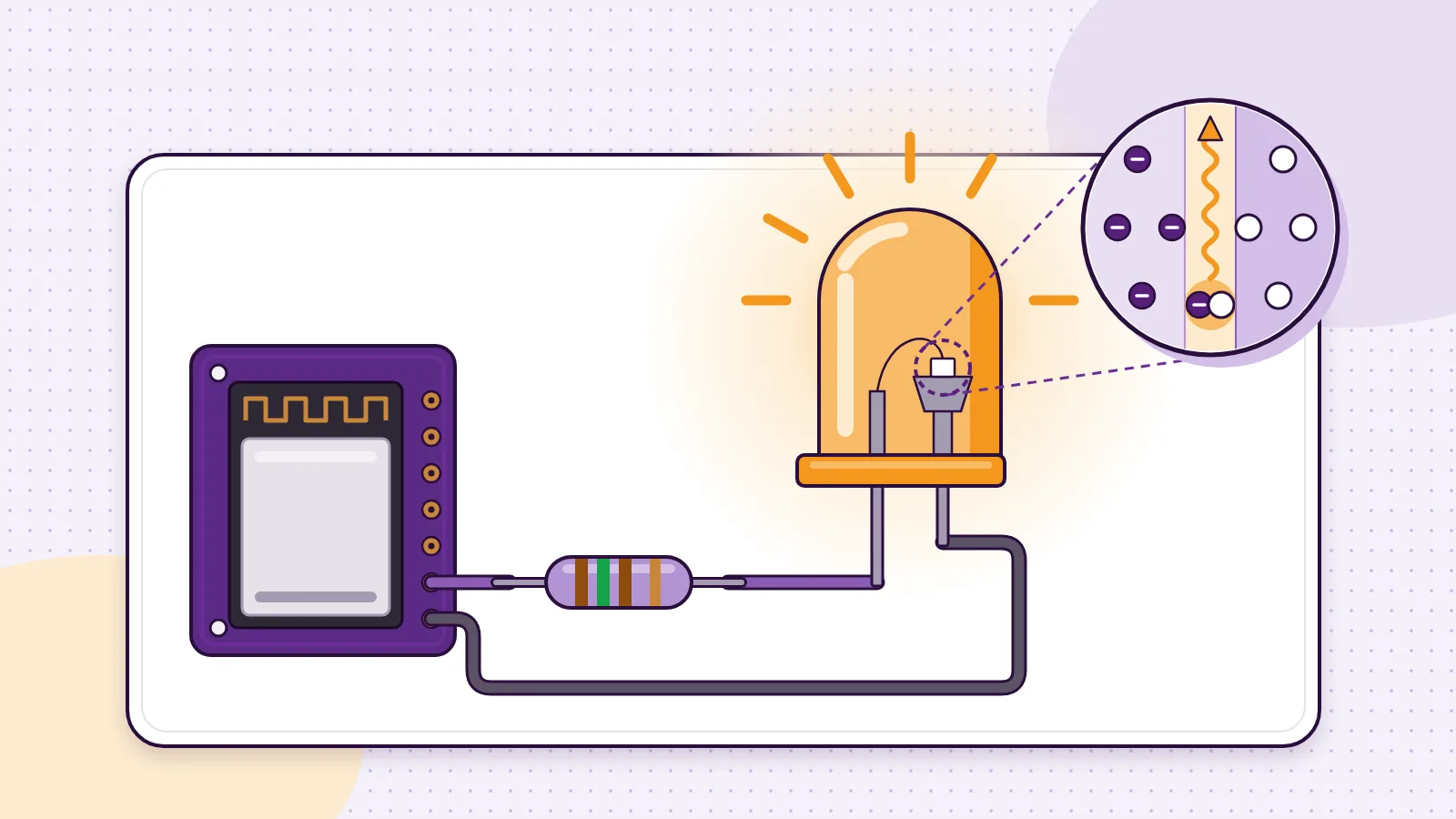
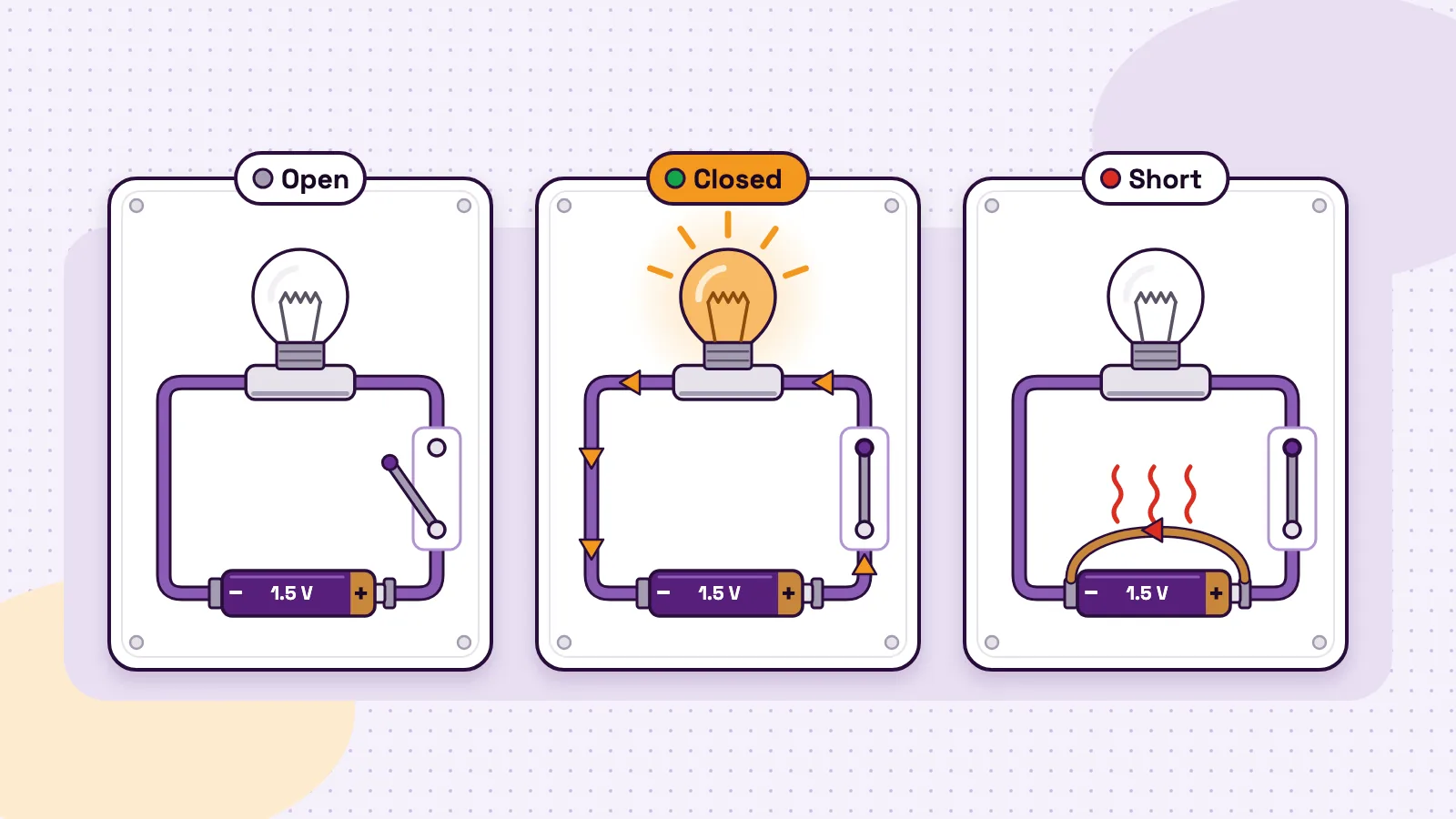
Voltage is the cause and current is the effect, and current only flows when there is a complete path. Energizer's alkaline battery handbook (opens in a new tab) puts it this way: when the circuit is closed, the battery pulls electrons through the wire, and that flow is electricity. Open the switch and the push is still there, but nothing flows. See open, closed and short circuits.
What is a volt? The unit, the formula and the name
A volt is the unit of voltage. One volt gives one joule of energy to each coulomb of charge that moves between the two points. That gives the voltage formula:
V = E ÷ Q, or voltage = energy ÷ charge.
A coulomb is a huge crowd of electrons: 6.241 × 10^18 of them, according to SparkFun's Ohm's law tutorial (opens in a new tab). So a 1.5 V cell gives 1.5 joules to every coulomb that flows. A 9 V battery, listed at a nominal 9.0 volts in Energizer's 522 data sheet (opens in a new tab), gives 9 joules to each coulomb. More energy per bit of charge means a stronger push.
The volt is named after the Italian physicist Alessandro Volta (1745 to 1827), who invented the voltaic pile, an early battery, as Fluke's voltage guide (opens in a new tab) notes. Small voltages are written in millivolts (mV), and 1,000 mV make 1 V. Big ones are written in kilovolts (kV): SparkFun's AC vs DC tutorial (opens in a new tab) mentions power sent at over 110 kV, and high-voltage DC reaching 800 kV.
The water-pressure analogy for voltage, current and resistance
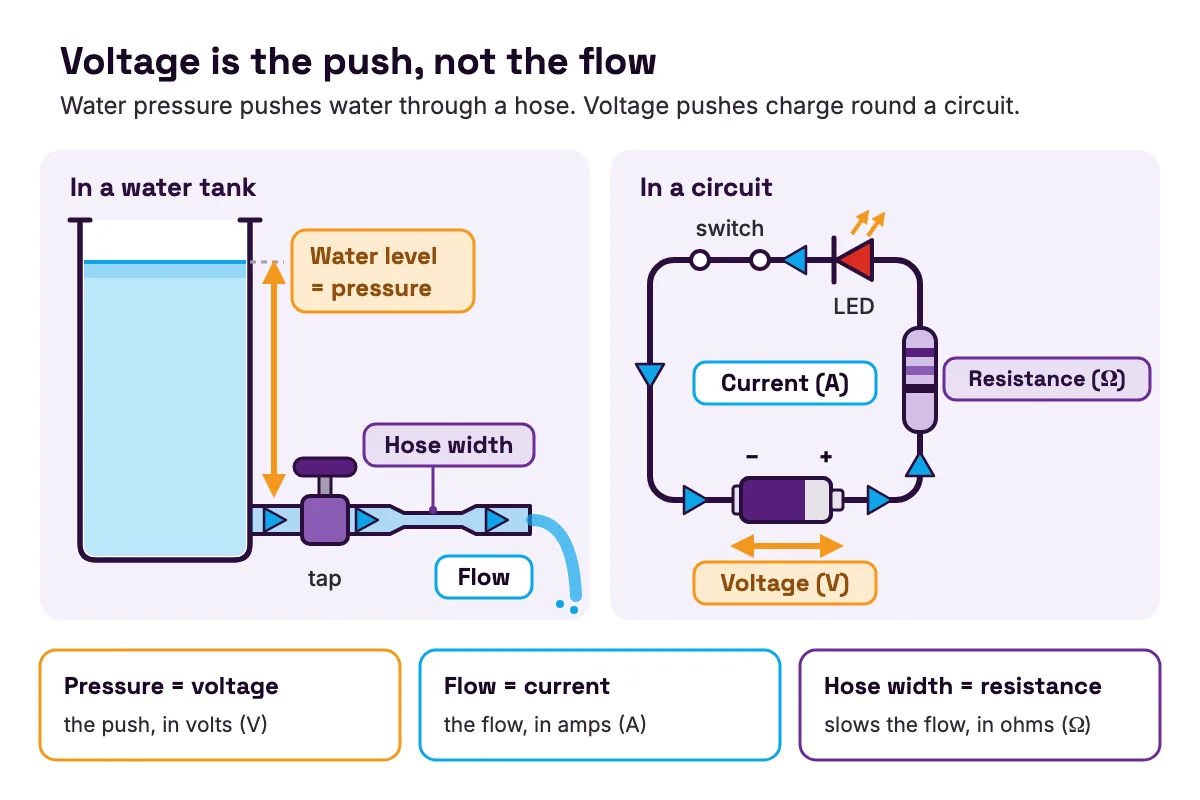
You cannot see electricity, so teachers picture it as water. SparkFun's voltage tutorial (opens in a new tab) uses a tank with a hose at the bottom: the higher the water, the harder it pushes out.
| In the water tank | In a circuit | Unit |
|---|---|---|
| The water | Charge | coulomb (C) |
| Water pressure | Voltage | volt (V) |
| How fast the water flows | Current | amp (A) |
| How narrow the hose is | Resistance | ohm (Ω) |
- In the water tank
- The water
- In a circuit
- Charge
- Unit
- coulomb (C)
- In the water tank
- Water pressure
- In a circuit
- Voltage
- Unit
- volt (V)
- In the water tank
- How fast the water flows
- In a circuit
- Current
- Unit
- amp (A)
- In the water tank
- How narrow the hose is
- In a circuit
- Resistance
- Unit
- ohm (Ω)
Table note: the four pairs follow SparkFun's Ohm's law tutorial (opens in a new tab).
Now play with the tank in your head.
- Fill the tank higher and more water rushes through the same hose. Raise the voltage and more current flows through the same part.
- Pinch the hose and less water flows. Add resistance and less current flows.
- Close the tap and the water still presses on it, but nothing moves. A battery in a drawer still has its voltage, but no current flows.
The picture has one limit. A cut hose spills water, but a cut wire spills no charge. The same charge goes round and round the loop, and the battery gives it energy on each trip.
Voltage vs current vs resistance: the difference in one table
Voltage and current always turn up together, so students mix them up. Voltage is the push. Current is the flow. Resistance is what slows the flow.
| Voltage | Current | Resistance | |
|---|---|---|---|
| What it is | The push between two points | The flow of charge past one point | How much a part slows the flow |
| Letter in formulas | V | I | R |
| Unit | volt (V) | amp (A) or milliamp (mA) | ohm (Ω) |
| Water picture | Pressure | Flow | Hose width |
| How a meter measures it | Across the part, in parallel | In line, with the circuit broken open | Across the part, with the power off |
- What it is
- Voltage
- The push between two points
- Current
- The flow of charge past one point
- Resistance
- How much a part slows the flow
- Letter in formulas
- Voltage
- V
- Current
- I
- Resistance
- R
- Unit
- Voltage
- volt (V)
- Current
- amp (A) or milliamp (mA)
- Resistance
- ohm (Ω)
- Water picture
- Voltage
- Pressure
- Current
- Flow
- Resistance
- Hose width
- How a meter measures it
- Voltage
- Across the part, in parallel
- Current
- In line, with the circuit broken open
- Resistance
- Across the part, with the power off
Table note: the meter connections follow SparkFun's multimeter tutorial (opens in a new tab), which measures voltage in parallel and says current must be measured in series.
The three are linked by Ohm's law, V = I × R. Know any two and you can work out the third. In SparkFun's Ohm's law tutorial (opens in a new tab), 1 V across 1 Ω pushes 1 A, and the same 1 V across 2 Ω pushes only 0.5 A. Go deeper with what electric current is, what a resistor actually does and Ohm's law with real examples.
Common voltages from 1.5 V to 230 V
| Where you meet it | Voltage | AC or DC |
|---|---|---|
| One AA alkaline cell | 1.5 V | DC |
| Three AA cells in a holder | about 4.5 V | DC |
| An ESP32 chip | 3.3 V recommended, works from 2.3 to 3.6 V | DC |
| A USB 2.0 port | 5 V, allowed from 4.75 to 5.25 V | DC |
| Arduino UNO R3 logic | 5 V | DC |
| A rectangular 9 V battery | 9.0 V nominal | DC |
| Wall socket, United States and Canada | 120 V | AC, 60 Hz |
| Wall socket, Pakistan and the United Kingdom | 230 V | AC, 50 Hz |
- Where you meet it
- One AA alkaline cell
- Voltage
- 1.5 V
- AC or DC
- DC
- Where you meet it
- Three AA cells in a holder
- Voltage
- about 4.5 V
- AC or DC
- DC
- Where you meet it
- An ESP32 chip
- Voltage
- 3.3 V recommended, works from 2.3 to 3.6 V
- AC or DC
- DC
- Where you meet it
- A USB 2.0 port
- Voltage
- 5 V, allowed from 4.75 to 5.25 V
- AC or DC
- DC
- Where you meet it
- Arduino UNO R3 logic
- Voltage
- 5 V
- AC or DC
- DC
- Where you meet it
- A rectangular 9 V battery
- Voltage
- 9.0 V nominal
- AC or DC
- DC
- Where you meet it
- Wall socket, United States and Canada
- Voltage
- 120 V
- AC or DC
- AC, 60 Hz
- Where you meet it
- Wall socket, Pakistan and the United Kingdom
- Voltage
- 230 V
- AC or DC
- AC, 50 Hz
Table note: AA from Fluke (opens in a new tab); three cells from SparkFun's series and parallel tutorial (opens in a new tab); ESP32 from the ESP32 Series datasheet (opens in a new tab) (v5.3); USB from TI's TIDUF26 design guide (opens in a new tab); UNO from the UNO R3 datasheet (opens in a new tab), which ties its logic reference pin, IOREF, to 5 V; 9 V from the Energizer 522 data sheet (opens in a new tab); sockets from the mains electricity by country (opens in a new tab) table.
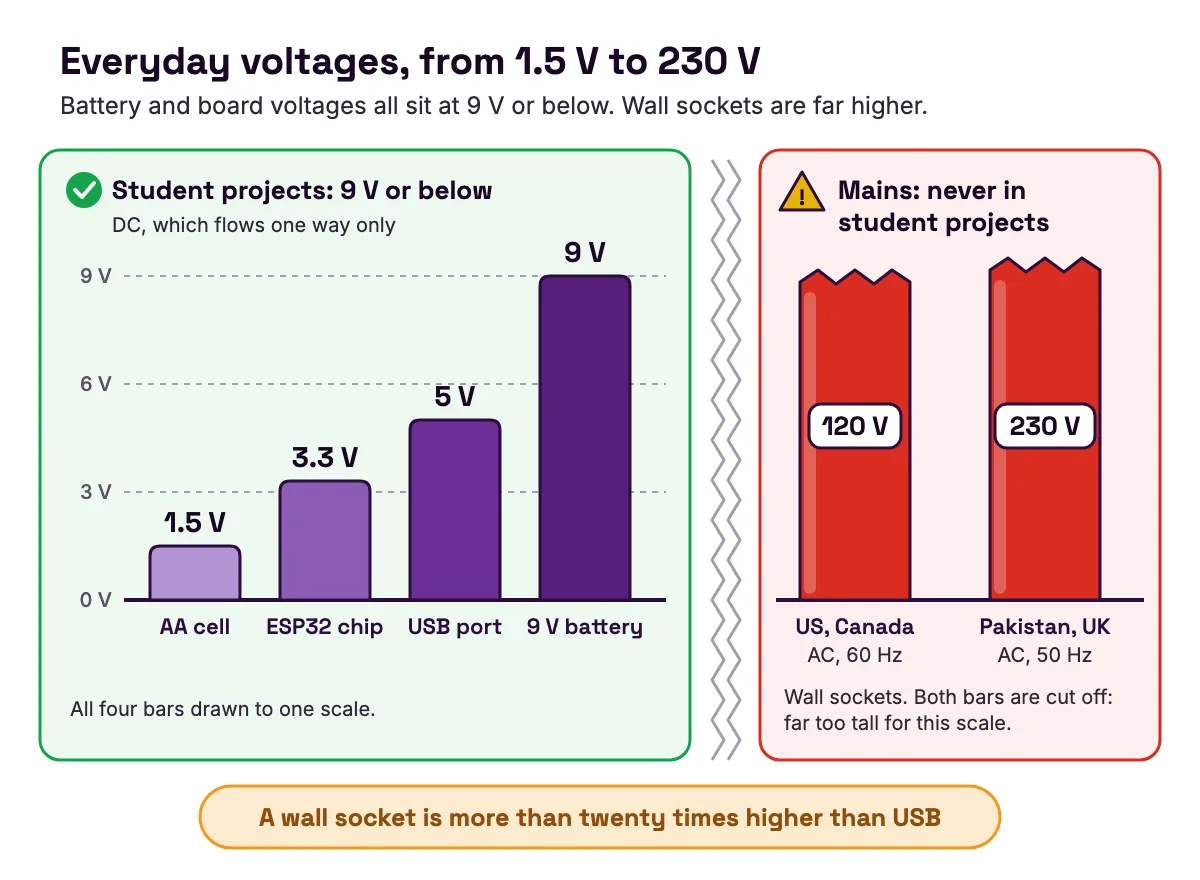
The first six rows are DC, direct current, which flows one way only. Wall sockets give AC, alternating current, which changes direction many times a second. SparkFun's AC vs DC tutorial (opens in a new tab) explains that the 120 V in North American homes is an RMS figure, a kind of average: the voltage really swings to about 170 V at its peak. More in our guide to AC vs DC and why electronics run on DC.
Look at the gap in that table. The battery and board voltages all sit at 9 V or below. A wall socket is more than twenty times higher than USB.
Why the MakerBuddy board uses two voltages: 5 V and 3.3 V
The MakerBuddy IoT Kit V1.0 is a learning board built around an ESP32, a small computer with Wi-Fi. It comes in purple or green, and both colours are the same board. The technical details page states its power plainly: the board runs on 5 V from a USB cable in the ESP32 DevKit's micro-USB port, and the DevKit turns the 5 V into the 3.3 V its chip needs. Lesson 1 tells students the same: a safe 5 V and 3.3 V on the board, 110 to 240 V at a wall socket. Students plug in that USB cable in Lesson 3.
The 3.3 V side: the chip and every signal
The ESP32 is a 3.3 V chip. Espressif's ESP32 Series datasheet (opens in a new tab) says it works from 2.3 V to 3.6 V and recommends 3.3 V. Its absolute maximum is 3.6 V, and going beyond its maximum ratings may cause permanent damage. So 5 V straight from USB could ruin it.
The chip's own pins work at 3.3 V too.
- Outputs: HIGH is 3.3 V and LOW is 0 V, as Lesson 4 explains. That is how pin 12 switches the blue light.
- The button: pin 5 is joined to 3.3 V through a pull-up resistor inside the ESP32, so it reads HIGH until a press connects it to GND (Lesson 6).
- Analog readings: the ESP32 turns 0 V to about 3.3 V into a number from 0 to 4095 (Lesson 9).
Why 3.3 V at all? SparkFun's logic levels tutorial (opens in a new tab) says newer devices run from a lower voltage to use less power, which also allows a smaller footprint and lower cost.
The 5 V side: the parts that want a bigger push
USB delivers 5 V. TI's TIDUF26 design guide (opens in a new tab) notes that USB 2.0 allows 5% either way, so a host gives 4.75 V to 5.25 V. The lessons name three places on the board where 5 V does the work.
- The knob runs from 5 V on the V1.0 board (Lesson 9), so near the end of its turn the reading sits at 100.
- The relay coil gets its current from the board's 5 V supply (Lesson 15).
- The two-pin 5V plug powers a small low-voltage load through the relay in the same lesson.
Several plug-in parts ask for about 5 V in their own data sheets too.
| Kit part | Socket (GPIO) | What its own data sheet or guide asks for |
|---|---|---|
| SG90 servo | 19 | 4.8 V, about 5 V |
| HC-SR04 distance sensor | trig 15, echo 2 | 5 V DC |
| MQ-2 smoke and gas sensor | 33 | heater at 5.0 V, give or take 0.2 V |
| DHT11 temperature and humidity | 25 | 3 to 5 V |
| DS18B20 waterproof probe | 26 | 3.0 to 5.5 V |
- Kit part
- SG90 servo
- Socket (GPIO)
- 19
- What its own data sheet or guide asks for
- 4.8 V, about 5 V
- Kit part
- HC-SR04 distance sensor
- Socket (GPIO)
- trig 15, echo 2
- What its own data sheet or guide asks for
- 5 V DC
- Kit part
- MQ-2 smoke and gas sensor
- Socket (GPIO)
- 33
- What its own data sheet or guide asks for
- heater at 5.0 V, give or take 0.2 V
- Kit part
- DHT11 temperature and humidity
- Socket (GPIO)
- 25
- What its own data sheet or guide asks for
- 3 to 5 V
- Kit part
- DS18B20 waterproof probe
- Socket (GPIO)
- 26
- What its own data sheet or guide asks for
- 3.0 to 5.5 V
Table note: from the SG90 (opens in a new tab), HC-SR04 (opens in a new tab) and MQ-2 (opens in a new tab) data sheets, Adafruit's DHT guide (opens in a new tab) and Adafruit's DS18B20 product page (opens in a new tab). These are each part's own figures, not a wiring guide for the board. Plug kit parts only into their labelled sockets.
The relay: both voltages as a team
Lesson 15 shows why one board needs both. When the ESP32 sets pin 23 to 3.3 V, a small transistor on the relay module switches on. Current from the 5 V supply then flows through the relay coil, which becomes a magnet and pulls a metal arm to open or close the contacts. The 3.3 V side decides. The 5 V side does the work. More in how a relay lets a small signal switch a big load.
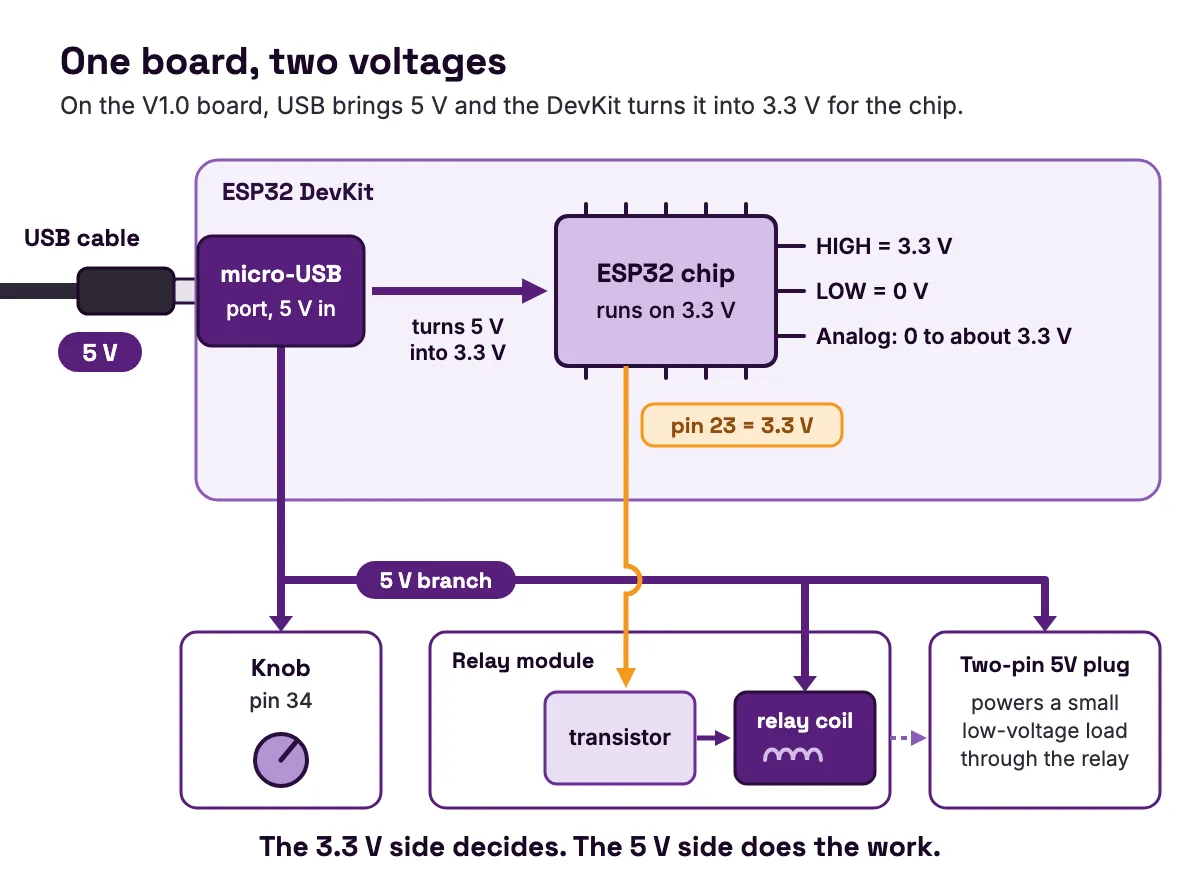
Every MakerBuddy kit has this split built in, with each socket labelled, so students can watch both voltages at work before they wire a circuit by hand.
Worked examples: four voltage sums you can check
Worked example 1: cells in series add up, then sag
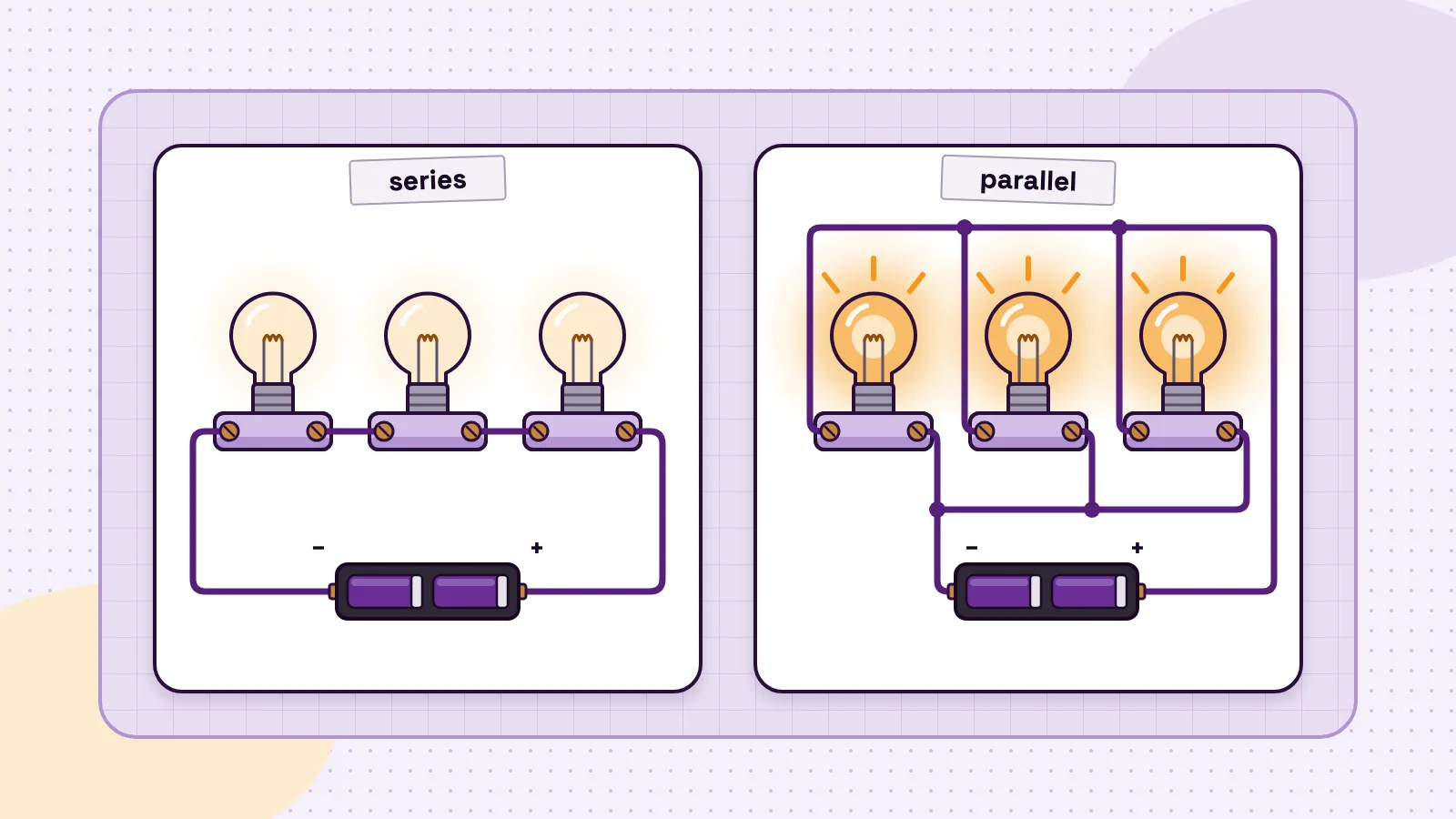
Put cells end to end, + to −, and their voltages add. SparkFun's series and parallel tutorial (opens in a new tab) expects around 4.5 V from three AA cells, a bit more if they are new: 1.5 + 1.5 + 1.5 = 4.5 V.
A cell's voltage is not fixed, though. Energizer's alkaline handbook (opens in a new tab) says most devices are designed to work from about 1.6 V down to 0.9 V per cell. Three cells therefore run from 3 × 1.6 = 4.8 V when fresh down to 3 × 0.9 = 2.7 V when nearly flat. A project that needs a steady voltage has to cope with that.
Worked example 2: voltage drop around an LED loop
SparkFun's multimeter tutorial (opens in a new tab) builds a loop from a 5 V supply, a 1 kΩ resistor and a blue LED. Across the LED, the meter reads 2.66 V. Where did the rest go?
- 1
The supply gives 5.00 V
across the whole loop.
- 2
The LED uses 2.66 V.
That is its voltage drop.
- 3
The resistor takes what is left
5.00 − 2.66 = 2.34 V.
- 4
Ohm's law gives the current
I = V ÷ R = 2.34 ÷ 1,000 = 0.00234 A, or 2.34 mA.
- 5
The same current flows through the LED,
because one loop has only one path.
Each part uses a slice of the supply, and the slices add back up: 2.66 + 2.34 = 5.00 V. Our guide to series vs parallel circuits shows the same rule with more parts.
Worked example 3: is a 5 V signal safe for a 3.3 V pin?
You need this when you wire your own parts. Table 5-3 of the ESP32 Series datasheet (opens in a new tab) sets the input limits as fractions of the 3.3 V supply:
| What the datasheet sets | Rule | At a 3.3 V supply |
|---|---|---|
| Input read as HIGH | 0.75 × supply and above | 2.475 V or more |
| Input read as LOW | 0.25 × supply and below | 0.825 V or less |
| Highest input allowed | supply + 0.3 V | 3.6 V |
- What the datasheet sets
- Input read as HIGH
- Rule
- 0.75 × supply and above
- At a 3.3 V supply
- 2.475 V or more
- What the datasheet sets
- Input read as LOW
- Rule
- 0.25 × supply and below
- At a 3.3 V supply
- 0.825 V or less
- What the datasheet sets
- Highest input allowed
- Rule
- supply + 0.3 V
- At a 3.3 V supply
- 3.6 V
Table note: rules from Table 5-3 of the ESP32 Series datasheet (opens in a new tab) (v5.3), multiplied out for 3.3 V. Between 0.825 V and 2.475 V the chip might read either way, which SparkFun's logic levels tutorial (opens in a new tab) calls floating.
A 5 V signal is above the 3.6 V limit, so it must come down. SparkFun's logic levels tutorial (opens in a new tab) suggests a voltage divider from a 1 kΩ and a 2 kΩ resistor. To get about 3.3 V, put the 1 kΩ nearest the signal and the 2 kΩ to ground.
- 1
Divider output
5.0 × 2,000 ÷ (1,000 + 2,000) = 3.33 V.
- 2
Is it safe?
3.33 V is under 3.6 V. Yes.
- 3
Is it still HIGH?
3.33 V is over 2.475 V. Yes.
- 4
Worst case
at 5.25 V, the top of the USB range in TI's design guide (opens in a new tab), the output is 5.25 × 2 ÷ 3 = 3.50 V. Still safe.
Our guides to 3.3 V vs 5 V logic and the voltage divider formula go further.
Worked example 4: why a higher voltage means a bigger shock
Your body has resistance too, so Ohm's law applies to it. NIOSH's electrical safety student manual (opens in a new tab) says dry skin may have a resistance of 100,000 ohms or more, and wet skin only 1,000 ohms. Divide each voltage by each resistance:
| Voltage | Current with dry skin (100,000 Ω) | Current with wet skin (1,000 Ω) |
|---|---|---|
| 5 V (USB) | 0.05 mA | 5 mA |
| 120 V (US socket) | 1.2 mA | 120 mA |
| 230 V (Pakistan or UK socket) | 2.3 mA | 230 mA |
- Voltage
- 5 V (USB)
- Current with dry skin (100,000 Ω)
- 0.05 mA
- Current with wet skin (1,000 Ω)
- 5 mA
- Voltage
- 120 V (US socket)
- Current with dry skin (100,000 Ω)
- 1.2 mA
- Current with wet skin (1,000 Ω)
- 120 mA
- Voltage
- 230 V (Pakistan or UK socket)
- Current with dry skin (100,000 Ω)
- 2.3 mA
- Current with wet skin (1,000 Ω)
- 230 mA
Table note: skin resistances from the NIOSH student manual (opens in a new tab); each cell is voltage ÷ resistance. It is a rough comparison, not a prediction: NIOSH notes that more force or a larger contact area lowers resistance further.
The same manual (opens in a new tab) says currents below 1 mA are generally not noticed, while 50 to 150 mA can stop breathing and may kill. With wet skin, both wall sockets land in or above that band. NIOSH also warns that low voltage does not mean low hazard, so keep every project dry and leave mains alone.
How the board turns a voltage into a number
Some parts give any voltage in a range, not just HIGH or LOW. The ESP32 measures it with its analog-to-digital converter, or ADC. Lesson 9 explains that the ADC is 12-bit: it splits 0 V to about 3.3 V into 4,096 steps, numbered 0 to 4095. Espressif's Arduino-ESP32 ADC reference (opens in a new tab) gives 12 bits as the default resolution. One step is tiny: 3.3 V ÷ 4,096 = about 0.8 mV.
The MakerBuddy firmware then reads each analog pin four times and averages them, to smooth out noise. For the light sensor, the knob and the gas sensor, it scales 0 to 4095 down to 0 to 100 for the dashboard and the rules, and drops any decimals.
Worked example: from pin voltage to dashboard number
| Voltage on the pin | Raw number (voltage ÷ 3.3 × 4095) | Sum for the card | Card shows |
|---|---|---|---|
| 0.825 V | about 1024 | 1024 × 100 ÷ 4095 = 25.01 | 25 |
| 1.65 V | about 2048 | 2048 × 100 ÷ 4095 = 50.01 | 50 |
| 2.475 V | about 3071 | 3071 × 100 ÷ 4095 = 74.99 | 74 |
| 3.3 V | 4095 | 4095 × 100 ÷ 4095 = 100 | 100 |
- Voltage on the pin
- 0.825 V
- Raw number (voltage ÷ 3.3 × 4095)
- about 1024
- Sum for the card
- 1024 × 100 ÷ 4095 = 25.01
- Card shows
- 25
- Voltage on the pin
- 1.65 V
- Raw number (voltage ÷ 3.3 × 4095)
- about 2048
- Sum for the card
- 2048 × 100 ÷ 4095 = 50.01
- Card shows
- 50
- Voltage on the pin
- 2.475 V
- Raw number (voltage ÷ 3.3 × 4095)
- about 3071
- Sum for the card
- 3071 × 100 ÷ 4095 = 74.99
- Card shows
- 74
- Voltage on the pin
- 3.3 V
- Raw number (voltage ÷ 3.3 × 4095)
- 4095
- Sum for the card
- 4095 × 100 ÷ 4095 = 100
- Card shows
- 100
Notice the third row: 74.99 shows as 74, because the decimals are dropped, not rounded. Each step on the card covers about 41 raw steps, as Lesson 9 points out, or about 33 mV.
The table is the ideal case. Espressif's ADC reference (opens in a new tab) gives the original ESP32's measurable range at its widest setting, 11 dB, as 150 mV to 3100 mV. So readings flatten out near the very bottom and top of the scale.
Watch it on two built-in parts. The light sensor on pin 35 sits in a row with a fixed resistor, as Lesson 7 explains, so more light means a higher voltage and a bigger number. The knob on pin 34 is a potentiometer: see how a potentiometer works.
How to measure voltage with a multimeter
These steps follow SparkFun's multimeter tutorial (opens in a new tab), which tests a AA battery.
- 1
Plug in the probes.
Black goes into COM. Red goes into the socket marked with a V (mAVΩ on SparkFun's meter).
- 2
Choose DC volts.
Turn the dial to the V with a straight line next to it. The V with a wavy line is for AC.
- 3
Pick a range above what you expect.
SparkFun uses the 2 V range for a AA cell and the 20 V range for a 5 V system.
- 4
Touch the probes across the battery.
Black on the − end, red on the + end.
- 5
Read the number.
A fresh AA shows around 1.5 V. A lone 1 or OL means out of range, so turn the dial up one step.
A 20-minute classroom activity: battery detective
You need a multimeter, a few new and used AA cells and a two-cell holder. Students predict, measure and record.
| What you measure | Predict | Your reading |
|---|---|---|
| A new AA cell | about 1.5 V or a little more | |
| A used AA cell | less than the new one | |
| Two new cells in series | about 3.0 V | |
| The same two cells, one turned round | about 0 V |
- What you measure
- A new AA cell
- Predict
- about 1.5 V or a little more
- Your reading
- What you measure
- A used AA cell
- Predict
- less than the new one
- Your reading
- What you measure
- Two new cells in series
- Predict
- about 3.0 V
- Your reading
- What you measure
- The same two cells, one turned round
- Predict
- about 0 V
- Your reading
The last row is a good puzzle: turn one cell round and the two pushes cancel out.
Then discuss what a meter cannot tell you. Energizer's alkaline handbook (opens in a new tab) warns that measuring a battery with nothing connected is misleading. Measured for a second or two while it powers a load, a fresh cell reads about 1.5 V, and one at 1.1 V has about 20% of its service left. A battery tester applies that load for you.
Only ever measure batteries and low-voltage circuits, never a wall socket. Our beginner's guide to using a multimeter covers current and resistance too.
Common voltage mistakes, with causes and fixes
The meter's fuse blew when you tested a supply
Cause: the meter was still set up for current, so it joined the supply straight to ground and its 200 mA fuse blew, as the SparkFun tutorial (opens in a new tab) explains. Fix: fit a fuse of the same rating. After any current test, move the red lead back to V and the dial back to volts.
A battery reads 1.5 V, but the toy will not run
Cause: the meter tested it with no load, which Energizer's alkaline handbook (opens in a new tab) calls misleading. A tired cell's voltage drops once it has to deliver current. Fix: use a battery tester, or swap in a fresh cell to compare.
The knob reaches 100 before the end of its turn
Cause: on the V1.0 board the knob runs from 5 V, too high for the ADC near the end of the turn. Lesson 9 says a reading of 100 at three-quarters of a turn comes from the 5 V supply. Fix: nothing is broken. Use the part of the turn where the number still changes, and set rule thresholds inside it.
A 5 V signal went straight into an ESP32 pin
Cause: 5 V is above the 3.6 V limit in the ESP32 Series datasheet (opens in a new tab). Watch for it with parts you wire yourself. Fix: bring the signal down with a voltage divider, as in worked example 3, or a level shifter. The technical details page warns that modules from other kits can need a different voltage even when the plug fits, so read the data sheet first.
FAQ
What is voltage in simple words?
Voltage is the push that moves electric charge around a circuit. It is always measured between two points, in volts (V). Think of it as electrical pressure: the higher the voltage, the harder the push.
What is another name for voltage?
The most common is potential difference. The Wikipedia article on voltage (opens in a new tab) also lists electric pressure and electric tension. If your science book says potential difference, it means the same thing as voltage.
What is a volt?
A volt is the unit of voltage. One volt gives one joule of energy to each coulomb of charge, as SparkFun's voltage tutorial (opens in a new tab) defines it. It is named after Alessandro Volta, who built an early battery.
How strong is 1 volt of electricity?
It is a small push; a AA cell gives 1.5 V. With Ohm's law and the 100,000 ohms that NIOSH's safety manual (opens in a new tab) gives for dry skin, 1 V would push about 0.01 mA through you, far below the 1 mA the manual says is generally not noticed.
Can voltage exist without current?
Yes. A battery on a shelf has its full voltage, but no current flows until something closes the circuit, as Energizer's alkaline handbook (opens in a new tab) describes. Current, though, cannot flow without a voltage to push it.
Which kills, current or voltage?
Current does the harm, but voltage pushes it through you. NIOSH's electrical safety manual (opens in a new tab) says injury depends on how much current flows and for how long: about 30 mA can stop breathing, and above 75 mA the heart can beat uselessly. It records breathing stopping after shocks from as low as 49 volts.
Is the US voltage 110 V or 220 V?
Neither, exactly. The mains electricity by country (opens in a new tab) table says US homes typically get 120/240 V split-phase power, and the everyday socket gives 120 V at 60 Hz. Pakistan and the United Kingdom use 230 V at 50 Hz.
Is 120 watts the same as 120 volts?
No. Volts measure the push, and watts measure power, the energy used each second. SparkFun's electric power tutorial (opens in a new tab) finds power by multiplying the voltage across a part by the current through it. So a 120 W lamp on a 120 V socket draws 120 ÷ 120 = 1 A.
Why does the ESP32 use 3.3 V instead of 5 V?
It is built as a 3.3 V chip. Its datasheet (opens in a new tab) recommends 3.3 V and sets 3.6 V as the absolute maximum. Lower-voltage chips use less power, as SparkFun's logic levels tutorial (opens in a new tab) explains, so a board like MakerBuddy takes 5 V from USB and turns it into 3.3 V. The free 32-lesson MakerBuddy curriculum teaches this on a real board, and the MakerBuddy blog has more plain explainers.
Sources
- SparkFun: Voltage, Current, Resistance, and Ohm's Law (opens in a new tab)
- SparkFun: How to Use a Multimeter (opens in a new tab)
- SparkFun: Logic Levels (opens in a new tab)
- SparkFun: Series and Parallel Circuits (opens in a new tab)
- SparkFun: Alternating Current (AC) vs. Direct Current (DC) (opens in a new tab)
- SparkFun: Electric Power (opens in a new tab)
- Fluke: What is Voltage? (opens in a new tab)
- Wikipedia: Voltage (opens in a new tab)
- Wikipedia: Mains electricity by country (opens in a new tab)
- Energizer: Alkaline Manganese Dioxide Handbook and Application Manual (opens in a new tab)
- Energizer 522 (9 V) product data sheet (opens in a new tab)
- Espressif: ESP32 Series Datasheet v5.3 (opens in a new tab)
- Espressif: Arduino-ESP32 ADC API reference (opens in a new tab)
- Texas Instruments: TIDUF26 design guide, USB power input (opens in a new tab)
- Arduino: UNO R3 datasheet (opens in a new tab)
- SG90 9 g Micro Servo data sheet (course copy, University of Hamburg) (opens in a new tab)
- HC-SR04 Ultrasonic Ranging Module data sheet (SparkFun copy) (opens in a new tab)
- MQ-2 Semiconductor Sensor for Combustible Gas data sheet (Pololu copy) (opens in a new tab)
- Adafruit: DHT11, DHT22 and AM2302 Sensors (opens in a new tab)
- Adafruit: Waterproof DS18B20 Digital Temperature Sensor (opens in a new tab)
- NIOSH: Electrical Safety, Safety and Health for Electrical Trades, Student Manual (2009-113) (opens in a new tab)