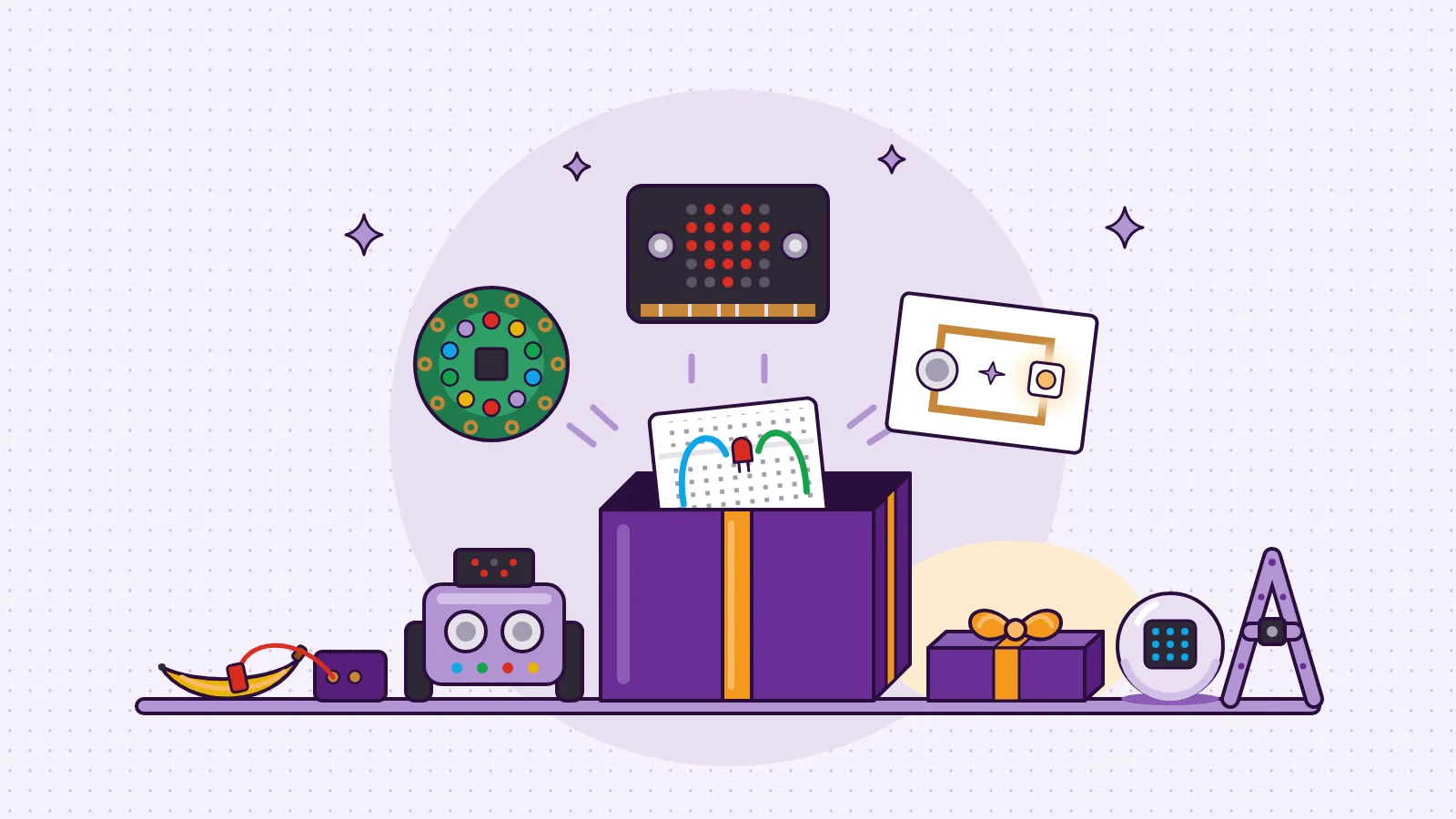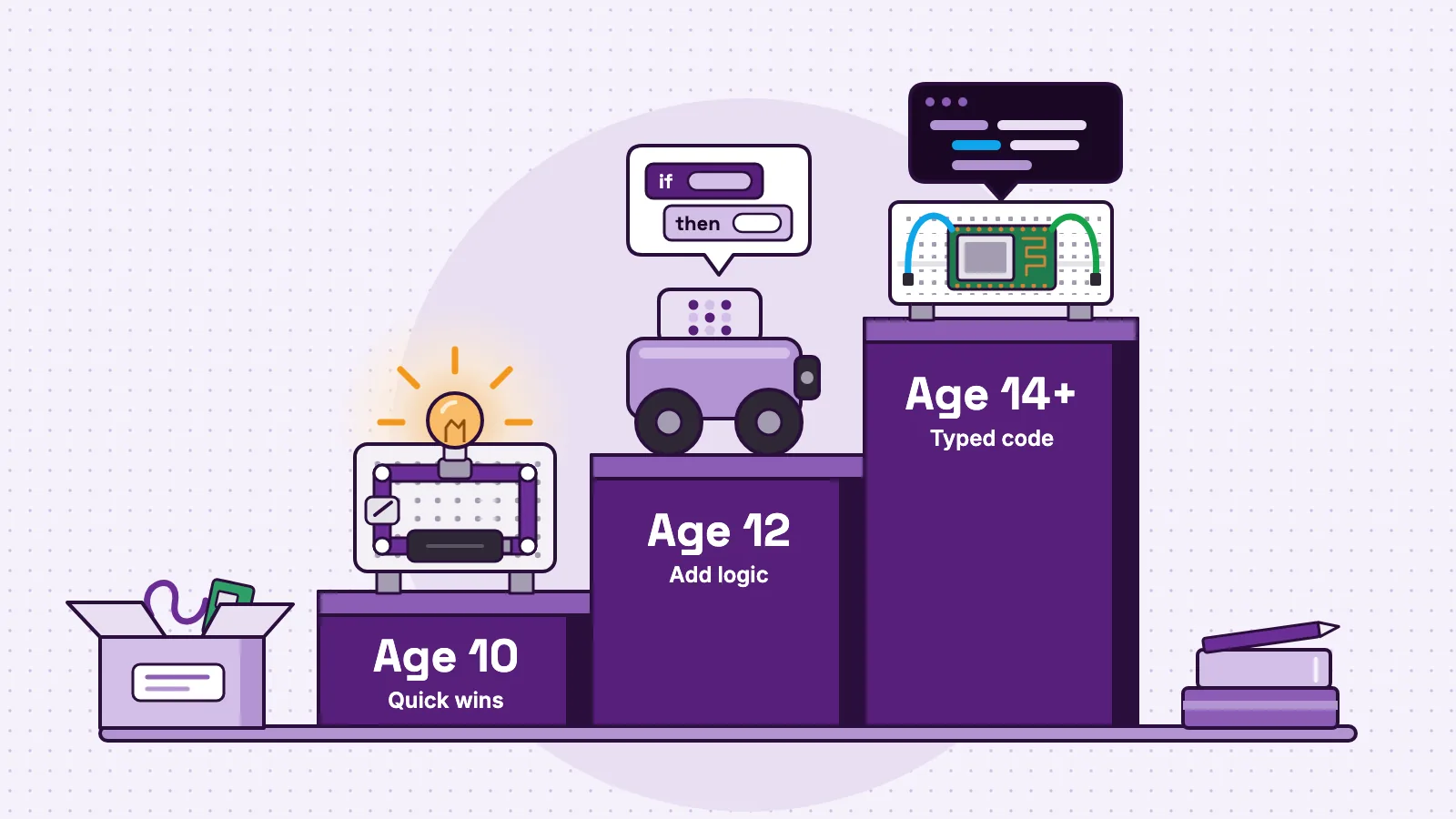
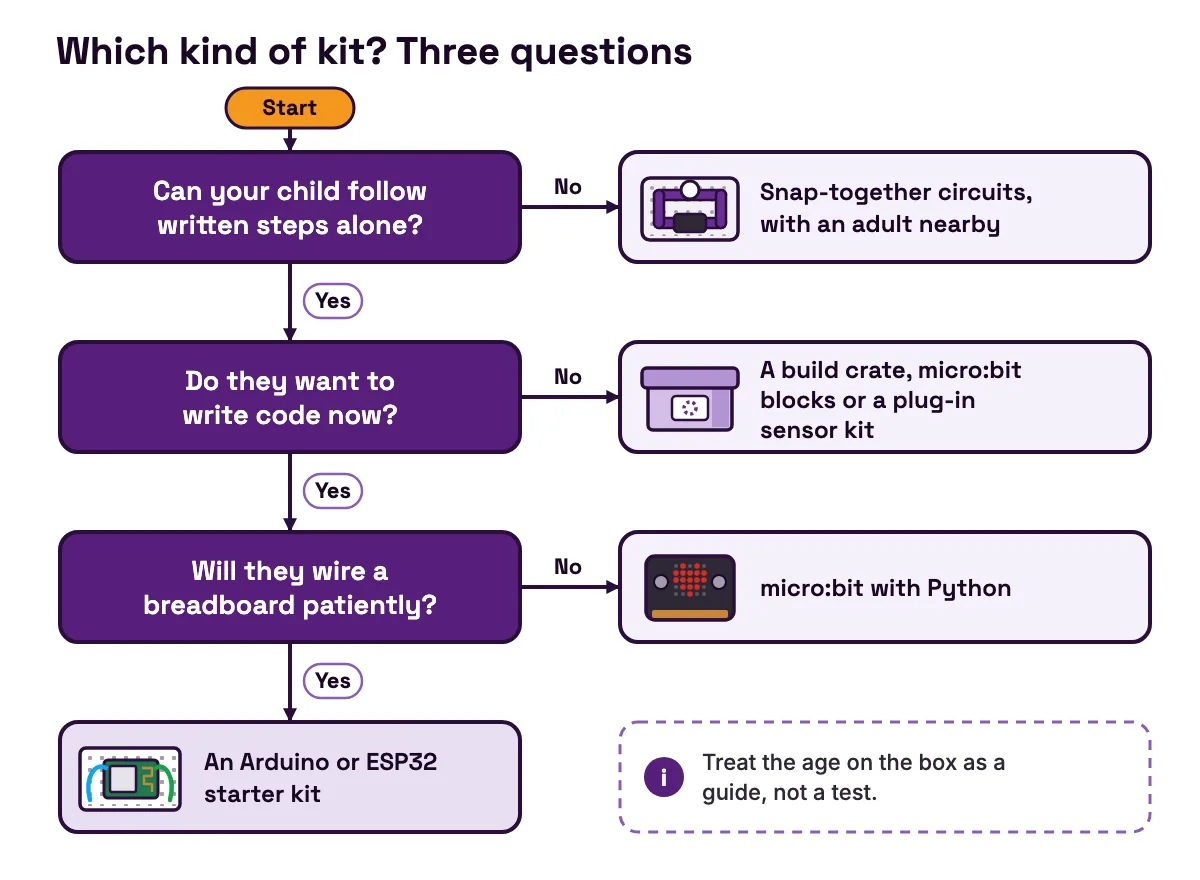
The best STEM kits match what a child can do today and give them somewhere to go next. For most 10-year-olds, that means a kit with a quick first win and no wiring or code on day one: snap-together circuits, a monthly build crate, a micro:bit or a plug-in sensor kit. At 12, look for kits that add logic, such as coding robots or sensor kits with if-then rules. From about 14, a real microcontroller kit with a breadboard and typed code is usually the right step. Treat the age on the box as a guide, not a test.
A word before the lists. We make MakerBuddy, one of the kits named here. It is a plug-in ESP32 kit for ages 10 and up, so it appears only in the 10, 12 and 14+ sections, each time next to the case against it. Every other kit is described from its maker's or seller's own page, linked as we go. We have not bench-tested every product, and there are no affiliate links on this page.
What the age on a STEM kit box really means
The age printed on a box is mostly a design and safety label. It is not a measure of how clever a child has to be.
In the United States, the Consumer Product Safety Commission publishes Age Determination Guidelines (opens in a new tab) for age-grading products. Age grading matches a product's features to the skills, play and interests of children in one age group. The document also sets out the legal line: a children's product is designed mainly for children aged 12 or younger, and a general use product mainly for people older than 12. So a 14+ label tells you who the maker designed for, not an exam your 12-year-old has to pass.
The CPSC guidelines (opens in a new tab) also describe what children tend to enjoy at each age. By 7 or 8, some children can build with sets that have motorised or computer-chip parts. Children aged 9 to 12 often prefer raw materials to finished products, so they can make something of their own. By 12, thinking is more adult-like, and children are able to carry out scientific experiments.
Three things predict success better than the number on the box:
- Reading. Can your child follow written steps alone, or do they still need pictures?
- Patience with failure. Electronics rarely works the first time. A child who gives up after one failed try needs quick wins.
- Fine motor control. Pushing thin jumper wires into a breadboard is fiddly. Snap-on or plug-in parts are easier for younger hands.
A strong reader with plenty of patience can move up a band. A child who gets frustrated quickly should move down one, or have an adult beside them at first.
Six things to compare in any STEM kit
A good kit is not the one with the most parts. It is the one your child keeps using after the first weekend. Six questions sort almost any kit:
- 1
First win.
Does something work in the first session?
- 2
Ceiling.
What can your child build after a month, and after a year?
- 3
Skills.
Circuits, mechanisms, logic or typed code?
- 4
Adult time.
How long does a grown-up need to sit with them?
- 5
Hidden needs.
Batteries, a computer, Wi-Fi, an app or a subscription?
- 6
Support.
Is the maker still selling it, and will its app keep working?
Here is how the main kinds of kit answer the first five.
| Kind of kit | First win | Ceiling | Skills | Adult time | Hidden needs |
|---|---|---|---|---|---|
| Snap-together circuits | Fast | Low | Circuits | Little | Batteries |
| Monthly build crates | Fast | One build a box | Mechanisms | Some | A subscription |
| micro:bit | Fast | Medium | Blocks, then Python | Some at first | A computer or tablet |
| Coding robots | First lesson | Medium | Sequences, loops | Some | A tablet or computer and the maker's app |
| Plug-in sensor kit with a dashboard (MakerBuddy) | First session, no code | Medium to high | Sensors, if-then rules | Wi-Fi setup | A supported device, 2.4 GHz Wi-Fi |
| Arduino or ESP32 breadboard kit | Slower: wiring first | High | Wiring, typed code | A lot at first | A computer |
| Raspberry Pi | Slowest | High | Linux, Python | Some | A power supply, a microSD card, a screen and keyboard |
- Kind of kit
- Snap-together circuits
- First win
- Fast
- Ceiling
- Low
- Skills
- Circuits
- Adult time
- Little
- Hidden needs
- Batteries
- Kind of kit
- Monthly build crates
- First win
- Fast
- Ceiling
- One build a box
- Skills
- Mechanisms
- Adult time
- Some
- Hidden needs
- A subscription
- Kind of kit
- micro:bit
- First win
- Fast
- Ceiling
- Medium
- Skills
- Blocks, then Python
- Adult time
- Some at first
- Hidden needs
- A computer or tablet
- Kind of kit
- Coding robots
- First win
- First lesson
- Ceiling
- Medium
- Skills
- Sequences, loops
- Adult time
- Some
- Hidden needs
- A tablet or computer and the maker's app
- Kind of kit
- Plug-in sensor kit with a dashboard (MakerBuddy)
- First win
- First session, no code
- Ceiling
- Medium to high
- Skills
- Sensors, if-then rules
- Adult time
- Wi-Fi setup
- Hidden needs
- A supported device, 2.4 GHz Wi-Fi
- Kind of kit
- Arduino or ESP32 breadboard kit
- First win
- Slower: wiring first
- Ceiling
- High
- Skills
- Wiring, typed code
- Adult time
- A lot at first
- Hidden needs
- A computer
- Kind of kit
- Raspberry Pi
- First win
- Slowest
- Ceiling
- High
- Skills
- Linux, Python
- Adult time
- Some
- Hidden needs
- A power supply, a microSD card, a screen and keyboard
Support is the sixth question, and it changes over time, so check the maker's own page before you pay. The coding robots section below shows why.
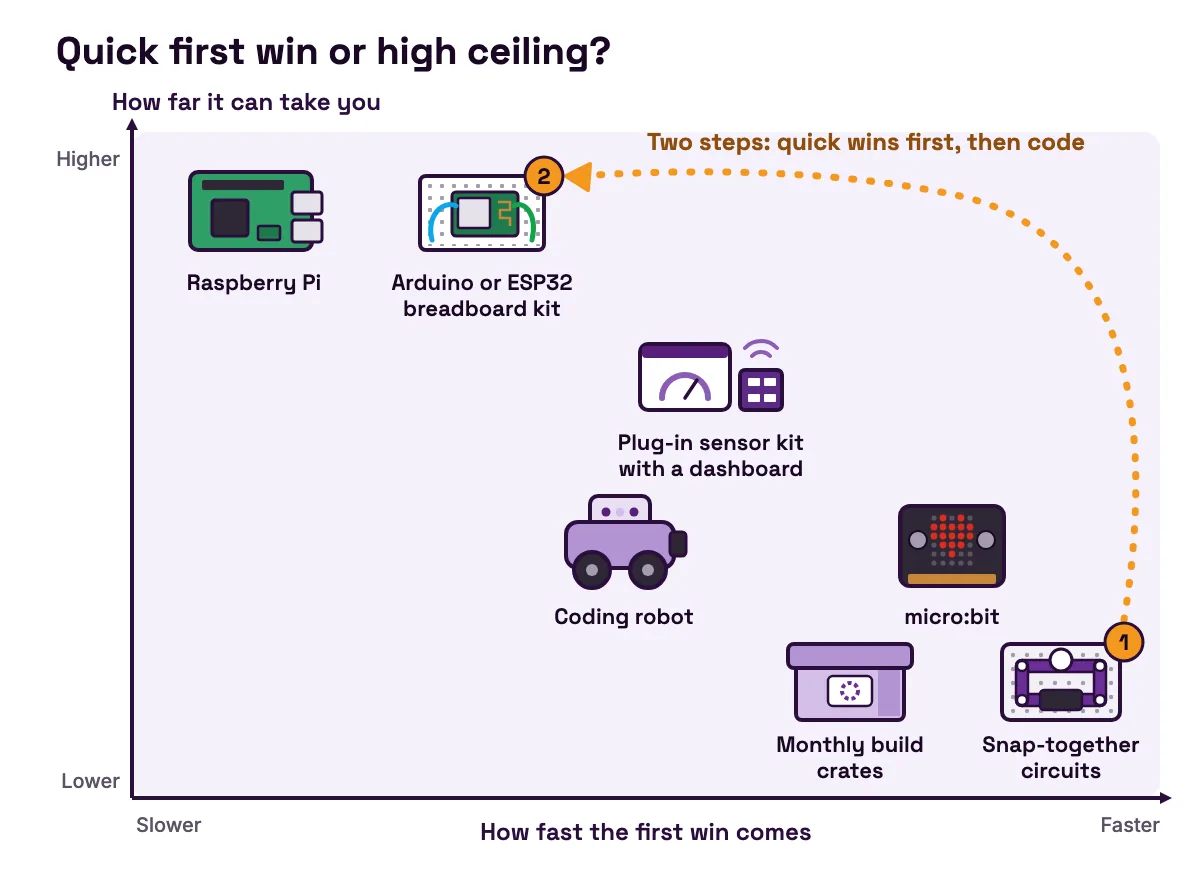
The pattern matters more than any one row. The kits with the fastest first win usually have the lowest ceiling. The kits with the highest ceiling need the most help at the start. For a child between 10 and 14, a good plan often has two steps: one kit for quick wins and confidence, then a second that leads into code.
STEM kits by age at a glance
| Age | What most children can handle | Kinds of kit that fit | Price band |
|---|---|---|---|
| 8 to 9 | Picture steps, snap-on parts, cause and effect | Snap-together circuits, building sets | Low |
| 10 | Written steps alone, first block coding, simple if-then ideas | Snap circuits, build crates, micro:bit, plug-in sensor kits such as MakerBuddy | Low to medium |
| 12 | Planning a build, testing a guess, blocks or first typed code | Coding robots, micro:bit with Python, engineering crates, sensor kits with rules | Medium to high |
| 14 and up | Wiring a breadboard, reading a datasheet, writing and debugging code | Arduino and ESP32 starter kits, Raspberry Pi | Medium |
- Age
- 8 to 9
- What most children can handle
- Picture steps, snap-on parts, cause and effect
- Kinds of kit that fit
- Snap-together circuits, building sets
- Price band
- Low
- Age
- 10
- What most children can handle
- Written steps alone, first block coding, simple if-then ideas
- Kinds of kit that fit
- Snap circuits, build crates, micro:bit, plug-in sensor kits such as MakerBuddy
- Price band
- Low to medium
- Age
- 12
- What most children can handle
- Planning a build, testing a guess, blocks or first typed code
- Kinds of kit that fit
- Coding robots, micro:bit with Python, engineering crates, sensor kits with rules
- Price band
- Medium to high
- Age
- 14 and up
- What most children can handle
- Wiring a breadboard, reading a datasheet, writing and debugging code
- Kinds of kit that fit
- Arduino and ESP32 starter kits, Raspberry Pi
- Price band
- Medium
The price bands are rough, and prices change. Low is around the price of a snap-circuit set: Adafruit's listing shows Snap Circuits Jr. at $29.95 (opens in a new tab), though it no longer stocks the set. Medium is around the official Arduino Starter Kit at €117 including VAT (opens in a new tab). High is a classroom robot set: LEGO launched SPIKE Prime in 2020 at $329.95 per set, shared by two students (opens in a new tab). All three were checked on 29 October 2026. MakerBuddy is priced only in Pakistan, at PKR 40,000, and other countries get a written quote, so it has no band here.
STEM kits for 10-year-olds
Most 10-year-olds can follow written steps alone, but they still need an early win, and many are not ready to wire a breadboard.
Snap-together circuits. Parts snap onto a base, so there is no wiring to get wrong. Adafruit's listing for Snap Circuits Jr. (opens in a new tab) gives ages 8 and up, over 30 parts and over 100 projects, with no tools needed and two AA batteries not included. The case against: there is no programming, and a confident 10-year-old can run out of new things to try.
Monthly build crates. Each box brings one project and its parts. KiwiCo lists its Tinker Crate for ages 9 to 12 (opens in a new tab), with robotics and engineering builds, and says you can switch or cancel any time. The case against: each box is one guided project, and the cost runs as long as the subscription does.
The micro:bit. This is a small programmable board for learning to code. The micro:bit V2 (opens in a new tab) has two buttons, 25 LEDs, light and temperature sensing, an accelerometer, a compass, a microphone and a speaker. Children start with colour-coded blocks (opens in a new tab), then can switch to Python. The case against: motors and bigger sensors mean buying add-ons.
Plug-in sensor kits with a dashboard. This is where MakerBuddy sits. Sensors plug into labelled sockets, and a browser dashboard shows live readings and switches the lights, the buzzer and a small motor, with no code. In the first light lesson, a child dims a light from the screen using only parts built into the board. The case against: an adult has to do the first Wi-Fi setup, the board needs 2.4 GHz Wi-Fi, and Android phones cannot control it yet.
For presents at this age, see hands-on STEM gift picks for 10-year-olds. To weigh the common first kits against each other, read Snap Circuits vs Arduino kits vs MakerBuddy.
STEM kits for 12-year-olds
At 12, many children can plan a build, guess what will happen and test the guess. A kit should now add logic, not just more parts.
Coding robots. Robot sets teach sequences, loops and sensors on something that moves. Check the support dates first. LEGO designed SPIKE Prime for ages 10 and up, grades 6 to 8 (opens in a new tab). Its LEGO Education page (opens in a new tab) now marks it as retired: sales by LEGO Education ended on 30 June 2026, and the app is supported until 30 June 2031. A second-hand set can still teach well, but it has an end date. Read more on whether coding toys and robots teach real coding.
micro:bit with Python. A child who has done blocks can move to Python on the same board, with the editor on the micro:bit coding page (opens in a new tab).
Engineering crates. KiwiCo lists Eureka Crate for ages 12 to 100 (opens in a new tab), with builds such as a pinball machine. It suits a child who prefers making useful objects to coding.
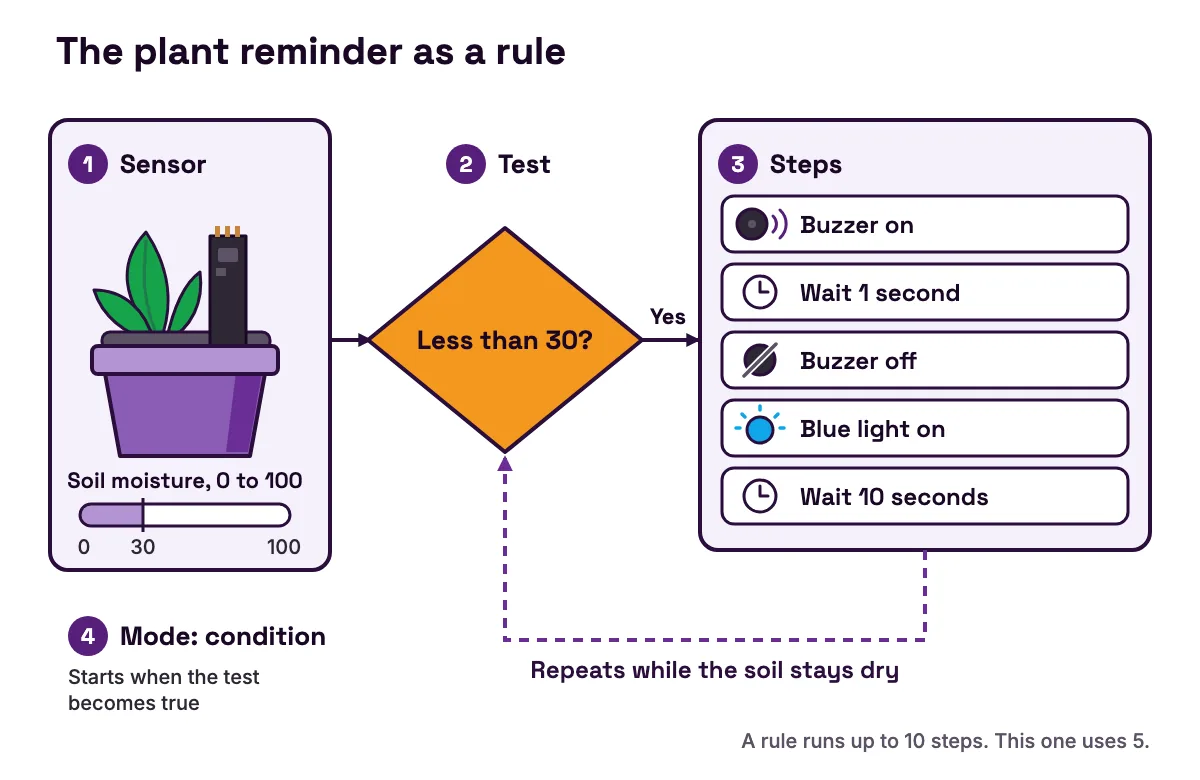
Sensor kits with if-then rules. On MakerBuddy, this is the second stage of the lessons. A rule watches one or two sensors and runs a short list of steps when a test is true. Here is a plant reminder, built step by step:
- 1
Pick the sensor.
Soil moisture. Once calibrated in dry air and in water, it reads on a 0 to 100 scale.
- 2
Pick the test.
Less than 30.
- 3
Pick the steps.
Buzzer on, wait one second, buzzer off, blue light on, wait ten seconds.
- 4
Pick the mode.
Condition, so the rule starts when the test becomes true and repeats while it stays true.
A rule can join two tests with AND or OR. Each rule runs up to 10 steps, the board holds up to 10 rules, and the rules run on the board itself, even with the laptop closed. The rule engine and loop modes lesson is where this starts.
The case against rules: they are not a programming language. A rule cannot count events or measure a time in milliseconds, such as a reaction time, and rules read the sensors once a second, so a very quick change can be missed. When a 12-year-old hits those limits, it is time to write code. The guide to how no-code rules teach real logic shows where rules stop.
If a science fair is coming up, see the ESP32 and Arduino project ideas for students, sorted by sensor and difficulty, or gift ideas for 12-year-olds who love building things for smaller budgets.
STEM kits for teens (14 and up)
From about 14, most teens can wire a breadboard and debug their own code with a little help. Toy-style kits often bore them, so a real microcontroller is usually the better buy.
Arduino starter kits. The official Arduino Starter Kit (opens in a new tab) has an Arduino Uno, a 400-point breadboard, 70 jumper wires, sensors, motors and LEDs, and a 170-page book with 15 projects. Arduino says no prior experience is required. The case against: the wiring is up to the student, and one loose wire can stop a project with no clear error message.
ESP32 boards. An ESP32 adds Wi-Fi and Bluetooth. Espressif's ESP32 datasheet (opens in a new tab) lists one or two cores at up to 240 MHz, 520 KB of SRAM and 2.4 GHz Wi-Fi. It is programmed from the same Arduino IDE once you add Espressif's ESP32 board package (opens in a new tab), so a teen can build things a phone can read or control. The case against: it works at 3.3 V, so some older 5 V modules need care. Compare the two in ESP32 vs Arduino Uno for beginners, or see the best ESP32 starter kits for students.
Raspberry Pi. This is a small computer, not a microcontroller. The Raspberry Pi 5 (opens in a new tab) has a 2.4 GHz quad-core Arm Cortex-A76 processor and takes 5 V, 5 A power over USB-C. It suits a teen who wants to learn Linux and Python. The case against: it needs its own setup. Raspberry Pi's getting started guide (opens in a new tab) lists a power supply, a microSD card or other boot media, and a screen, keyboard and mouse for desktop use. Simple sensor projects also take more effort than on a microcontroller.
MakerBuddy for teens. A teen can start with the dashboard and rules, then write their own code for the same board: an Arduino sketch, or a program that reads the board over Wi-Fi with the REST API in the MakerBuddy documentation. Their own sketch replaces the MakerBuddy firmware until it is put back, as the guide to updating the firmware explains. To be honest about the fit, the 32 lessons do not teach programming. For typed code from day one, an Arduino or ESP32 starter kit is the more direct path.
Teens who want a robot rather than a gadget should read what to look for in robotics kits for teens. For presents, see tech gifts for teens that teach real skills.
What STEM kits cost after the box
The price on the box is rarely the whole cost. The hidden needs column above lists the extras, from batteries to a computer. MakerBuddy needs a micro-USB cable, a 5 V USB charger, 2.4 GHz Wi-Fi and a supported device.
Two more costs never appear on a price tag: the adult time a kit needs, and the next kit when your child outgrows this one. A fairer way to compare is the cost per week of real use. Here is the sum for three examples. The weeks are guesses to show the method, not measurements.
| Kit | Price | Weeks of use (example) | Cost per week |
|---|---|---|---|
| Snap Circuits Jr. | $29.95 | 6 | about $5 |
| Arduino Starter Kit | €117 | 30 (a book project every two weeks) | €3.90 |
| MakerBuddy, in Pakistan | PKR 40,000 | 32 (a lesson a week) | PKR 1,250 |
- Kit
- Snap Circuits Jr.
- Price
- $29.95
- Weeks of use (example)
- 6
- Cost per week
- about $5
- Kit
- Arduino Starter Kit
- Price
- €117
- Weeks of use (example)
- 30 (a book project every two weeks)
- Cost per week
- €3.90
- Kit
- MakerBuddy, in Pakistan
- Price
- PKR 40,000
- Weeks of use (example)
- 32 (a lesson a week)
- Cost per week
- PKR 1,250
The working: 29.95 ÷ 6 = 4.99, 117 ÷ 30 = 3.90 and 40,000 ÷ 32 = 1,250. The Snap Circuits and Arduino prices come from Adafruit (opens in a new tab) and the Arduino store (opens in a new tab). Adafruit no longer stocks the set, so treat its price as a guide. Now put in your own guess. A cheap kit used for two weekends can cost more per week than a dearer one used all year, and two children sharing one kit halve the cost per child.
In Pakistan, MakerBuddy is ordered online and paid by bank transfer. Families and schools in the US, Canada and elsewhere can ask for a written quote with delivery on the MakerBuddy order page. To see what else is sold locally, read robotics kits in Pakistan and how to choose and ESP32 and Arduino prices in Pakistan.
Worked example: choosing kits for three children
Here is the method applied to three made-up but typical buyers.
| Check | Maya, 10, United States | Bilal, 12, Pakistan | Noah, 15, Canada |
|---|---|---|---|
| Reads steps alone? | Yes, but quits after one failed try | Yes, and likes to plan | Yes, reads documentation |
| Wants to make | Things that light up and beep | A plant gadget for the science fair | Something with Wi-Fi, in real code |
| Devices at home | Windows laptop, Android phone | iPad and home Wi-Fi | Laptop |
| Adult time each week | One hour on Saturdays | A parent for setup only | Little needed |
| Coding so far | A little Scratch | Block coding at school | Some Python |
- Check
- Reads steps alone?
- Maya, 10, United States
- Yes, but quits after one failed try
- Bilal, 12, Pakistan
- Yes, and likes to plan
- Noah, 15, Canada
- Yes, reads documentation
- Check
- Wants to make
- Maya, 10, United States
- Things that light up and beep
- Bilal, 12, Pakistan
- A plant gadget for the science fair
- Noah, 15, Canada
- Something with Wi-Fi, in real code
- Check
- Devices at home
- Maya, 10, United States
- Windows laptop, Android phone
- Bilal, 12, Pakistan
- iPad and home Wi-Fi
- Noah, 15, Canada
- Laptop
- Check
- Adult time each week
- Maya, 10, United States
- One hour on Saturdays
- Bilal, 12, Pakistan
- A parent for setup only
- Noah, 15, Canada
- Little needed
- Check
- Coding so far
- Maya, 10, United States
- A little Scratch
- Bilal, 12, Pakistan
- Block coding at school
- Noah, 15, Canada
- Some Python
Maya, 10. She needs a fast first win, so a breadboard kit is out. Snap Circuits Jr. fits a Saturday hour, and a micro:bit builds on her Scratch. MakerBuddy would also work on the Windows laptop in Chrome or Edge with the free extension, but not on the Android phone. The family's real choice is one structured year with sensors, or a cheaper kit now and a second one later.
Bilal, 12. His project asks a real question: when is the soil dry enough to water? MakerBuddy works on his iPad in Safari if the home Wi-Fi has a 2.4 GHz band. The soil sensor is a capacitive blade with no bare metal prongs to corrode, and the smart agriculture lesson teaches him to calibrate it. A small low-voltage pump is not in the kit, so automatic watering means buying one.
Noah, 15. He wants typed code and Wi-Fi. An ESP32 board with a breadboard set, or the Arduino Starter Kit followed by an ESP32, is the direct route. A dashboard kit would give him quick results but hold back what he wants to learn. The honest answer for Noah is not MakerBuddy.
The pattern: start from the child, not the box. Pick the kind of kit first, and the brand last.
Where MakerBuddy fits, and where it does not
The MakerBuddy IoT Kit V1.0 is a board carrying an ESP32, powered by 5 V over micro-USB. Six parts are built in, and nine more plug into labelled sockets. The full list is on the technical details page, and the types of sensors used in student projects explains each sensor.
It fits when:
- Your child is 10 or older and wants things that sense and react: lights, alarms, plant reminders.
- You want a year of structure. The MakerBuddy curriculum has 32 free lessons of 45 to 60 minutes. Lessons 1 to 20 use the dashboard, and lessons 21 to 32 build if-then rules.
- You want to try before you buy. Most lessons have a Try it demo that runs in the browser with no kit.
- You want ideas to keep going. The project ideas page has 50 ideas, and 43 need no code.
It is the wrong buy when:
- No adult is around for setup. A grown-up types the Wi-Fi password in the first setup lesson.
- Your home has only Android phones and tablets. You need a computer with Chrome, Edge or Firefox and the free MakerBuddy extension, or Safari on a Mac, iPhone or iPad.
- Your Wi-Fi is 5 GHz only. The board needs 2.4 GHz, though a phone hotspot works.
- They want a robot that drives. Nothing in the box is a wheeled chassis.
- They want typed code from the first lesson.
There are no accounts, and readings stay on your own Wi-Fi. The board's local connection has no password, so use it only on a network you trust, never open to the internet. The full safety rules are on the MakerBuddy page for parents.
Common mistakes when buying STEM kits
| Symptom | Cause | Fix |
|---|---|---|
| The kit sits in a cupboard after one weekend | Every project was a guided booklet with no next step | Before buying, ask what your child will build in month three |
| Tears in the first session | The kit needs wiring or reading beyond their skills today | Pick a kit with a fast first win, or sit with them at first |
| The app stops getting updates | The kit has been discontinued | Check the maker's page for sale and support dates |
| Setup fails at home | Your device or Wi-Fi band is not supported | Check the device list and Wi-Fi band before you pay |
| The parent ends up building it | The kit is too hard, or the adult takes over | Ask for a guess first, and let the first version be rough |
| A 14+ kit bought for a 9-year-old gathers dust | The label was read as a challenge, not a design target | Buy for today's skills, and plan the next kit for later |
- Symptom
- The kit sits in a cupboard after one weekend
- Cause
- Every project was a guided booklet with no next step
- Fix
- Before buying, ask what your child will build in month three
- Symptom
- Tears in the first session
- Cause
- The kit needs wiring or reading beyond their skills today
- Fix
- Pick a kit with a fast first win, or sit with them at first
- Symptom
- The app stops getting updates
- Cause
- The kit has been discontinued
- Fix
- Check the maker's page for sale and support dates
- Symptom
- Setup fails at home
- Cause
- Your device or Wi-Fi band is not supported
- Fix
- Check the device list and Wi-Fi band before you pay
- Symptom
- The parent ends up building it
- Cause
- The kit is too hard, or the adult takes over
- Fix
- Ask for a guess first, and let the first version be rough
- Symptom
- A 14+ kit bought for a 9-year-old gathers dust
- Cause
- The label was read as a challenge, not a design target
- Fix
- Buy for today's skills, and plan the next kit for later
If you find yourself holding the screwdriver, step back and ask questions instead. New to the term itself? Read what STEM is and why it matters, and find more guides like this one on the MakerBuddy blog.
FAQ
What are STEM kits?
STEM kits are boxed sets of parts and instructions that teach science, technology, engineering or maths by building something. They range from snap-together circuits to coding robots and microcontroller boards.
What is a good STEM kit for a 10-year-old?
Pick a kit with a fast first win and no wiring or code on day one, such as snap-together circuits, a build crate, a micro:bit or a plug-in sensor kit. If your child has done some Scratch, a micro:bit or a sensor kit gives more room to grow.
What STEM kit is best for a 12-year-old?
Choose a kit that adds logic: a coding robot, a micro:bit with Python, an engineering crate or a sensor kit with if-then rules. Check that a robot's app is still supported before you buy.
What are the best STEM kits for teens?
For most teens, a real microcontroller kit is the best value: an Arduino starter kit, or an ESP32 board with a breadboard and sensors. A Raspberry Pi suits teens who want to learn Linux and how computers work.
Which science kit is considered the best?
No single kit is best for every child. The best kit fits your child's reading, patience and interests today, and still has something to offer in three months. Pick the kind of kit first and the brand last.
Is a 14+ kit too hard for a 12-year-old?
Not always. In the CPSC's Age Determination Guidelines (opens in a new tab), a children's product is one designed mainly for children aged 12 or younger, so a 14+ label partly reflects who the product was designed for. A patient 12-year-old with an adult nearby can often manage. Check for small parts, sharp tools or mains power first.
Are STEM subscription boxes worth it?
They suit a child who likes a new project each month and a family that wants no planning. Each box is one guided build, so add up a year of boxes before you compare them with a one-off kit.
How do I get my kid into STEM?
Start with what they already like, such as plants, games or animals, and find a build that connects to it. Ask them to guess what will happen before they test. Let the first version be rough.
Do STEM kits need a computer or tablet?
Snap-together circuits and most build crates do not. Coding robots, the micro:bit and microcontroller kits need one to send code. MakerBuddy needs a laptop with Chrome, Edge or Firefox and its free extension, or Safari on a Mac, iPhone or iPad.
Sources
- U.S. Consumer Product Safety Commission: Age Determination Guidelines (2020) (opens in a new tab)
- Adafruit: Snap Circuits Jr. 100 Experiments, Elenco SC-100 (opens in a new tab)
- KiwiCo: Tinker Crate (opens in a new tab)
- KiwiCo: Eureka Crate (opens in a new tab)
- micro:bit Educational Foundation: micro:bit V2 features overview (opens in a new tab)
- micro:bit Educational Foundation: Let's code (opens in a new tab)
- LEGO: SPIKE Prime launch announcement (January 2020) (opens in a new tab)
- LEGO Education: SPIKE Prime set 45678, retirement and support FAQ (opens in a new tab)
- Arduino Store: Arduino Starter Kit (opens in a new tab)
- Espressif: ESP32 Series Datasheet (opens in a new tab)
- Espressif: Installing the Arduino-ESP32 board package (opens in a new tab)
- Raspberry Pi 5 product page (opens in a new tab)
- Raspberry Pi documentation: Getting started (opens in a new tab)