The best gifts for 10 year old boys and girls who like to make things are gifts they can build, test and then change. At 10, most children can follow written steps on their own and want to make something that is theirs, but many are not ready to wire a breadboard alone. So look for a quick first win and room to grow, and choose by what your child already loves, not by the toy aisle. A puzzle fan may love a computer that runs on marbles. A robot fan may love a robot pet they program with cards. A music fan may love a piano they can reprogram. Below are 13 hands-on STEM picks sorted by interest, each with its price, the age on the box, what it teaches, what else you need and when it is the wrong buy.
A disclosure first. We make MakerBuddy, one of the 13 picks. Every other product is described from its seller's page, its maker's FAQ or Purdue University's Engineering Gift Guide, linked as we go. We have not bench-tested them, and this post has no affiliate links. Prices are in US dollars.
Gifts for 10 year olds at a glance
| If they love | Pick | Listed price | Age on the box | Screen? | Also needed |
|---|---|---|---|---|---|
| Building | Smartivity Mechanical Hand | $41.00 | 8 to 14 | No | Nothing listed |
| Building | KiwiCo Tinker Crate | Shown when you pick a plan | 9 to 12 | No | A subscription |
| Puzzles | Turing Tumble | $87.72 | 8+ | No | Nothing listed |
| Puzzles | Spintronics Act One | $95.24 | 8+ | No | Nothing, not even batteries |
| Robots and animals | Coding Chameleon | $54.95 | 8+ | No | AAA batteries |
| Robots | Makeblock mBot | $89.99 | 8 to 12 | Yes | Batteries, a computer or app device |
| Music | Code Piano JUMBO | $54.99 | 8 to 13 | Yes | A computer |
| Games and music | Makey Makey Classic | $53.50 | 8+ | Yes | A computer with USB |
| Screens and games | Bitsbox | $16.95 a month | 6 to 12 | Yes | A computer with a keyboard |
| Screens and games | micro:bit v2 Go Bundle | $19.95 | Not stated | Yes | A computer, tablet or phone |
| Electricity | Snap Circuits Jr. SC-100 | $29.95 to $52.99 | 8+ | No | Two AA batteries |
| Electricity | Snap Circuits Arcade | $88.99 | 8+ | No | Batteries |
| Nature and gadgets | MakerBuddy IoT Kit V1.0 | PKR 40,000 in Pakistan; a quote elsewhere | 10+ | Yes | A supported device, 2.4 GHz Wi-Fi, a micro-USB cable and 5 V USB charger |
- If they love
- Building
- Pick
- Smartivity Mechanical Hand
- Listed price
- $41.00
- Age on the box
- 8 to 14
- Screen?
- No
- Also needed
- Nothing listed
- If they love
- Building
- Pick
- KiwiCo Tinker Crate
- Listed price
- Shown when you pick a plan
- Age on the box
- 9 to 12
- Screen?
- No
- Also needed
- A subscription
- If they love
- Puzzles
- Pick
- Turing Tumble
- Listed price
- $87.72
- Age on the box
- 8+
- Screen?
- No
- Also needed
- Nothing listed
- If they love
- Puzzles
- Pick
- Spintronics Act One
- Listed price
- $95.24
- Age on the box
- 8+
- Screen?
- No
- Also needed
- Nothing, not even batteries
- If they love
- Robots and animals
- Pick
- Coding Chameleon
- Listed price
- $54.95
- Age on the box
- 8+
- Screen?
- No
- Also needed
- AAA batteries
- If they love
- Robots
- Pick
- Makeblock mBot
- Listed price
- $89.99
- Age on the box
- 8 to 12
- Screen?
- Yes
- Also needed
- Batteries, a computer or app device
- If they love
- Music
- Pick
- Code Piano JUMBO
- Listed price
- $54.99
- Age on the box
- 8 to 13
- Screen?
- Yes
- Also needed
- A computer
- If they love
- Games and music
- Pick
- Makey Makey Classic
- Listed price
- $53.50
- Age on the box
- 8+
- Screen?
- Yes
- Also needed
- A computer with USB
- If they love
- Screens and games
- Pick
- Bitsbox
- Listed price
- $16.95 a month
- Age on the box
- 6 to 12
- Screen?
- Yes
- Also needed
- A computer with a keyboard
- If they love
- Screens and games
- Pick
- micro:bit v2 Go Bundle
- Listed price
- $19.95
- Age on the box
- Not stated
- Screen?
- Yes
- Also needed
- A computer, tablet or phone
- If they love
- Electricity
- Pick
- Snap Circuits Jr. SC-100
- Listed price
- $29.95 to $52.99
- Age on the box
- 8+
- Screen?
- No
- Also needed
- Two AA batteries
- If they love
- Electricity
- Pick
- Snap Circuits Arcade
- Listed price
- $88.99
- Age on the box
- 8+
- Screen?
- No
- Also needed
- Batteries
- If they love
- Nature and gadgets
- Pick
- MakerBuddy IoT Kit V1.0
- Listed price
- PKR 40,000 in Pakistan; a quote elsewhere
- Age on the box
- 10+
- Screen?
- Yes
- Also needed
- A supported device, 2.4 GHz Wi-Fi, a micro-USB cable and 5 V USB charger
Table note: seller prices are from SparkFun (opens in a new tab), Adafruit (micro:bit (opens in a new tab), Snap Circuits Jr. (opens in a new tab)) and Stemfinity (opens in a new tab), checked on 28 October 2026. Code Piano, Coding Chameleon and Bitsbox are as listed in Purdue's 2025 guide (opens in a new tab), the rest from Purdue's 2024 Gifts for Ages 8+ (opens in a new tab), and the Tinker Crate age from KiwiCo (opens in a new tab). Prices change; shipping and tax are extra.
Purdue's guide comes from its INSPIRE Research Institute for Pre-College Engineering. The 2025 edition (opens in a new tab) picked 10 microelectronics gifts, and the 2024 edition (opens in a new tab) listed 40, sorted by age.
How to choose educational toys for 10 year olds that get used
A good gift fits what your child can do today and leaves room for next month. The age on the box helps, but it is not the whole story.
The US Consumer Product Safety Commission's Age Determination Guidelines (opens in a new tab) describe children aged 9 through 12. They look for new activities that challenge their thinking, and instead of finished products they often prefer raw materials, so they can make something of their own. They can follow multi-step instructions, so complex model kits suit them.
Ask four questions before you buy:
- 1
Is there a win in the first hour?
A child who gets something working on the first evening comes back for a second.
- 2
Can they change it afterwards?
A fixed booklet ends when the booklet does. A gift they can reprogram or rebuild keeps going.
- 3
What else does it need?
Batteries, a computer, an app, Wi-Fi, a subscription or a second product. Check before you wrap it.
- 4
Does it need a screen?
Several picks need none. If your home limits screens, this may decide it.
Pick by interest, not by the aisle. Lists of gifts for 10 year old boys often sort by colour and theme, but what the parts can do matters far more. Every pick here suits any 10-year-old, boy or girl. For the wider picture, our honest guide to the best STEM kits by age explains what each kind of kit teaches at 10, 12 and 14.
For builders and puzzle lovers: engineering toys with gears, marbles and chains
Engineering toys suit the child who takes things apart to see how they work. None of these four needs a screen.
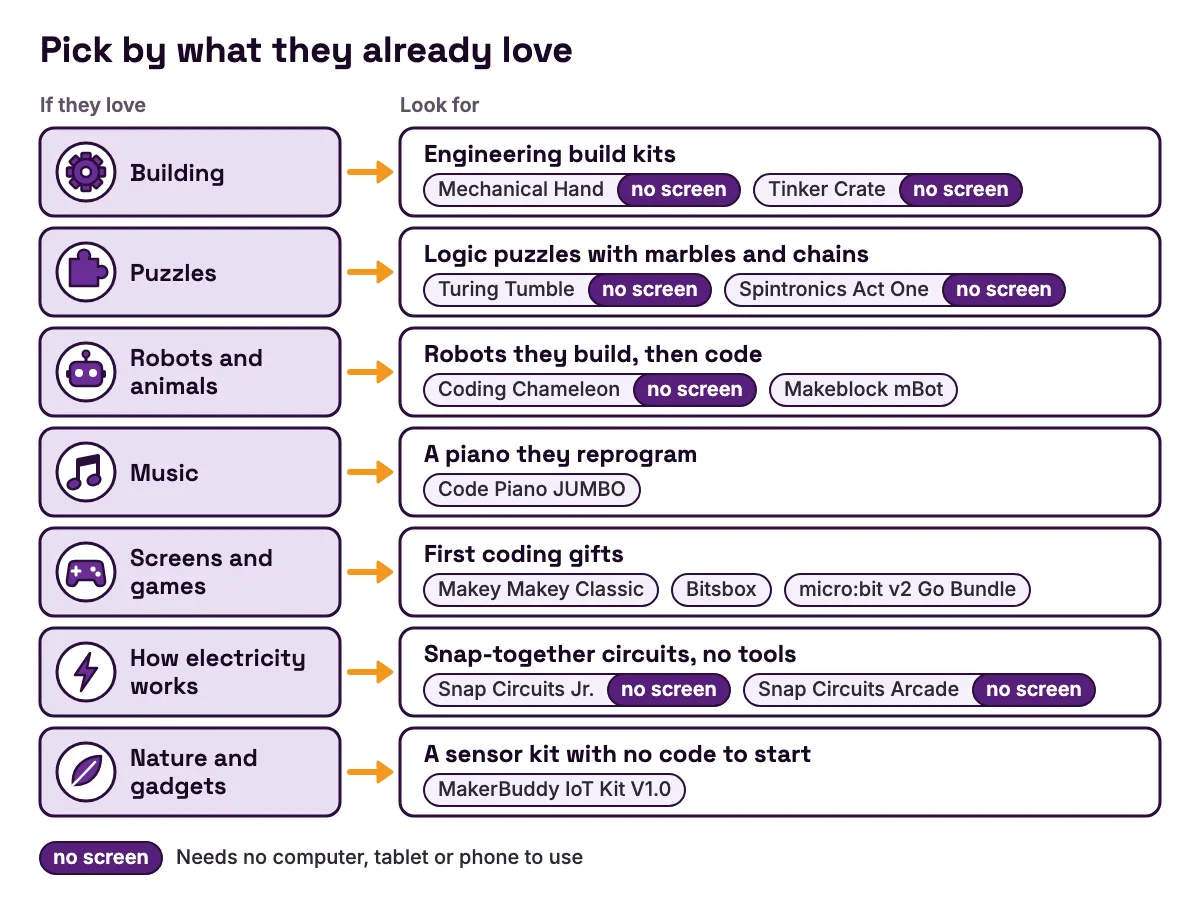
Smartivity Mechanical Hand, $41.00. Purdue's 2024 guide lists the Mechanical Hand (opens in a new tab) at $41.00 for ages 8 to 14. Your child builds wooden pieces and rubber bands, step by step, into a working hand with gears. It shows how a mechanism turns one movement into another. The case against: once built, it is finished, so it suits one weekend more than a long hobby.
KiwiCo Tinker Crate. KiwiCo lists Tinker Crate (opens in a new tab) for ages 9 to 12, with one engineering build a month, such as a remote-control delivery robot, a giant hand whose fingers move, or a bottle rocket launcher. The case against: each box is one guided project, the price appears only when you pick a plan, and the cost runs until you cancel.
Turing Tumble, $87.72. Purdue's guide lists Turing Tumble (opens in a new tab) at $87.72 for ages 8 and up. Your child builds mechanical computers powered by marbles, with gears, ramps and levers, to solve logic puzzles told as a space rescue story. It makes the logic inside a computer visible. The case against: it is a puzzle book at heart, so a child who wants to invent freely may prefer an open kit.
Spintronics Act One, $95.24. Purdue's guide lists Spintronics Act One (opens in a new tab) at $95.24 for ages 8 and up. It teaches circuits with pulleys and chain belts instead of electricity. Children place parts that act like resistors, capacitors and switches on magnetic tiles and watch how each one changes the circuit. The case against: it has the highest listed price in this section, and Act Two needs Act One.
For robot and animal fans
Robots give an exciting first result, because something moves. At 10, look for one your child builds as well as codes.
My Robotic Pet: Coding Chameleon, $54.95. Purdue's 2025 guide lists Thames & Kosmos's Coding Chameleon (opens in a new tab) at $54.95 for ages 8 and up. Your child assembles a colour-changing robot pet, then sets its modes and behaviours with coding cards. Stemfinity's listing (opens in a new tab) says the cards need no screen or devices. Once built, it lights up, moves and reacts to its surroundings. The case against: AAA batteries are not included, and the sources disagree on how many (Purdue says two, Stemfinity four), so buy a four-pack. Card coding also has a lower ceiling than code on a computer.
Makeblock mBot, $89.99. Purdue's 2024 guide lists Makeblock's mBot (opens in a new tab) at $89.99 for ages 8 to 12. The box has everything to build the robot, plus a remote and several sensors. Your child plays with its preset modes first, then codes it on a computer or in Makeblock's app. The case against: you also need 4 AA batteries or Makeblock's own battery, a CR2025 coin cell for the remote, and a computer or app device.
Does a coding robot teach real coding, or only look like it? Our guide to whether coding toys and robots teach real coding covers what to check. Robot cars that need a micro:bit are in our building gifts for 12-year-olds.
For music, games and screen fans: first coding gifts
If your child already loves games or music, turn some screen time into making. These four picks need a computer or tablet.
Code Piano JUMBO, $54.99. Purdue's 2025 guide lists Code Piano JUMBO by Let's Start Coding (opens in a new tab) at $54.99 for ages 8 to 13, with a piano, a USB cable and a book of step-by-step projects. Your child plugs it into a computer and edits the code behind the songs. The case against: a child who does not care about music may lose interest.
Makey Makey Classic, $53.50. SparkFun lists the Makey Makey Classic (opens in a new tab) at $53.50, with the board, a USB cable, crocodile clips and jumper wires. Clip it to anything that conducts, such as a banana, and touching it presses a key on the computer. SparkFun says it needs no drivers, no programming and no software. The case against: on its own it is an input device; the bigger projects come when your child pairs it with games or code.
Bitsbox, $16.95 a month. Purdue's 2025 guide lists Bitsbox (opens in a new tab), a monthly box, at $16.95 for ages 6 to 12. Each box brings app and game projects on paper, and the Bitsbox FAQ (opens in a new tab) says your child types the code into its website on a computer, ideally with a physical keyboard, then changes it. The case against: 10 is near the top of its age range, and it is a subscription of screen time.
micro:bit v2 Go Bundle, $19.95. Adafruit lists the micro:bit v2 Go Bundle (opens in a new tab) at $19.95, with the board, a USB cable and batteries. The micro:bit (opens in a new tab) has buttons, a grid of 25 lights that can also sense light, a microphone and a speaker. Its coding page (opens in a new tab) starts with blocks that feel familiar after Scratch, and offers JavaScript and Python for typed code. The case against: motors and bigger sensors mean buying add-ons.
For kids who ask how electricity works
Some children want to know what is happening inside the wire. Snap-together circuits answer that with no tools and no screen.
Snap Circuits Jr. SC-100, $29.95 to $52.99. Adafruit's Snap Circuits Jr. page (opens in a new tab) describes over 30 parts that snap together, over 100 projects such as alarms and a flying saucer, ages 8 and up, and two AA batteries not included. Adafruit lists it at $29.95 but no longer stocks it, and Stemfinity lists it at $52.99 (opens in a new tab). It teaches what a circuit is and what a switch does. The case against: there is no programming, and a confident 10-year-old can finish the booklet quickly.
Snap Circuits Arcade, $88.99. Purdue's 2024 guide lists Snap Circuits Arcade (opens in a new tab) at $88.99 for ages 8 and up. The same snap-together idea builds games, from a programmable fan that shows LED text to a baseball arcade game. The case against: it costs about three times Adafruit's listed price for Snap Circuits Jr., so start smaller if circuits are new.
Still deciding between snap circuits and a real microcontroller? Our comparison of Snap Circuits vs Arduino kits vs MakerBuddy weighs the three.
For nature lovers and gadget fans: is MakerBuddy right at 10?
We make this one, so weigh this section with that in mind. The MakerBuddy IoT Kit V1.0 is one board carrying an ESP32, powered by 5 V over micro-USB. Six parts are built in: a blue light, a colour light, a push button, a light sensor, a buzzer and a turning knob. Nine more plug into labelled sockets, including temperature, soil moisture, distance and motion sensors, a small servo motor and a text screen. The full list is on the technical details page.
Why it can suit a 10-year-old: there is no code to start. A browser dashboard shows live readings and switches the outputs. The MakerBuddy curriculum has 32 free lessons for ages 10 and up, each 45 to 60 minutes, and lessons 4 to 8 use only the built-in parts. In the Hello World and PWM dimming lesson, your child switches and dims a light from the screen, and its Try it demo runs in the browser with no kit. Later they build if-then rules from menus: a rule watches one or two sensors and runs up to 10 steps, and the rules run on the board itself.
It is the wrong gift when:
- No adult can help with setup. A grown-up types the Wi-Fi password in the powering up and connectivity lesson.
- You want no screens, or have only Android devices. The dashboard needs a computer with Chrome, Edge or Firefox and the free MakerBuddy extension, or Safari on a Mac, iPhone or iPad. Android cannot control the board yet.
- Your Wi-Fi is 5 GHz only. The board needs 2.4 GHz, though a phone hotspot works.
- They want a robot that drives, or typed code from day one. Nothing in the box is a wheeled chassis, and the lessons use no typed code.
- You need a real alarm. Gas sensor builds are learning models, and the relay is for low-voltage things only, never mains power.
There are no accounts, and readings stay on your own Wi-Fi. The board's local connection has no password, so use it only on a network you trust. Read the safety rules on our page for parents together before the first build.
In Pakistan, the kit is PKR 40,000, ordered online and paid by bank transfer. Families in the United States, Canada and elsewhere ask for a written quote on the MakerBuddy order page, with price, shipping and delivery confirmed in writing. For a birthday, ask early rather than assume a delivery date.
Worked example: a no-code night light on the first afternoon
Here is a first afternoon with a sensor gift. It is the Smart Night Light from the MakerBuddy project idea library, and it uses only the board's built-in light sensor and blue light. There is nothing to plug in and no code to write. Allow an hour for a first try, with an adult for the Wi-Fi step.
Step 1: watch the number. Open the dashboard and find the Light Level card, which reads from 0 to 100. Write down the reading in the room. Then cover the light sensor with your hand and write down the new reading. A bright room might read about 80 and a covered sensor about 20, but yours will differ. The light sensing lesson explains why every room needs its own level.
Step 2: make two rules. Open the Rule Engine tab and create these, one at a time.
| Field | Rule 1 | Rule 2 |
|---|---|---|
| Rule name | Dark | Morning |
| Loop mode | Condition | Condition |
| Sensor | Light Level (LDR) | Light Level (LDR) |
| Operator | Less than (<) | Greater than (>) |
| Threshold | 40 | 60 |
| Step 1 | LED On, value 255, delay 100 ms | LED Off, delay 100 ms |
- Field
- Rule name
- Rule 1
- Dark
- Rule 2
- Morning
- Field
- Loop mode
- Rule 1
- Condition
- Rule 2
- Condition
- Field
- Sensor
- Rule 1
- Light Level (LDR)
- Rule 2
- Light Level (LDR)
- Field
- Operator
- Rule 1
- Less than (<)
- Rule 2
- Greater than (>)
- Field
- Threshold
- Rule 1
- 40
- Rule 2
- 60
- Field
- Step 1
- Rule 1
- LED On, value 255, delay 100 ms
- Rule 2
- LED Off, delay 100 ms
Why two rules? A Condition rule repeats its steps while its test is true, but it does not undo them when the test turns false. One rule with only an On step leaves the light on all morning. The condition loops lesson builds that version on purpose, and the range logic lesson fixes it.
Why 40 and 60, not 50 for both? A reading wobbling between 49 and 51 would flick the light on and off. The gap is a threshold window: inside it neither rule runs, so the light keeps its last state.
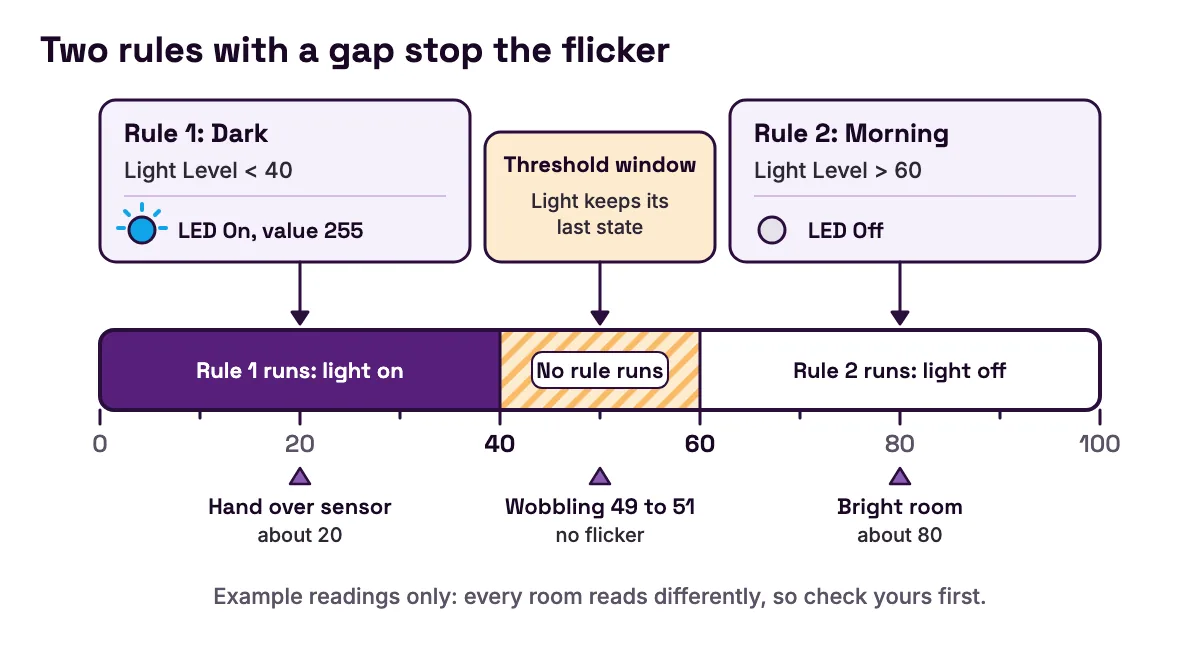
Step 3: test it. Cover the sensor. Within about a second, the blue light comes on: the board reads its sensors once a second, and a test must stay true for 0.3 seconds before a rule starts. Uncover it, and the light goes off once the reading passes 60. While the rules watch, the dashboard locks the light's switch; stop a rule in the Rule Engine list to take back control.
What your child learns. The rule is a real if-then program built from menus: an input, a test, an output and a deliberate gap. They also meet an honest limit. The board has no clock, so it cannot switch on at 8 pm; it only knows light and dark. Ask how a street light knows when to turn on. Our guides to how an LDR works and where it is used and if-then statements explained with real sensors take that question further.
Worked example: four gift baskets for about $75
Say you have about $75 for a 10-year-old who likes to make things. Here are four real baskets at the prices above.
| Basket | What is in it | Total | Left from $75 | Best for |
|---|---|---|---|---|
| Robot pet and first board | Coding Chameleon ($54.95), micro:bit v2 Go Bundle ($19.95) | $74.90 | $0.10 | An animal lover who will code next |
| Music and games | Makey Makey Classic ($53.50), micro:bit v2 Go Bundle ($19.95) | $73.45 | $1.55 | A child who loves games and music |
| Build, then code | Mechanical Hand ($41.00), one month of Bitsbox ($16.95) | $57.95 | $17.05 | A child who likes hands-on and screens |
| Circuits, then code | Snap Circuits Jr. at Stemfinity ($52.99), micro:bit v2 Go Bundle ($19.95) | $72.94 | $2.06 | A child who asks how things work |
- Basket
- Robot pet and first board
- What is in it
- Coding Chameleon ($54.95), micro:bit v2 Go Bundle ($19.95)
- Total
- $74.90
- Left from $75
- $0.10
- Best for
- An animal lover who will code next
- Basket
- Music and games
- What is in it
- Makey Makey Classic ($53.50), micro:bit v2 Go Bundle ($19.95)
- Total
- $73.45
- Left from $75
- $1.55
- Best for
- A child who loves games and music
- Basket
- Build, then code
- What is in it
- Mechanical Hand ($41.00), one month of Bitsbox ($16.95)
- Total
- $57.95
- Left from $75
- $17.05
- Best for
- A child who likes hands-on and screens
- Basket
- Circuits, then code
- What is in it
- Snap Circuits Jr. at Stemfinity ($52.99), micro:bit v2 Go Bundle ($19.95)
- Total
- $72.94
- Left from $75
- $2.06
- Best for
- A child who asks how things work
Table note: prices from SparkFun (opens in a new tab), Adafruit (opens in a new tab) and Stemfinity (opens in a new tab), checked on 28 October 2026, and Purdue's entries for the Coding Chameleon (opens in a new tab), the Mechanical Hand (opens in a new tab) and Bitsbox (opens in a new tab). The micro:bit bundle's batteries power the micro:bit, so add a pack of AAA batteries for the Chameleon.
Now work out the cost per session, because the box price hides it. Divide the price by the times your child is likely to use the gift:
- Turing Tumble (opens in a new tab), $87.72, used two evenings a week for 8 weeks: $87.72 ÷ 16 = about $5.48 a session.
- The Mechanical Hand (opens in a new tab), $41.00, built over 2 afternoons and then kept on a shelf: $41.00 ÷ 2 = $20.50 a session.
- Bitsbox (opens in a new tab), $16.95 a month, used 4 times a month: $16.95 ÷ 4 = about $4.24 a session, for as long as it continues.
The dearest box can be the cheapest gift per session. The session counts are guesses, so use your own. Buying from Canada? These prices are in US dollars, so check a Canadian seller before you compare.
Common mistakes when buying gifts for 10-year-olds
| Symptom | Cause | Fix |
|---|---|---|
| The gift does nothing on the big day | Batteries or a base product are sold separately | Read the "also needed" column and buy them together |
| It is finished by lunchtime and never touched again | Every project was a fixed booklet | Pick a gift they can reprogram, rebuild or extend |
| "This is for babies" | The age range starts at 6 or 8 and your child is at the top | Check what a child can build after a month |
| Arguments about screen time | The gift needs a screen and your home limits screens | Pick a screen-free gift, or agree build time apart from game time |
| Setup fails at home | The device, app or Wi-Fi needs do not match your home | Check the device list and your Wi-Fi band before you buy |
| The parent ends up building it | The adult takes over when it does not work first time | Ask "what do you think is wrong?" and let the first version be rough |
- Symptom
- The gift does nothing on the big day
- Cause
- Batteries or a base product are sold separately
- Fix
- Read the "also needed" column and buy them together
- Symptom
- It is finished by lunchtime and never touched again
- Cause
- Every project was a fixed booklet
- Fix
- Pick a gift they can reprogram, rebuild or extend
- Symptom
- "This is for babies"
- Cause
- The age range starts at 6 or 8 and your child is at the top
- Fix
- Check what a child can build after a month
- Symptom
- Arguments about screen time
- Cause
- The gift needs a screen and your home limits screens
- Fix
- Pick a screen-free gift, or agree build time apart from game time
- Symptom
- Setup fails at home
- Cause
- The device, app or Wi-Fi needs do not match your home
- Fix
- Check the device list and your Wi-Fi band before you buy
- Symptom
- The parent ends up building it
- Cause
- The adult takes over when it does not work first time
- Fix
- Ask "what do you think is wrong?" and let the first version be rough

A good gift makes your child the builder. If you find yourself holding the screwdriver, hand it back and ask a question. For an older brother or sister, see our tech gifts for teens that teach real skills. More guides like this one are on the MakerBuddy blog.
FAQ
What is a good gift for a 10-year-old boy?
Choose by what he already loves, not by his being a boy. A builder may enjoy the Smartivity Mechanical Hand (opens in a new tab), a puzzle fan Turing Tumble (opens in a new tab), a robot fan a robot pet he programs with cards, and a music fan a piano he can reprogram. The best picks give a win in the first hour and something to change afterwards.
What's a cool gift for a 10 year old boy?
Something he builds and makes his own feels cooler than something he unwraps and finishes. A banana piano made with a Makey Makey Classic (opens in a new tab), a computer that runs on marbles, or a night light he programs himself all stand out, and he can show them to his friends.
What are some good toys for boys ages 10 and up?
Engineering toys with gears, coding robots, snap-together circuits, first coding boards and sensor kits all suit most children from 10. Toys with a quick first win and something to change afterwards get the most use. Every pick in this list works for girls as well as boys.
What do 10 year old boys like to do?
It varies from child to child. The CPSC's Age Determination Guidelines (opens in a new tab) say children aged 9 through 12 enjoy arts and crafts, theatre and advanced science projects, and that around 9 their interests start to move from cartoon characters to real people, such as sports stars and musicians.
What are the best educational toys for a 10-year-old?
The best ones teach without feeling like homework. Look for a quick first win, room to change the project, and a real skill underneath: mechanisms, logic, circuits or coding. A micro:bit v2 Go Bundle (opens in a new tab) at $19.95 is a low-cost start in coding, and Turing Tumble teaches logic with no screen.
What do you get a 10 year old who has everything?
Give something they make rather than something they own. A kit with a new build each month, such as KiwiCo's Tinker Crate (opens in a new tab) for ages 9 to 12, or a puzzle that gets harder as they go, lasts longer than a finished toy. A weekend build with an adult beside them is a gift in itself.
Are engineering toys good for 10-year-olds?
Yes, when they match the child's patience. The CPSC's Age Determination Guidelines (opens in a new tab) say children aged 9 to 12 can follow multi-step instructions and build with tiny screws, gears, nuts and bolts, so complex model kits suit them. Start with something that works on the first evening before a build that takes a week.
How much should you spend on a gift for a 10-year-old?
There is no right amount. Good hands-on picks start at about $20, such as the micro:bit v2 Go Bundle (opens in a new tab) at $19.95, and about $55 buys a robot pet or a reprogrammable piano at the prices in Purdue's 2025 Engineering Gift Guide (opens in a new tab). Compare the cost per session, not just the box price.
Is a 10-year-old too young for Arduino or coding kits?
Not too young to code, but a bare Arduino kit with a breadboard is often too fiddly to enjoy alone at 10. Block coding on a micro:bit, typed code with Bitsbox, or a no-code sensor kit gives quicker wins. When your child is ready for wiring and typed code, our guide to the best STEM kits by age explains the next step.
Sources
- U.S. Consumer Product Safety Commission: Age Determination Guidelines (2020) (opens in a new tab)
- Purdue University INSPIRE: Engineering Gift Guide 2025 (opens in a new tab)
- Purdue Engineering Gift Guide: Code Piano JUMBO by Let's Start Coding (opens in a new tab)
- Purdue Engineering Gift Guide: My Robotic Pet, Coding Chameleon (opens in a new tab)
- Purdue Engineering Gift Guide: Bitsbox Coding Subscription (opens in a new tab)
- Purdue University INSPIRE: Engineering Gift Guide 2024 (opens in a new tab)
- Purdue Engineering Gift Guide 2024: Gifts for Ages 8+ (opens in a new tab)
- Purdue Engineering Gift Guide: Mechanical Hand by Smartivity (opens in a new tab)
- Purdue Engineering Gift Guide: Turing Tumble (opens in a new tab)
- Purdue Engineering Gift Guide: Spintronics Act One (opens in a new tab)
- Purdue Engineering Gift Guide: mBot by Makeblock (opens in a new tab)
- Purdue Engineering Gift Guide: Snap Circuits Arcade (opens in a new tab)
- KiwiCo: Tinker Crate (opens in a new tab)
- SparkFun: Makey Makey Classic by JoyLabz (opens in a new tab)
- Bitsbox: Frequently asked questions (opens in a new tab)
- Adafruit: micro:bit v2 Go Bundle (opens in a new tab)
- micro:bit Educational Foundation: micro:bit features overview (opens in a new tab)
- micro:bit Educational Foundation: Let's code (opens in a new tab)
- Adafruit: Snap Circuits Jr. 100 Experiments, Elenco SC-100 (opens in a new tab)
- Stemfinity: Snap Circuits Junior (opens in a new tab)
- Stemfinity: My Robotic Pet, Coding Chameleon (opens in a new tab)