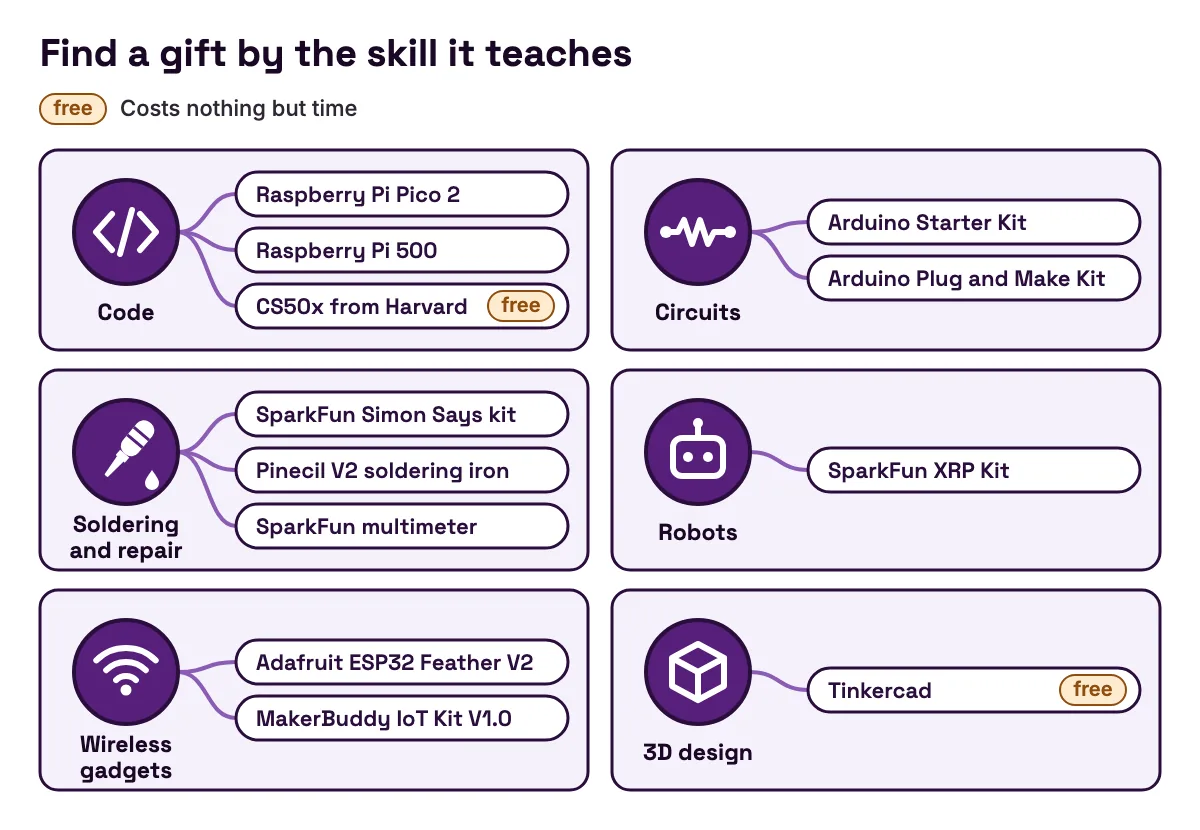
The best tech gifts for teens teach a skill they keep using after the box is empty: writing code, wiring circuits, soldering, building robots, or making gadgets that talk over Wi-Fi. So pick the skill first and the gift second. A teen who wants to code needs a board or a computer they can program. A teen who takes things apart needs a soldering kit and a meter. A robot fan needs a robot they assemble and then program. A teen who wants gadgets that react to the room needs sensors and Wi-Fi. Below are 12 picks sorted by skill, each with its listed price, what else you need and when it is the wrong buy. At the end is a seven-day plan that shows what a teen can build in the first week, from no code at all to a first Python script.
A disclosure first. We make MakerBuddy, one of the 12 picks. Every other product is described from its maker's or seller's own page, linked as we go. We have not bench-tested them, and this post has no affiliate links. Prices are in US dollars. Canadian stores price in Canadian dollars, so check a local seller before you compare.
Tech gifts for teens at a glance
| Skill | Gift | Listed price (USD) | What it teaches | Also needed |
|---|---|---|---|---|
| Code | Raspberry Pi Pico 2 | From $5 | MicroPython or C/C++ on a tiny board | A computer, a USB cable, parts and wires |
| Code and computing | Raspberry Pi 500 | $180, or $200 as a Desktop Kit | Linux, Python, how a computer works | A monitor or TV |
| Circuits | Arduino Starter Kit | $110.00 | Breadboard wiring and Arduino code | A computer |
| Circuits | Arduino Plug and Make Kit | $87.99 | Arduino code and Wi-Fi, no wiring | A computer |
| Soldering | SparkFun Learn to Solder: Simon Says | $54.95 | Soldering a working game | A ventilated table |
| Soldering and repair | Pinecil V2 soldering iron | $25.99 | Repairs and your own circuits | A matching USB-C charger, solder, a stand |
| Repair | SparkFun Digital Multimeter Basic | $21.50 | Measuring voltage, current and resistance | Nothing listed |
| Robots | SparkFun XRP Kit | $119.95 | Motors and sensors, blocks then Python | 4 AA batteries, a USB-C cable |
| Wireless | Adafruit ESP32 Feather V2 | $19.95 | Wi-Fi and Bluetooth projects | A computer, a USB cable, parts |
| Wireless, no code first | MakerBuddy IoT Kit V1.0 | PKR 40,000 in Pakistan; a quote elsewhere | Sensors and rules, then code over Wi-Fi | A supported device, 2.4 GHz Wi-Fi, a USB charger |
| Code | CS50x from Harvard | Free | C, Python, SQL and web code | A computer and time |
| 3D design | Tinkercad | Free | 3D design, circuits and code | A computer |
- Skill
- Code
- Gift
- Raspberry Pi Pico 2
- Listed price (USD)
- From $5
- What it teaches
- MicroPython or C/C++ on a tiny board
- Also needed
- A computer, a USB cable, parts and wires
- Skill
- Code and computing
- Gift
- Raspberry Pi 500
- Listed price (USD)
- $180, or $200 as a Desktop Kit
- What it teaches
- Linux, Python, how a computer works
- Also needed
- A monitor or TV
- Skill
- Circuits
- Gift
- Arduino Starter Kit
- Listed price (USD)
- $110.00
- What it teaches
- Breadboard wiring and Arduino code
- Also needed
- A computer
- Skill
- Circuits
- Gift
- Arduino Plug and Make Kit
- Listed price (USD)
- $87.99
- What it teaches
- Arduino code and Wi-Fi, no wiring
- Also needed
- A computer
- Skill
- Soldering
- Gift
- SparkFun Learn to Solder: Simon Says
- Listed price (USD)
- $54.95
- What it teaches
- Soldering a working game
- Also needed
- A ventilated table
- Skill
- Soldering and repair
- Gift
- Pinecil V2 soldering iron
- Listed price (USD)
- $25.99
- What it teaches
- Repairs and your own circuits
- Also needed
- A matching USB-C charger, solder, a stand
- Skill
- Repair
- Gift
- SparkFun Digital Multimeter Basic
- Listed price (USD)
- $21.50
- What it teaches
- Measuring voltage, current and resistance
- Also needed
- Nothing listed
- Skill
- Robots
- Gift
- SparkFun XRP Kit
- Listed price (USD)
- $119.95
- What it teaches
- Motors and sensors, blocks then Python
- Also needed
- 4 AA batteries, a USB-C cable
- Skill
- Wireless
- Gift
- Adafruit ESP32 Feather V2
- Listed price (USD)
- $19.95
- What it teaches
- Wi-Fi and Bluetooth projects
- Also needed
- A computer, a USB cable, parts
- Skill
- Wireless, no code first
- Gift
- MakerBuddy IoT Kit V1.0
- Listed price (USD)
- PKR 40,000 in Pakistan; a quote elsewhere
- What it teaches
- Sensors and rules, then code over Wi-Fi
- Also needed
- A supported device, 2.4 GHz Wi-Fi, a USB charger
- Skill
- Code
- Gift
- CS50x from Harvard
- Listed price (USD)
- Free
- What it teaches
- C, Python, SQL and web code
- Also needed
- A computer and time
- Skill
- 3D design
- Gift
- Tinkercad
- Listed price (USD)
- Free
- What it teaches
- 3D design, circuits and code
- Also needed
- A computer
Table note: prices are from the makers' and sellers' pages for the Raspberry Pi Pico 2 (opens in a new tab), the Raspberry Pi 500 (opens in a new tab), the Arduino Starter Kit (opens in a new tab), the Plug and Make Kit (opens in a new tab), the Simon Says kit (opens in a new tab), the Pinecil (opens in a new tab), the multimeter (opens in a new tab), the XRP Kit (opens in a new tab) and the ESP32 Feather V2 (opens in a new tab), checked on 28 October 2026. CS50x (opens in a new tab) and Tinkercad (opens in a new tab) describe themselves as free. Prices change; shipping and tax are extra.
How to choose STEM gifts for teens
A teen gift is usually a product made for adults. Under US rules summarised in the CPSC's Age Determination Guidelines (opens in a new tab), a children's product is designed mainly for children aged 12 or younger, and a general use product mainly for people older than 12. So most tech gifts for teens carry adult instructions and warnings. Read them before you wrap a soldering iron.
The age on the box is not always about difficulty, either. Arduino's Plug and Make Kit page (opens in a new tab) says the kit is for ages 14 and up, and its FAQ gives the company's children's privacy policy as the reason.
Ask three questions before you buy:
- 1
Which skill do they want?
Code, circuits, soldering, robots, wireless gadgets or design. Ask them.
- 2
What will they build in month two?
A project book, a course or a board they can reprogram keeps going. One fixed project ends when the project does.
- 3
What else does it need?
A monitor, batteries, a cable, the right charger or 2.4 GHz Wi-Fi. Check before the day, not on it.
Pick by interest, not by the aisle. Gifts for teens who like technology are often sorted "for him" and "for her", but what the parts can do matters far more, and every pick here suits any teen.
| If your teen loves | Look at |
|---|---|
| Games | The Simon Says soldering kit, or the Plug and Make Kit's game controller project |
| Fixing broken things | A Pinecil and a multimeter |
| Robots | The SparkFun XRP Kit |
| Apps and websites | CS50x or a Raspberry Pi 500 |
| Gadgets around the house | An ESP32 Feather V2 or MakerBuddy |
| Art and design | Tinkercad |
- If your teen loves
- Games
- Look at
- The Simon Says soldering kit, or the Plug and Make Kit's game controller project
- If your teen loves
- Fixing broken things
- Look at
- A Pinecil and a multimeter
- If your teen loves
- Robots
- Look at
- The SparkFun XRP Kit
- If your teen loves
- Apps and websites
- Look at
- CS50x or a Raspberry Pi 500
- If your teen loves
- Gadgets around the house
- Look at
- An ESP32 Feather V2 or MakerBuddy
- If your teen loves
- Art and design
- Look at
- Tinkercad
Gifts that teach coding
Raspberry Pi Pico 2, from $5. Raspberry Pi lists Pico 2 (opens in a new tab) from $5. It is a small microcontroller board built on Raspberry Pi's RP2350 chip, programmable in C/C++ and Python, with MicroPython support. The Pico 2 W adds 2.4 GHz Wi-Fi and Bluetooth 5.2. The case against: it is a bare board, so the lights, sensors and wires come separately. Without them, it stays in the drawer.
Raspberry Pi 500, $180 or $200. Raspberry Pi lists the Raspberry Pi 500 (opens in a new tab) from $180 for the unit, or $200 for the Desktop Kit, which adds a mouse, a USB-C power supply, an HDMI cable and the Raspberry Pi Beginner's Guide. It is a whole computer inside a keyboard, with a 2.4 GHz quad-core 64-bit Arm Cortex-A76 processor and 8 GB of memory. A teen learns Linux, Python and how a computer is put together. The case against: neither option includes a screen. It plugs into a monitor or TV through micro HDMI.
Which language should a teen learn first on a small board? Our guide to MicroPython vs Arduino C on the ESP32 weighs the two.
Gifts that teach circuits and electronics
Arduino Starter Kit, $110. Arduino's US store lists the Arduino Starter Kit (opens in a new tab) at $110.00. It has an Arduino Uno, a 400-point breadboard, 70 solid-core jumper wires, sensors, motors and LEDs, and a 170-page book with 15 projects. Arduino says no prior experience is required. The case against: every circuit is wired by hand, and one loose wire can stop a project with no clear error.
Arduino Plug and Make Kit, $87.99. Arduino lists the Plug and Make Kit (opens in a new tab) at $87.99. It uses an Arduino UNO R4 WiFi and seven small plug-together modules: a knob, lights, distance, movement, a buzzer, temperature and buttons. Arduino says it needs no breadboard, jumper wires or soldering. Its seven guided projects include a game controller and a weather report. The case against: with no breadboard, a teen learns less about how the parts are wired.
Torn between an Arduino and a Wi-Fi board? Read ESP32 vs Arduino Uno for beginners, or our student's guide to embedded systems for the big picture.
Gifts that teach soldering and repair
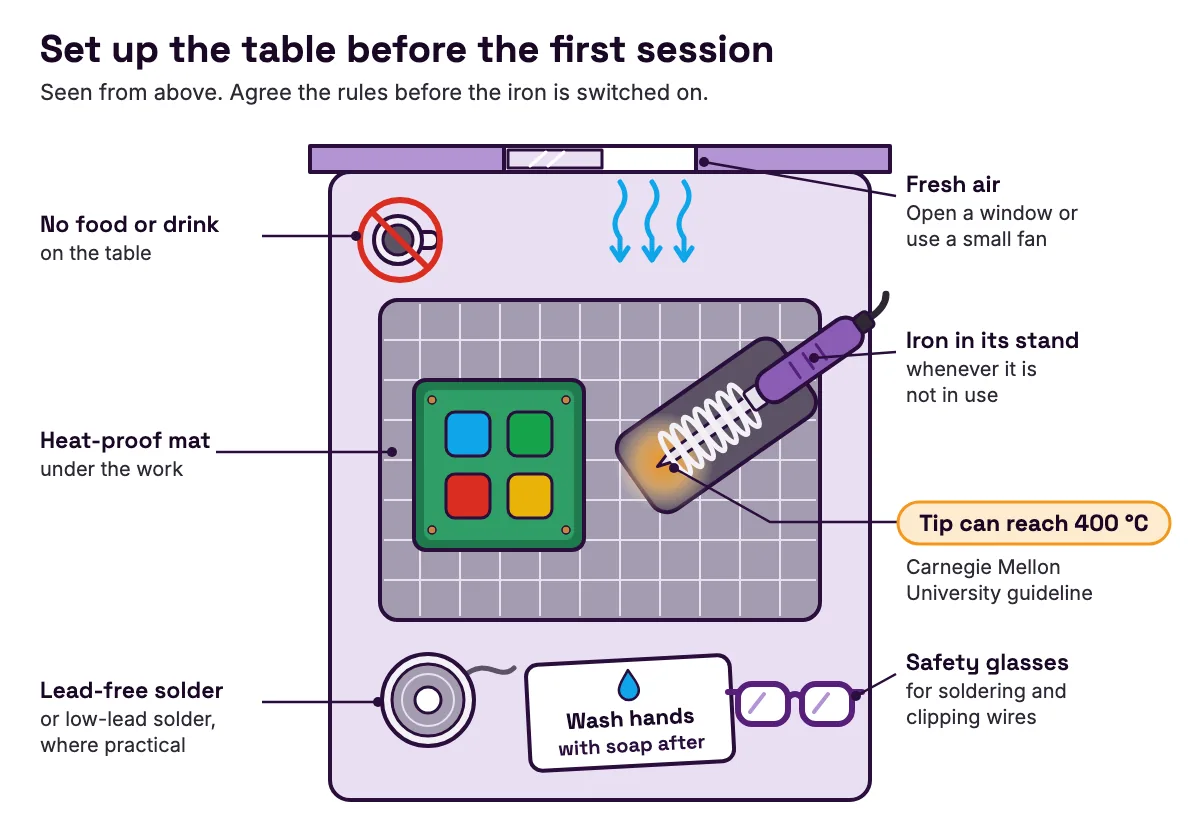
Soldering is the skill that turns a kit builder into someone who can fix things. It also involves heat and fumes, so it needs rules.
SparkFun Learn to Solder: Simon Says, $54.95. SparkFun lists the Simon Says kit (opens in a new tab) at $54.95. A teen solders the parts onto a board and ends up with a working memory game, which SparkFun says takes a true beginner 20 to 40 minutes. The kit includes a soldering iron, lead-free solder, a stand, safety glasses and the batteries. The case against: once built, it plays one game until a teen learns to reprogram it, which SparkFun says the finished board allows. On 28 October 2026 its page showed both "In stock" and "Backorder", so order early.
Pinecil V2 soldering iron, $25.99. Pine64 lists the Pinecil V2 (opens in a new tab) at $25.99 with one tip. It takes power from a USB-C PD or QC charger at 12 to 20 V, or from a 12 to 24 V barrel-jack supply. It is the natural next step after the Simon Says kit. The case against: no power supply, stand or solder is included, and a small phone charger may not reach the voltage it needs.
SparkFun Digital Multimeter Basic, $21.50. SparkFun lists its basic multimeter (opens in a new tab) at $21.50. It measures DC voltage, AC voltage, DC current up to 10 A and resistance up to 20 megohms, and it beeps for continuity. A meter is how a teen finds the broken wire instead of guessing. The case against: it teaches nothing on its own, so give it with a kit.
Gifts that teach robotics
A robot gives an exciting first result, because the teen's own code makes something move.
SparkFun XRP Kit, $119.95. SparkFun lists the XRP Kit (opens in a new tab) at $119.95. The box has a controller with Wi-Fi and Bluetooth, a chassis, two motors with encoders, a distance sensor, a line sensor and a small servo. SparkFun lists Blockly and Python among the ways to program it, so a teen can start with blocks and move to typed code. The case against: 4 AA batteries and a USB-C cable are not included. Buy them with the kit, or the robot sits still on the day.
Teens who want to compare robot kits before buying should read what to look for in robotics kits for teens.
Gifts that teach wireless gadgets and IoT
Wi-Fi boards let a teen build things a phone or laptop can read and control: the Internet of Things.
Adafruit ESP32 Feather V2, $19.95. Adafruit lists the ESP32 Feather V2 (opens in a new tab) at $19.95, or $20.95 with the headers already soldered on. It is a small board with a dual-core ESP32, Wi-Fi and Bluetooth, and Adafruit says it works with Arduino or MicroPython. The case against: like the Pico, it is a bare board. To get started, follow our step-by-step guide to programming an ESP32 with the Arduino IDE.
MakerBuddy IoT Kit V1.0. We make this one, so weigh this section with that in mind. It is a board carrying a 30-pin ESP32 DevKit, powered by 5 V over micro-USB, with six parts built in: two lights, a button, a light sensor, a buzzer and a knob. Nine more plug into labelled sockets, including temperature, distance and motion sensors, a small servo motor, a relay for low-voltage things and a two-line text screen.
Why it suits a teen: no code to start, and a clear path to code later. A browser dashboard shows live readings and switches the outputs. Rules built from menus run on the board itself, even with the laptop closed. Then a teen can write a program on a laptop that talks to the board over Wi-Fi, and later upload their own Arduino sketch. The seven-day plan below walks that path.
It is the wrong gift when:
- Your Wi-Fi is 5 GHz only. The board needs 2.4 GHz, though a phone hotspot works. Espressif's ESP32 datasheet (opens in a new tab) lists its Wi-Fi as 802.11 b/g/n at 2.4 GHz.
- Your teen already writes code and wants to wire everything by hand. A bare ESP32 board is the more direct path.
- You want a real alarm, or to switch mains power. Gas sensor builds are learning models, never a real alarm, and the relay is for low-voltage things only.
There are no accounts, and readings stay on your own Wi-Fi. The board's local web connection has no password, so use it only on a network you trust and never open it to the internet. You also need a micro-USB cable and a 5 V USB charger. In Pakistan, the kit is PKR 40,000, ordered online and paid by bank transfer. Families in the United States, Canada and elsewhere can ask for a written quote with delivery on the MakerBuddy order page.
Free tech gifts that still teach
Some good gifts cost nothing but time, and they test an interest before you spend.
CS50x from Harvard, free. Harvard's CS50x (opens in a new tab) is its introduction to computer science, and the course page says anyone is welcome to take it for free, with or without prior programming experience. It starts with Scratch, then teaches C, Python, SQL, and HTML, CSS and JavaScript. Submitting work for feedback needs an edX account. The case against: it is a full university course, not a quick win. Make it a gift by adding a promise of weekly help.
Tinkercad, free. Tinkercad's learn page (opens in a new tab) calls it a free, easy-to-use app for designing and printing in 3D, coding and creating circuits. A teen can design a case for a gadget before anyone buys a 3D printer. The case against: designs stay on the screen unless someone has a printer, or a library or school lends one.
The free MakerBuddy lessons and demo. The MakerBuddy curriculum has 32 free lessons for ages 10 and up, each with a Try it demo that runs in the browser. The dashboard's demo mode shows sample readings with no board at all. If those hold their interest for a weekend, a kit is a safer bet.
What a teen can build in the first week, from no code to code
Here is a worked example: a week with the MakerBuddy kit, about 45 to 60 minutes a day, from clicking to a first real program. A teen working alone moves faster than a class, so this week borrows from lessons spread across the year.
| Day | Build | What it teaches | Where to read more |
|---|---|---|---|
| 1 | Set up, then switch and dim the blue light and mix colours | Wi-Fi setup, outputs | Powering up lesson |
| 2 | Test the sensors against real tools | Measurement error | Distance lesson |
| 3 | A night light made of two rules | Thresholds, and why a gap stops flicker | Rule engine lesson |
| 4 | A parking gate with the distance sensor and servo | Two rules sharing one motor | Parking gate lesson |
| 5 | Live readings on the text screen | Fitting data into 16 characters | Text screen lesson |
| 6 | A Python script that logs readings to a file | APIs, loops and files | REST API reference |
| 7 | Choose the next path and write a build log | Planning | Ways to code with the board |
- Day
- 1
- Build
- Set up, then switch and dim the blue light and mix colours
- What it teaches
- Wi-Fi setup, outputs
- Where to read more
- Powering up lesson
- Day
- 2
- Build
- Test the sensors against real tools
- What it teaches
- Measurement error
- Where to read more
- Distance lesson
- Day
- 3
- Build
- A night light made of two rules
- What it teaches
- Thresholds, and why a gap stops flicker
- Where to read more
- Rule engine lesson
- Day
- 4
- Build
- A parking gate with the distance sensor and servo
- What it teaches
- Two rules sharing one motor
- Where to read more
- Parking gate lesson
- Day
- 5
- Build
- Live readings on the text screen
- What it teaches
- Fitting data into 16 characters
- Where to read more
- Text screen lesson
- Day
- 6
- Build
- A Python script that logs readings to a file
- What it teaches
- APIs, loops and files
- Where to read more
- REST API reference
- Day
- 7
- Build
- Choose the next path and write a build log
- What it teaches
- Planning
- Where to read more
- Ways to code with the board
Day 1: set up and explore. With the power off, plug the parts into their labelled sockets. Power the board, join its setup network, and enter your home's 2.4 GHz Wi-Fi details on the setup page. The text screen then shows the board's IP address; write it down. Open the dashboard and check the numbers change before you switch anything.
Day 2: test the sensors. Compare the distance reading with a tape measure at 10, 50 and 100 centimetres. Put the waterproof probe in cold water, then warm water. The board reads its sensors once a second and the dashboard updates about every 2 seconds, so wait before you write a number down. Engineers trust a sensor only after testing it.
Day 3: a night light from two rules. First cover the light sensor with a hand and note the number; low means dark and high means bright. Then build two Condition rules.
| Rule | Loop mode | Test | Steps |
|---|---|---|---|
| Dark on | Condition | Light level < 30 | Blue light on, wait 1000 ms |
| Bright off | Condition | Light level > 40 | Blue light off, wait 1000 ms |
- Rule
- Dark on
- Loop mode
- Condition
- Test
- Light level < 30
- Steps
- Blue light on, wait 1000 ms
- Rule
- Bright off
- Loop mode
- Condition
- Test
- Light level > 40
- Steps
- Blue light off, wait 1000 ms
Use your own numbers from the hand test. Why two rules? Stopping a rule never switches anything off, so the second rule does it. Why the gap between 30 and 40? With one number, a level hovering around it would flick the light on and off.
Day 4: a parking gate. Tape a craft stick or a strip of card to the servo as a barrier, and point the distance sensor at the road.
| Rule | Loop mode | Test | Steps |
|---|---|---|---|
| Gate open | Condition | Distance < 10 | Servo to 90°, wait 0 ms; colour light green, wait 1000 ms |
| Gate close | Condition | Distance > 20 | Colour light red, wait 3000 ms; servo to 0°, wait 1000 ms |
- Rule
- Gate open
- Loop mode
- Condition
- Test
- Distance < 10
- Steps
- Servo to 90°, wait 0 ms; colour light green, wait 1000 ms
- Rule
- Gate close
- Loop mode
- Condition
- Test
- Distance > 20
- Steps
- Colour light red, wait 3000 ms; servo to 0°, wait 1000 ms
The 3-second wait gives the car time to pass. The gap between 10 and 20 centimetres does the same job as on Day 3.
Day 5: the text screen. On the dashboard, set the screen to your own two lines, such as Temp {temp} C and Dist {distance} cm. The wildcards fill in live values. Each line holds 16 characters, and a value can grow wider, so leave room.
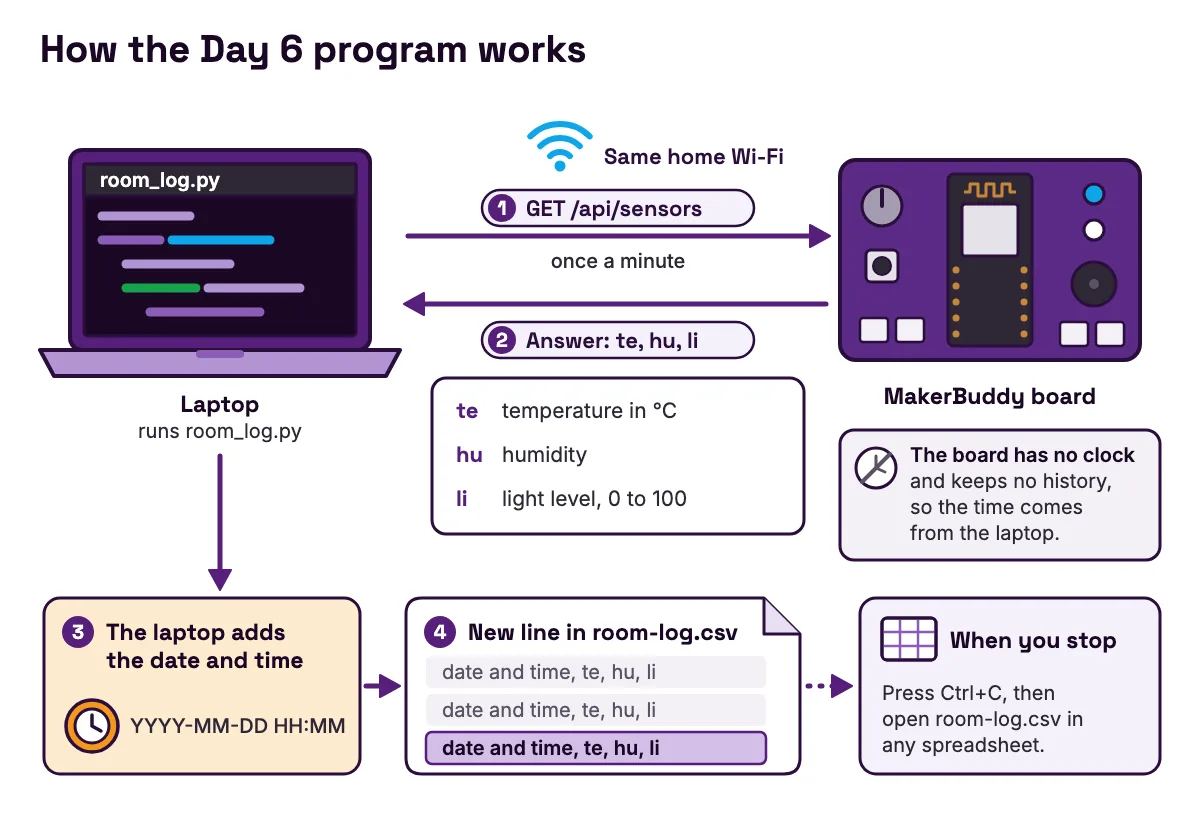
Day 6: the first program. Now the teen writes code without changing the board. The board has no clock and keeps no history, so the laptop adds the time and saves the readings. Install Python 3 on a laptop on the same Wi-Fi, run pip install requests once, and save this as room_log.py:
"""room_log.py: read the MakerBuddy board once a minute and save the readings."""
import csv
import time
from datetime import datetime

import requests

BOARD = "http://192.168.1.100"   # change to your board's IP address

with open("room-log.csv", "a", newline="") as f:
    log = csv.writer(f)
    while True:
        data = requests.get(BOARD + "/api/sensors", timeout=5).json()
        now = datetime.now().strftime("%Y-%m-%d %H:%M")
        log.writerow([now, data["te"], data["hu"], data["li"]])
        f.flush()                                  # save each line straight away
        print(now, "temp", data["te"], "humidity", data["hu"], "light", data["li"])
        if data["te"] > 30:                        # too warm: one short beep
            requests.post(BOARD + "/api/buzzer", data={"state": "true"}, timeout=5)
        time.sleep(60)                             # wait one minute
How it works: GET /api/sensors returns every reading as short keys, where te is the temperature in °C, hu the humidity and li the light level from 0 to 100. POST /api/buzzer with state set to true gives one 500 ms beep; data= sends the form fields the board expects. Press Ctrl+C to stop, then open room-log.csv in any spreadsheet. All the keys are in the MakerBuddy REST API reference, and our guide to what a REST API is explains the idea.
Day 7: choose the next path. A teen who liked Day 6 can keep writing programs that talk to the board; the project idea library has a motion email alert built this way. To program the board itself, they can upload their own Arduino sketch, but it replaces the MakerBuddy software until that is uploaded again, as updating the board's software explains. A second, bare ESP32 board for sketches keeps the kit ready. Either way, write a one-page build log with photos: the start of a student engineering portfolio.
Common mistakes when buying tech gifts for teens
| Symptom | Cause | Fix |
|---|---|---|
| The robot sits still on the day | Batteries and a cable were not in the box | Read the "not included" line, and buy them together |
| The Raspberry Pi has no screen | Neither Raspberry Pi 500 option includes a monitor | Check for a spare monitor or TV, and the right cable |
| The new soldering iron barely heats | The charger cannot supply the voltage the iron needs | Check the iron's listed input, and use a charger that matches it |
| The board will not join the home Wi-Fi | The network is 5 GHz only, or a guest network blocks devices | Use a 2.4 GHz network, or a phone hotspot |
| The log file fills with 0.0 for temperature | A failed DHT11 read shows as 0.0 | Power off, check the sensor is in its labelled socket, then try again |
| The dashboard stops working after an Arduino upload | Your own sketch replaced the MakerBuddy software | Upload the MakerBuddy software again by USB, or use a second ESP32 board for sketches |
- Symptom
- The robot sits still on the day
- Cause
- Batteries and a cable were not in the box
- Fix
- Read the "not included" line, and buy them together
- Symptom
- The Raspberry Pi has no screen
- Cause
- Neither Raspberry Pi 500 option includes a monitor
- Fix
- Check for a spare monitor or TV, and the right cable
- Symptom
- The new soldering iron barely heats
- Cause
- The charger cannot supply the voltage the iron needs
- Fix
- Check the iron's listed input, and use a charger that matches it
- Symptom
- The board will not join the home Wi-Fi
- Cause
- The network is 5 GHz only, or a guest network blocks devices
- Fix
- Use a 2.4 GHz network, or a phone hotspot
- Symptom
- The log file fills with 0.0 for temperature
- Cause
- A failed DHT11 read shows as 0.0
- Fix
- Power off, check the sensor is in its labelled socket, then try again
- Symptom
- The dashboard stops working after an Arduino upload
- Cause
- Your own sketch replaced the MakerBuddy software
- Fix
- Upload the MakerBuddy software again by USB, or use a second ESP32 board for sketches
The pattern: start from the skill, check what the box leaves out, and make sure there is a month two. For younger builders, see gift ideas for 12-year-olds who love building things. For a wider view by age, read our honest guide to the best STEM kits by age. More guides are on the MakerBuddy blog.
FAQ
What do you buy a teen who has everything?
Buy a skill rather than another device. A teen with a phone and a console rarely has a soldering iron or a robot they built. A kit like the Simon Says soldering kit (opens in a new tab) gives them something new to do, not just something new to own.
What are good digital gifts for teens?
Free courses and design tools make strong digital gifts when you add your time. Harvard's CS50x (opens in a new tab) is free to take, and Tinkercad (opens in a new tab) is a free app for 3D design, circuits and code. Pair either with a small board, so the code runs on something real.
What tech gift should I buy a 13-year-old gamer?
Let them build part of the game. The Arduino Plug and Make Kit (opens in a new tab) includes a game controller project, and the Simon Says kit (opens in a new tab) becomes a memory game once soldered. Arduino labels the Plug and Make Kit 14 and up, citing its children's privacy policy, so read that label with your teen first.
What are good tech gifts for teen girls?
The same gifts that suit boys: choose by interest, not by the colour of the box. An artist may enjoy Tinkercad, a fixer a soldering kit, and a robot fan the XRP Kit. Ask what she wants to make, then pick the skill.
Is a Raspberry Pi a good gift for a teenager?
Yes, for a teen who wants to learn Linux, Python and how computers work. The Raspberry Pi 500 (opens in a new tab) is a full computer inside a keyboard, from $180, or $200 as a Desktop Kit, and it needs a monitor or TV. For gadgets with sensors and motors, a microcontroller such as an Arduino is quicker to start.
Does my teen need to know how to code before getting an electronics kit?
No. Arduino says its Starter Kit (opens in a new tab) needs no prior experience, and CS50x (opens in a new tab) welcomes students with or without programming experience. A kit that starts with no code suits a teen who wants a working gadget first and code second.
Is soldering safe for a teenager?
It can be, with rules and an adult nearby for the first session. Carnegie Mellon's soldering safety guideline (opens in a new tab) notes the tip can reach 400 °C, and asks for lead-free solder where practical, good ventilation, safety glasses and washing hands afterwards. Keep the iron in its stand whenever it is not in use.
Sources
- U.S. Consumer Product Safety Commission: Age Determination Guidelines (opens in a new tab)
- Raspberry Pi: Raspberry Pi Pico 2 (opens in a new tab)
- Raspberry Pi: Raspberry Pi 500 (opens in a new tab)
- Arduino US Store: Arduino Starter Kit Multi-Language (opens in a new tab)
- Arduino US Store: Plug and Make Kit (opens in a new tab)
- SparkFun: Learn to Solder, Simon Says (opens in a new tab)
- Pine64: Pinecil Smart Mini Portable Soldering Iron (opens in a new tab)
- SparkFun: Digital Multimeter, Basic (opens in a new tab)
- SparkFun: Experiential Robotics Platform (XRP) Kit (opens in a new tab)
- Adafruit: ESP32 Feather V2 (opens in a new tab)
- Espressif: ESP32 Series Datasheet (opens in a new tab)
- Harvard University: CS50x (opens in a new tab)
- Tinkercad: Learn how to use Tinkercad (opens in a new tab)
- Carnegie Mellon University EHS: Soldering Safety Guideline (opens in a new tab)