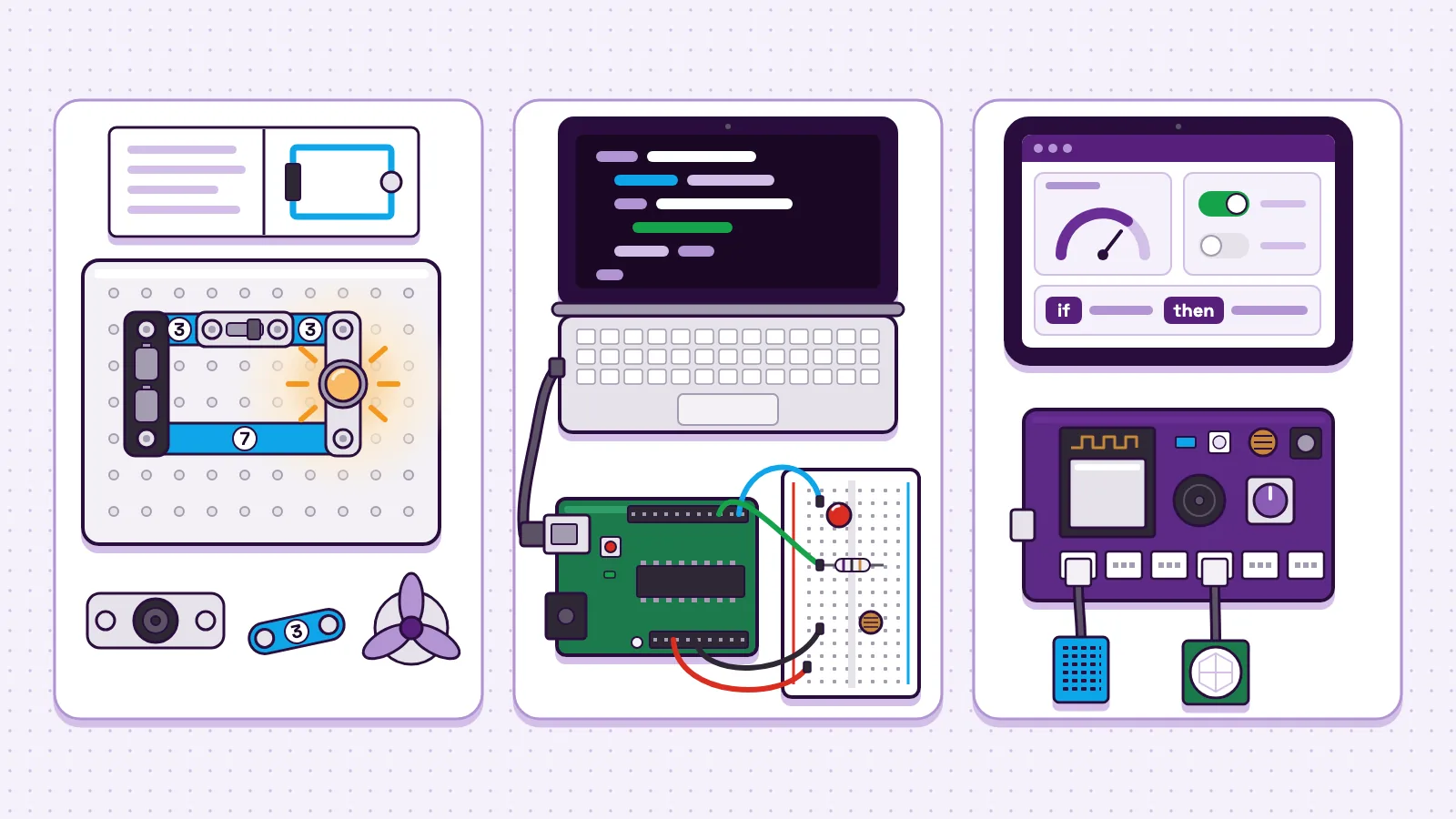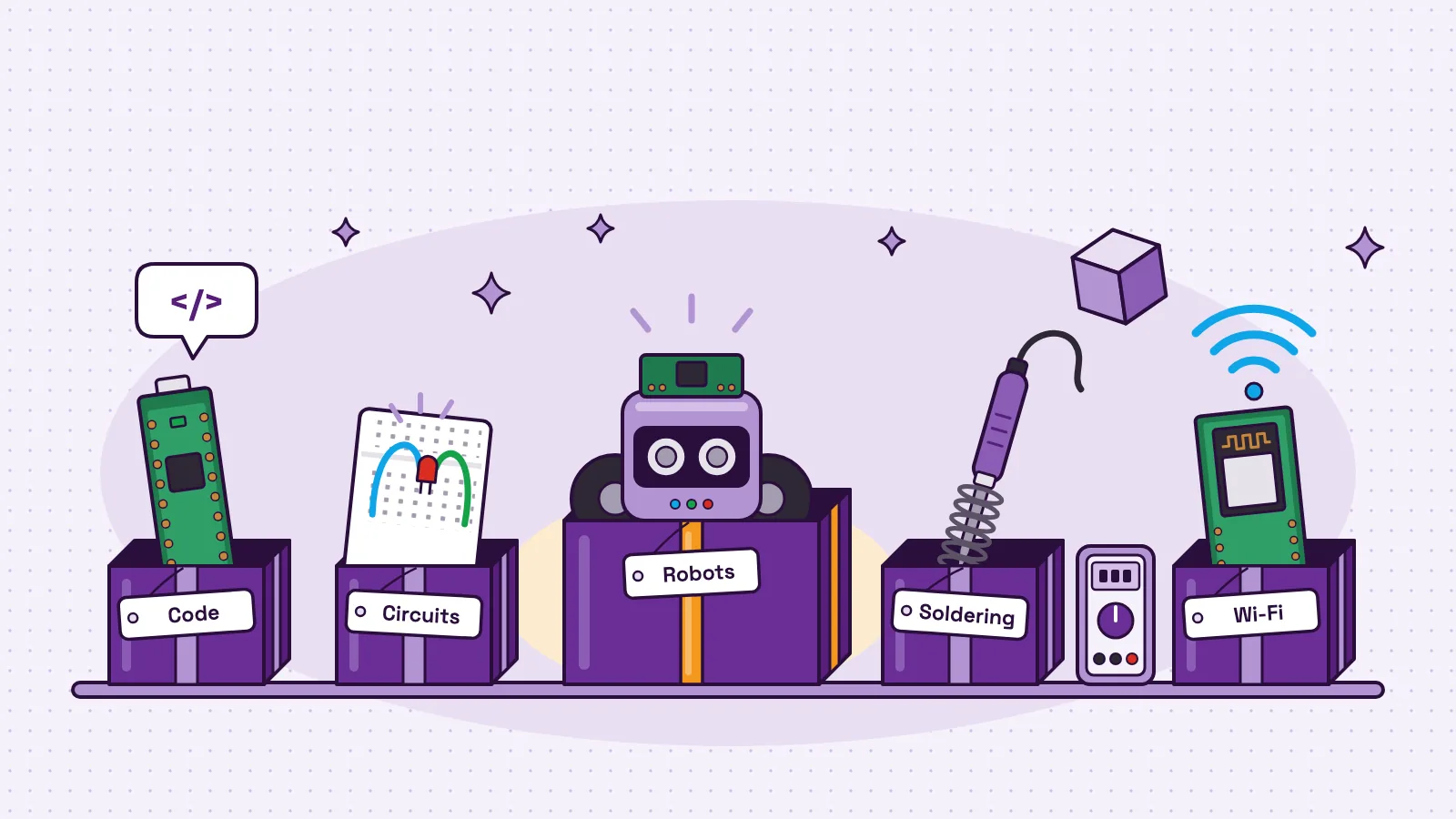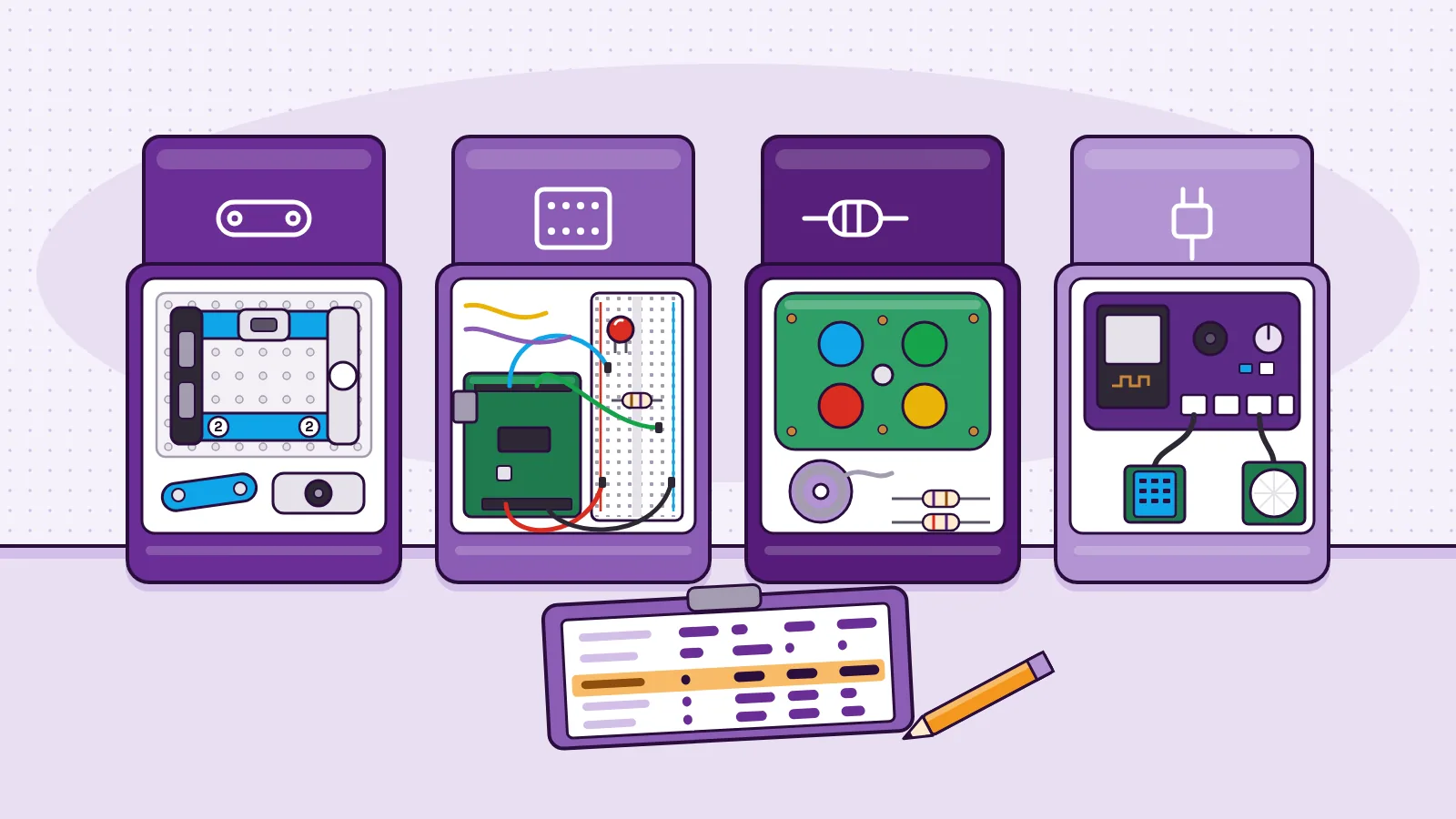
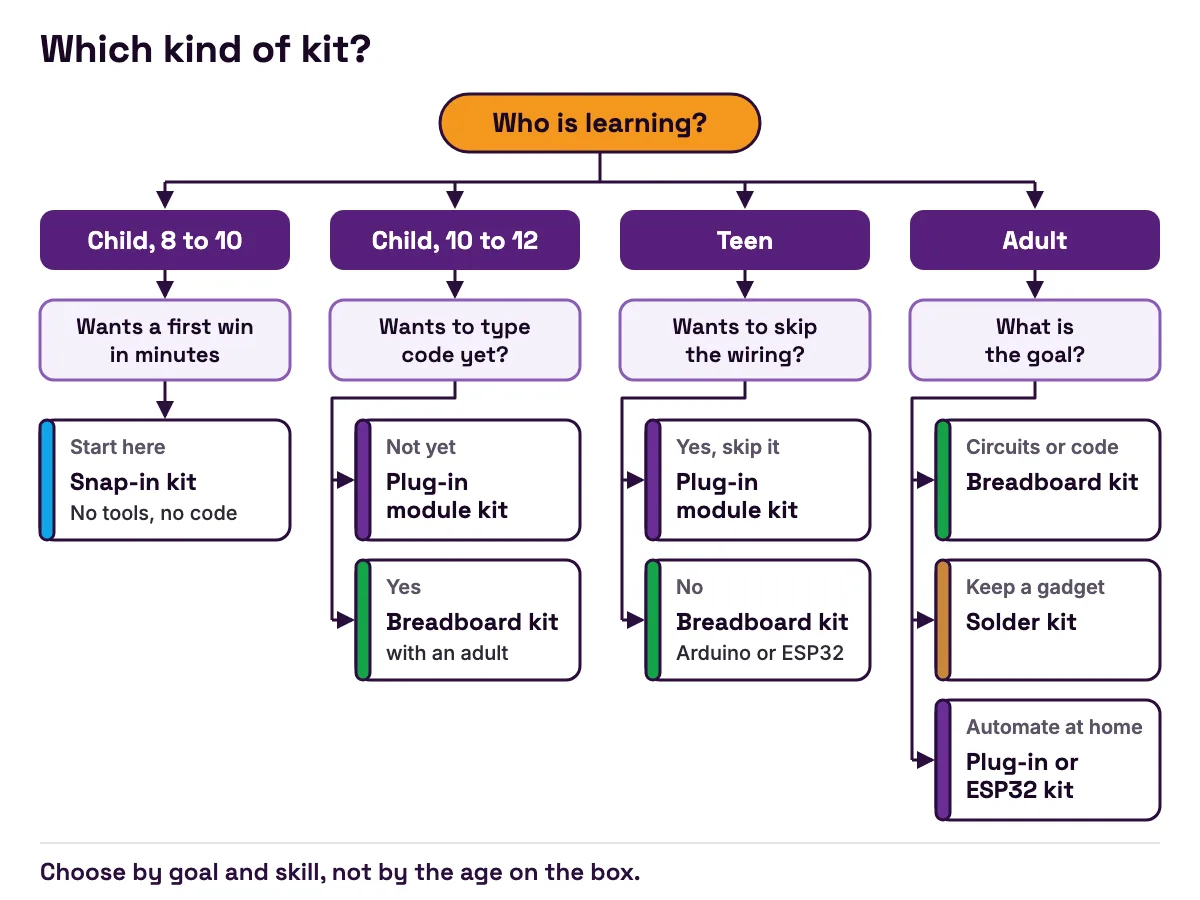
The best electronics kit for beginners is the one that matches how the learner wants to connect parts. For a child of 8 to 10 who has never built a circuit, a snap-together kit such as Snap Circuits gives a working circuit in minutes, with no tools and no code. For a teen or an adult who wants to understand electronics properly, a breadboard kit built around an Arduino board teaches real wiring and real code, and goes furthest. In between sit plug-in kits, where sensors click into sockets and you control them from a screen. MakerBuddy is one of those.
So pick the kind of kit first and the brand last. Below are a criteria table, a comparison of named kits and a worked scorecard for two buyers.
A disclosure first: we make MakerBuddy. Every other kit here is described from its maker's own page or manual, linked as we go and read on 29 October 2026. We have not bench-tested them, and there are no affiliate links on this page.
The four kinds of beginner electronics kit
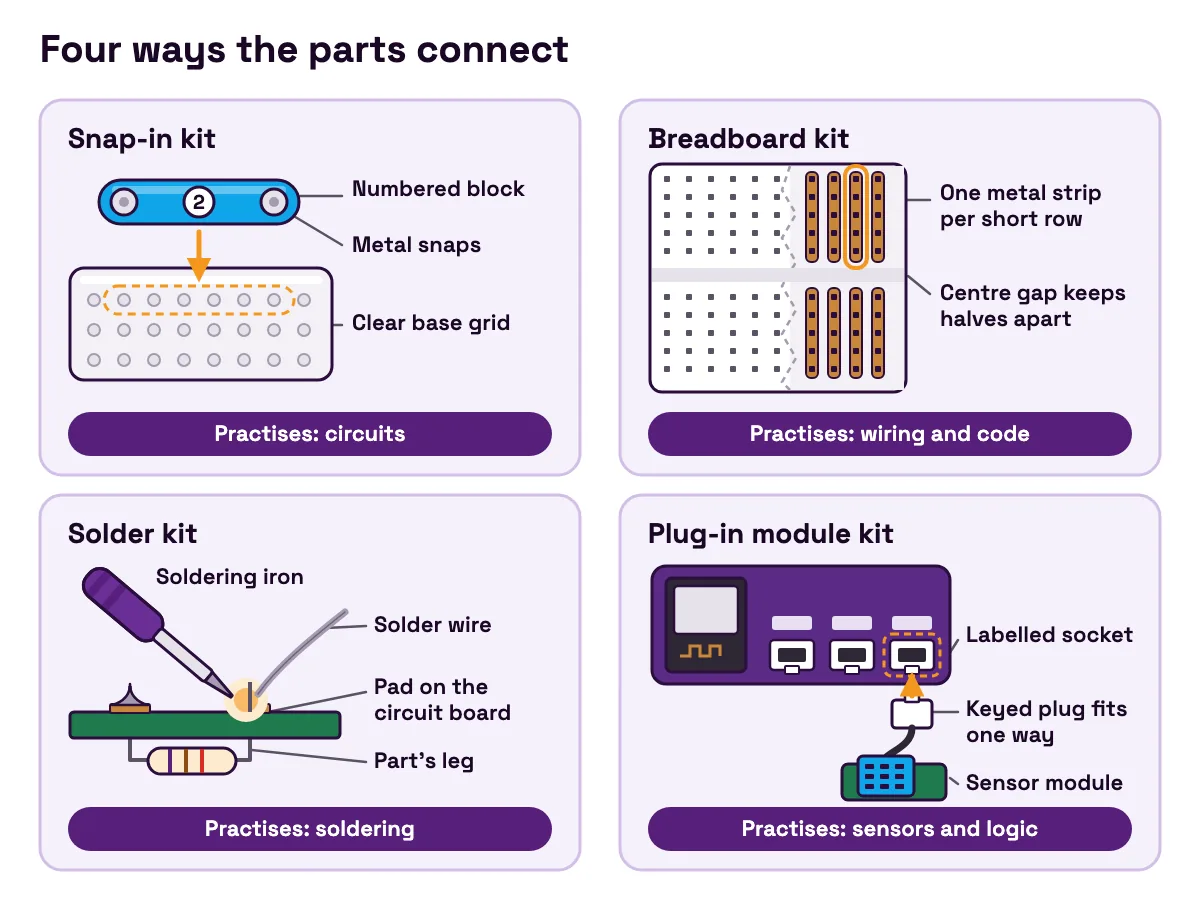
Electronics kits for beginners connect their parts in one of four main ways. How the parts connect decides how fast the first win comes, what goes wrong and what the learner ends up knowing.
- 1
Snap-in kits.
Each part sits on a plastic block with metal snaps. The Snap Circuits Jr. manual explains that the blocks come in different colours and carry numbers, so you match each one to a coloured drawing and press it onto a clear base grid (Elenco SC-100 manual (opens in a new tab)). Nothing to cut, strip or solder.
- 2
Breadboard kits.
Parts push into a board full of holes, and jumper wires join them to each other and to a small programmable board. Inside a breadboard, each row is a metal strip with clips, so anything in the same short row is joined, and a gap down the middle keeps the two halves apart (SparkFun breadboard tutorial (opens in a new tab)). Nothing is permanent, so mistakes cost nothing but time.
- 3
Solder kits.
You heat a soldering iron and join each part to a printed circuit board for good. The finished thing is a real gadget, such as a game or a clock. It teaches a hand skill the other kinds skip.
- 4
Plug-in module kits.
Sensors and outputs come on small boards with a cable that plugs into a socket, and most plugs are keyed so they fit only one way. There is no breadboard and no loose wiring. Arduino's Plug and Make Kit works this way, and so does MakerBuddy.
Small boards sold on their own, such as the micro:bit, are a common first buy too, so one appears below. Big parts assortments with no instructions are refills for people who know what they are doing, not a place to start.
What to check in any electronics kit for beginners
A good kit is the one the learner keeps using after the first weekend. These eight checks sort almost any kit, whatever the age on the box.
| Criterion | What good looks like | How to check before you buy |
|---|---|---|
| First win | Something works in the first session | Read the first project in the manual or guide; count the steps |
| Ceiling | Months of new projects, not one weekend | Count the projects, then ask what comes after the last one |
| What it teaches | Matches the goal: circuits, wiring, code, sensors or soldering | Look at the parts list: no microcontroller means no code |
| Help needed | The learner can work alone after setup | Look for typed code, tiny parts or a hot iron on day one |
| Guide quality | Full steps for every project, from the maker | Download the guide or book sample before paying |
| Hidden needs | Every extra listed: batteries, computer, Wi-Fi, account, tools | Read the "not included" line and the setup page |
| Mistake recovery | A wrong move is easy to spot and undo | Snaps and plugs fail loudly; loose wires fail silently |
| Next step | The parts or board keep working when the learner moves on | Check if the board takes your own code, and in which language |
- Criterion
- First win
- What good looks like
- Something works in the first session
- How to check before you buy
- Read the first project in the manual or guide; count the steps
- Criterion
- Ceiling
- What good looks like
- Months of new projects, not one weekend
- How to check before you buy
- Count the projects, then ask what comes after the last one
- Criterion
- What it teaches
- What good looks like
- Matches the goal: circuits, wiring, code, sensors or soldering
- How to check before you buy
- Look at the parts list: no microcontroller means no code
- Criterion
- Help needed
- What good looks like
- The learner can work alone after setup
- How to check before you buy
- Look for typed code, tiny parts or a hot iron on day one
- Criterion
- Guide quality
- What good looks like
- Full steps for every project, from the maker
- How to check before you buy
- Download the guide or book sample before paying
- Criterion
- Hidden needs
- What good looks like
- Every extra listed: batteries, computer, Wi-Fi, account, tools
- How to check before you buy
- Read the "not included" line and the setup page
- Criterion
- Mistake recovery
- What good looks like
- A wrong move is easy to spot and undo
- How to check before you buy
- Snaps and plugs fail loudly; loose wires fail silently
- Criterion
- Next step
- What good looks like
- The parts or board keep working when the learner moves on
- How to check before you buy
- Check if the board takes your own code, and in which language
The checks people skip are hidden needs and next step. A cheap kit that needs a computer you do not have is not cheap. Our pillar guide to the best STEM kits by age applies similar checks to the wider field of STEM toys.
Breadboard kits vs snap-in kits vs MakerBuddy, compared fairly
Here are the named kits this guide covers, side by side. Prices are the makers' or sellers' list prices on 29 October 2026, and prices change.
| Kit | Kind | Age the maker gives | What you get | Listed price | You also need |
|---|---|---|---|---|---|
| Snap Circuits Jr. SC-100 | Snap-in | 8 and up | 101 projects, over 30 parts | US$52.95 | Two AA batteries |
| micro:bit V2 | Board on its own | Not stated on the features page | Buttons, 25 LEDs, sensors, speaker, microphone, radio | Not checked | A computer or tablet |
| SparkFun Simon Says | Solder | 10 and up | A Simon memory game to solder | US$29.95 | A soldering iron, solder and cutters |
| SparkFun Inventor's Kit v4.1.2 | Breadboard | 10 and up | Arduino-compatible board, 5 projects, 16 circuits, printed guide | US$99.95 | A computer and a driver |
| Arduino Starter Kit | Breadboard | Not stated | Arduino Uno, 15 projects, 170-page book | €117 incl. VAT | A computer with the Arduino IDE |
| Arduino Plug and Make Kit | Plug-in modules | 14 and up | UNO R4 WiFi, 7 modules, 7 projects | €95.20 incl. VAT | A computer, an Arduino account, 2.4 GHz Wi-Fi |
| MakerBuddy IoT Kit V1.0 | Plug-in modules | 10 and up | ESP32 board, 6 built-in parts, 9 plug-in parts, 32 free lessons | PKR 40,000 in Pakistan; a quote elsewhere | A supported device, 2.4 GHz Wi-Fi, a micro-USB cable and 5 V charger |
- Kit
- Snap Circuits Jr. SC-100
- Kind
- Snap-in
- Age the maker gives
- 8 and up
- What you get
- 101 projects, over 30 parts
- Listed price
- US$52.95
- You also need
- Two AA batteries
- Kit
- micro:bit V2
- Kind
- Board on its own
- Age the maker gives
- Not stated on the features page
- What you get
- Buttons, 25 LEDs, sensors, speaker, microphone, radio
- Listed price
- Not checked
- You also need
- A computer or tablet
- Kit
- SparkFun Simon Says
- Kind
- Solder
- Age the maker gives
- 10 and up
- What you get
- A Simon memory game to solder
- Listed price
- US$29.95
- You also need
- A soldering iron, solder and cutters
- Kit
- SparkFun Inventor's Kit v4.1.2
- Kind
- Breadboard
- Age the maker gives
- 10 and up
- What you get
- Arduino-compatible board, 5 projects, 16 circuits, printed guide
- Listed price
- US$99.95
- You also need
- A computer and a driver
- Kit
- Arduino Starter Kit
- Kind
- Breadboard
- Age the maker gives
- Not stated
- What you get
- Arduino Uno, 15 projects, 170-page book
- Listed price
- €117 incl. VAT
- You also need
- A computer with the Arduino IDE
- Kit
- Arduino Plug and Make Kit
- Kind
- Plug-in modules
- Age the maker gives
- 14 and up
- What you get
- UNO R4 WiFi, 7 modules, 7 projects
- Listed price
- €95.20 incl. VAT
- You also need
- A computer, an Arduino account, 2.4 GHz Wi-Fi
- Kit
- MakerBuddy IoT Kit V1.0
- Kind
- Plug-in modules
- Age the maker gives
- 10 and up
- What you get
- ESP32 board, 6 built-in parts, 9 plug-in parts, 32 free lessons
- Listed price
- PKR 40,000 in Pakistan; a quote elsewhere
- You also need
- A supported device, 2.4 GHz Wi-Fi, a micro-USB cable and 5 V charger
Table notes: Snap Circuits figures are from Home Science Tools (opens in a new tab). The micro:bit row is from the micro:bit V2 features overview (opens in a new tab). The Simon Says row is from SparkFun's product page (opens in a new tab) and the Inventor's Kit row from SparkFun's Inventor's Kit page (opens in a new tab). The Arduino rows are from the Starter Kit (opens in a new tab) and Plug and Make Kit (opens in a new tab) store pages. MakerBuddy's parts are listed on our technical details page.
What the table hides is how each kind fails. Snap and plug-in kits fail loudly: a block is not pressed down, a cable is out, or the Wi-Fi is wrong. A breadboard kit can fail silently, because one wire one hole off gives no error at all. That is where beginners lose heart, and where they learn the most. The guide to using a breadboard, and when you can skip it shows the common traps.
Best electronics kits for kids (ages 8 to 12)
Children in this range need a first win in the first session. Many are not ready to debug a breadboard alone.
Snap Circuits Jr. Home Science Tools (opens in a new tab) lists it for ages 8 and up, with 101 projects and two AA batteries you provide. The early projects in the SC-100 manual (opens in a new tab) cover a light and switch, a lamp and fan in series and then in parallel, and a sound-activated switch. The case against: the core set has no programming, and its sound chips are fixed modules, so a confident 10-year-old can run out of new things to try.
The micro:bit. This is a pocket-sized programmable board. The micro:bit V2 (opens in a new tab) has two buttons, 25 LEDs that can also sense light, a temperature sensor, a compass, an accelerometer, a speaker, a microphone and radio. Children can start with blocks in MakeCode and move to Python later, using the editors on the micro:bit coding page (opens in a new tab). The case against: it is a board, not a kit, so motors and extra sensors are add-ons.
MakerBuddy. Sensors plug into labelled sockets on an ESP32 board, and a browser dashboard shows live readings and switches the lights, buzzer and servo, with no code. The board tour lesson names every part before anything is plugged in, and the first light lesson dims a light from the screen. Later, children write if-then rules that the board runs on its own. The case against: a grown-up may need to help with the first Wi-Fi setup, and the board needs 2.4 GHz Wi-Fi.
SparkFun Inventor's Kit. SparkFun gives ages 10 and up (opens in a new tab) for this breadboard kit with typed code. At 10 to 12, plan on an adult beside them for the first projects.
For the head-to-head of the three most common first kits, read Snap Circuits vs Arduino kits vs MakerBuddy, which builds one box alarm all three ways.
A Snap Circuits alternative when the snapping gets easy
Children outgrow snap kits in one of three ways. If they finished the manual and still love snapping, get a bigger snap set. If they ask "can it do this when that happens?", move to sensors and if-then rules on a micro:bit or a plug-in kit like MakerBuddy. If they want to type code, move to a breadboard kit such as the Inventor's Kit.
Best electronics kits for teens
From about 13 or 14, many teens can wire a breadboard and fix their own mistakes with a little help. A teen electronics kit should lead to real code.
Arduino Starter Kit. The official kit has an Arduino Uno, a 400-point breadboard, 70 solid-core jumper wires, a 16x2 text screen, a small servo, a small DC motor, a piezo and a 170-page book with 15 projects, according to the Arduino Store page (opens in a new tab). Arduino says no prior experience is needed.
Arduino Plug and Make Kit. This pairs an UNO R4 WiFi with seven small modules that connect by Qwiic cable, with no breadboard, jumper wires or soldering, as the store page (opens in a new tab) says. It suits a teen who wants code and connected projects without wiring. Arduino recommends it for ages 14 and up, an Arduino account is needed for all the content, and the cloud projects need 2.4 GHz Wi-Fi.
An ESP32 breadboard kit. An ESP32 adds Wi-Fi and Bluetooth. Espressif's ESP32 datasheet (opens in a new tab) lists one or two cores at up to 240 MHz and 520 KB of SRAM, and the boards are programmed from the same Arduino IDE once you add Espressif's ESP32 board package (opens in a new tab). Our honest guide to ESP32 starter kits for students compares six of them, and ESP32 vs Arduino Uno for beginners explains the trade-offs.
MakerBuddy for teens. A teen can start with the dashboard and rules, then program the same ESP32 board from the Arduino IDE, as the Arduino development notes explain. Their own sketch replaces the MakerBuddy firmware until it is uploaded again, as the firmware update guide covers. The 32 lessons teach rules, not typed code, so a teen who wants code from day one is better served by a breadboard kit.
If the teen wants a robot that drives rather than a gadget that senses, read what to look for in robotics kits for teens and whether coding toys teach real coding.
Best electronics kits for adult beginners
Adults often bring patience with a manual, a computer of their own and a clear goal. The goal decides the kit.
"I want to understand how circuits work." Start with a breadboard and real components. The Arduino Starter Kit's 15 book projects, listed on the Arduino Store page (opens in a new tab), and the Inventor's Kit guide (opens in a new tab), whose first circuit flashes an LED, both start from simple circuits. Add a cheap multimeter early, because it turns guessing into measuring; see how to use a multimeter. The 12 ideas you need before your first circuit covers the theory in plain words.
"I want to make a gadget I can keep." Try a solder kit. SparkFun's Simon Says kit builds a memory game with four coloured lights, five buttons and a buzzer. SparkFun's page (opens in a new tab) estimates 20 to 40 minutes to assemble it, includes the AA batteries, and says the soldering iron, solder and cutters are not included. Budget for those, and solder in a room with fresh air.
"I want to automate something at home." Look at a plug-in kit or an ESP32 kit. The Plug and Make Kit gets you to connected projects fast. MakerBuddy lets you test ideas with real sensors through rules before you write code: a rule watches one or two sensors and runs up to 10 steps, and the board holds up to 10 rules. It has no clock, though, so it cannot act at a set time of day.
"I want to learn to code hardware." A breadboard kit with an Arduino or ESP32 is the direct route. Our plain-English guide to what Arduino is explains the ecosystem before you buy.
Worked example: scoring kits for two beginners
A scorecard turns the criteria into a decision. Score each kit from 1 to 5 on each criterion, weight each criterion by how much it matters to this learner, multiply and add up. The scores below are our own judgement from the makers' pages, not lab results, and they stay the same for every buyer. Change them if you disagree; the method still works.
| Criterion | Snap Circuits Jr. | Arduino Starter Kit | Plug and Make Kit | MakerBuddy |
|---|---|---|---|---|
| First win | 5 | 2 | 4 | 5 |
| Circuit basics | 3 | 5 | 1 | 1 |
| Real sensors | 1 | 4 | 4 | 5 |
| Path to code | 1 | 5 | 4 | 2 |
| Ceiling | 1 | 4 | 4 | 3 |
| Little help needed | 5 | 2 | 3 | 3 |
- Criterion
- First win
- Snap Circuits Jr.
- 5
- Arduino Starter Kit
- 2
- Plug and Make Kit
- 4
- MakerBuddy
- 5
- Criterion
- Circuit basics
- Snap Circuits Jr.
- 3
- Arduino Starter Kit
- 5
- Plug and Make Kit
- 1
- MakerBuddy
- 1
- Criterion
- Real sensors
- Snap Circuits Jr.
- 1
- Arduino Starter Kit
- 4
- Plug and Make Kit
- 4
- MakerBuddy
- 5
- Criterion
- Path to code
- Snap Circuits Jr.
- 1
- Arduino Starter Kit
- 5
- Plug and Make Kit
- 4
- MakerBuddy
- 2
- Criterion
- Ceiling
- Snap Circuits Jr.
- 1
- Arduino Starter Kit
- 4
- Plug and Make Kit
- 4
- MakerBuddy
- 3
- Criterion
- Little help needed
- Snap Circuits Jr.
- 5
- Arduino Starter Kit
- 2
- Plug and Make Kit
- 3
- MakerBuddy
- 3
Why some scores look harsh: Snap Circuits gets 1 for real sensors because its light sensor is a photoresistor that changes how a circuit behaves, with no number to read (SC-100 manual (opens in a new tab)). MakerBuddy gets 1 for circuit basics because nothing is wired. The Starter Kit gets 2 for first win because every project starts with wiring.
Buyer one: Sara, 34, an adult beginner
Sara wants to understand circuits, then write code for a sensor at home. She has a laptop and patience, so a fast first win matters little. Her weights: first win 1, circuit basics 3, real sensors 1, path to code 3, ceiling 2, little help needed 1. The best possible total is 5 × 11 = 55.
| Kit | Working | Total out of 55 |
|---|---|---|
| Snap Circuits Jr. | 5×1 + 3×3 + 1×1 + 1×3 + 1×2 + 5×1 | 25 |
| Arduino Starter Kit | 2×1 + 5×3 + 4×1 + 5×3 + 4×2 + 2×1 | 46 |
| Plug and Make Kit | 4×1 + 1×3 + 4×1 + 4×3 + 4×2 + 3×1 | 34 |
| MakerBuddy | 5×1 + 1×3 + 5×1 + 2×3 + 3×2 + 3×1 | 28 |
- Kit
- Snap Circuits Jr.
- Working
- 5×1 + 3×3 + 1×1 + 1×3 + 1×2 + 5×1
- Total out of 55
- 25
- Kit
- Arduino Starter Kit
- Working
- 2×1 + 5×3 + 4×1 + 5×3 + 4×2 + 2×1
- Total out of 55
- 46
- Kit
- Plug and Make Kit
- Working
- 4×1 + 1×3 + 4×1 + 4×3 + 4×2 + 3×1
- Total out of 55
- 34
- Kit
- MakerBuddy
- Working
- 5×1 + 1×3 + 5×1 + 2×3 + 3×2 + 3×1
- Total out of 55
- 28
The Arduino Starter Kit wins clearly, and MakerBuddy comes third. That is the right answer for Sara. A dashboard kit would give her quick results but skip the wiring she wants to learn.
Buyer two: Ayaan, 10, loves gadgets, gives up fast
Ayaan wants things that sense and react: alarms, lights, a plant reminder. He quits after one failed try, and a parent can help on Saturdays. His weights: first win 3, circuit basics 1, real sensors 2, path to code 1, ceiling 2, little help needed 3. The best possible total is 5 × 12 = 60.
| Kit | Working | Total out of 60 |
|---|---|---|
| Snap Circuits Jr. | 5×3 + 3×1 + 1×2 + 1×1 + 1×2 + 5×3 | 38 |
| Arduino Starter Kit | 2×3 + 5×1 + 4×2 + 5×1 + 4×2 + 2×3 | 38 |
| Plug and Make Kit | 4×3 + 1×1 + 4×2 + 4×1 + 4×2 + 3×3 | 42 |
| MakerBuddy | 5×3 + 1×1 + 5×2 + 2×1 + 3×2 + 3×3 | 43 |
- Kit
- Snap Circuits Jr.
- Working
- 5×3 + 3×1 + 1×2 + 1×1 + 1×2 + 5×3
- Total out of 60
- 38
- Kit
- Arduino Starter Kit
- Working
- 2×3 + 5×1 + 4×2 + 5×1 + 4×2 + 2×3
- Total out of 60
- 38
- Kit
- Plug and Make Kit
- Working
- 4×3 + 1×1 + 4×2 + 4×1 + 4×2 + 3×3
- Total out of 60
- 42
- Kit
- MakerBuddy
- Working
- 5×3 + 1×1 + 5×2 + 2×1 + 3×2 + 3×3
- Total out of 60
- 43
Before reading the totals, apply the filters. The Plug and Make Kit is out: Arduino recommends (opens in a new tab) users be 14 or older and it needs an account. That leaves MakerBuddy on 43, with Snap Circuits and the Starter Kit tied on 38. MakerBuddy fits Ayaan only if the family has a supported device and 2.4 GHz Wi-Fi; if not, Snap Circuits is the better first kit, and the Starter Kit can wait two years.
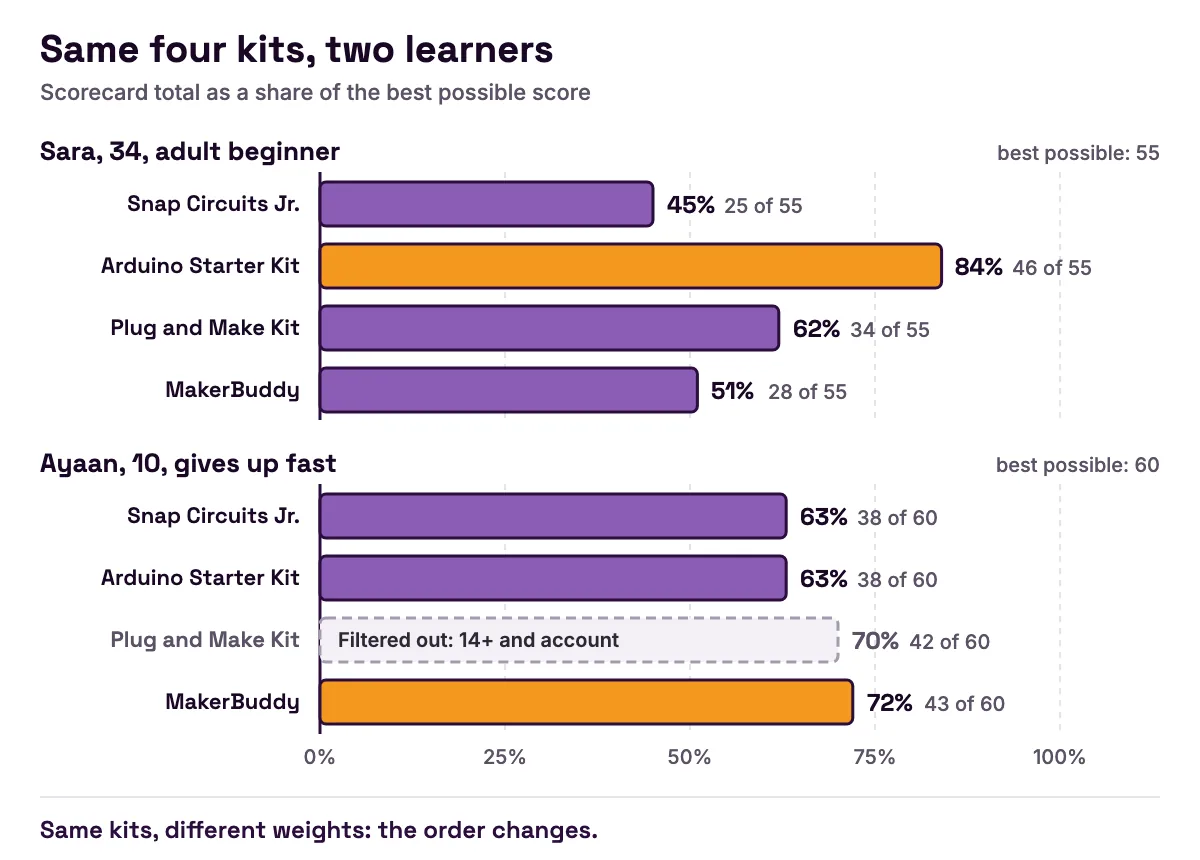
The lesson is in the method, not the winner. The same four kits rank in a different order for the two buyers, because the weights come from the learner. Filters for age, devices and accounts come first, scores second.
What an electronics kit costs after the box
The box price is rarely the whole cost. Add these before you compare:
| Extra | Which kits need it | Notes |
|---|---|---|
| Batteries | Snap Circuits Jr. | Two AA, not included, per Home Science Tools (opens in a new tab) |
| A computer | Every breadboard and plug-in kit here | The Starter Kit's code lives in the Arduino IDE under File, Examples, 10.StarterKit, per the Arduino Store (opens in a new tab) |
| Soldering iron, solder, cutters | Solder kits | Not included with the Simon Says kit, per SparkFun (opens in a new tab) |
| An online account | Plug and Make Kit | Needed for all the content, per the Arduino Store (opens in a new tab) |
| 2.4 GHz Wi-Fi | Plug and Make Kit cloud projects, MakerBuddy | A phone hotspot works for MakerBuddy |
| A multimeter | Breadboard and solder kits | Not essential on day one, but it replaces guessing with measuring |
- Extra
- Batteries
- Which kits need it
- Snap Circuits Jr.
- Notes
- Two AA, not included, per Home Science Tools (opens in a new tab)
- Extra
- A computer
- Which kits need it
- Every breadboard and plug-in kit here
- Notes
- The Starter Kit's code lives in the Arduino IDE under File, Examples, 10.StarterKit, per the Arduino Store (opens in a new tab)
- Extra
- Soldering iron, solder, cutters
- Which kits need it
- Solder kits
- Notes
- Not included with the Simon Says kit, per SparkFun (opens in a new tab)
- Extra
- An online account
- Which kits need it
- Plug and Make Kit
- Notes
- Needed for all the content, per the Arduino Store (opens in a new tab)
- Extra
- 2.4 GHz Wi-Fi
- Which kits need it
- Plug and Make Kit cloud projects, MakerBuddy
- Notes
- A phone hotspot works for MakerBuddy
- Extra
- A multimeter
- Which kits need it
- Breadboard and solder kits
- Notes
- Not essential on day one, but it replaces guessing with measuring
Then there is cost per project. The Arduino Starter Kit at €117 for 15 book projects works out at €7.80 a project (117 ÷ 15). The Inventor's Kit at US$99.95 for 16 circuits is about US$6.25 a circuit (99.95 ÷ 16). Snap Circuits Jr. at US$52.95 for 101 projects is about 52 cents a project (52.95 ÷ 101), but the projects are much smaller. The figures come from the Arduino Store (opens in a new tab), SparkFun (opens in a new tab) and Home Science Tools (opens in a new tab). Compare cost per project only between kits of the same kind.
MakerBuddy comes with 32 free lessons in the MakerBuddy curriculum and 50 ideas on the project ideas page, 43 of which need no code. In Pakistan it costs PKR 40,000 and is ordered online with payment by bank transfer. Families and schools in the US, Canada and elsewhere can ask for a written quote on the MakerBuddy order page. If you plan to teach a term at home with one kit, the homeschool semester plan shows how to pace it.
Where MakerBuddy fits among beginner electronics kits
The MakerBuddy IoT Kit V1.0 is a board carrying a 30-pin ESP32 DevKit, powered by 5 V over micro-USB, with six parts built in and nine that plug into labelled sockets. The full parts and pin list is on the technical details page.
It fits a beginner who:
- Wants things that sense and react, and wants a first result with no code and no wiring.
- Wants structure: 32 free lessons of 45 to 60 minutes, for ages 10 and up.
- Wants to try logic before syntax. The rule engine lesson shows how a rule watches a sensor and runs steps on the board itself, even with the dashboard closed.
It is the wrong buy for a beginner who:
- Wants to learn wiring, resistors and how a circuit is built. Choose a breadboard kit.
- Has 5 GHz-only Wi-Fi and no phone hotspot. The board needs 2.4 GHz.
- Has no adult nearby for the first setup. The setup lesson asks learners to get a grown-up's help with the Wi-Fi password.
There are no accounts, and readings stay on your own network. Rules read the sensors once a second, so very fast events need your own code.
Common mistakes when buying an electronics kit
| Symptom | Cause | Fix |
|---|---|---|
| The kit is finished in a week | A snap kit bought for a learner who already wanted to code | Choose by goal and skill, not by the age on the box |
| Nothing works, and there is no error | One jumper wire is a row off on the breadboard | Check each wire against the drawing, one row at a time; measure with a multimeter |
| The board will not show up on the computer | The USB cable only charges, or the board's driver is missing | Try a data cable; install the driver the maker names, as SparkFun's guide (opens in a new tab) does for its RedBoard Qwiic |
| Setup fails at home | 5 GHz-only Wi-Fi, a missing account or an unsupported device | Read the hidden needs before you pay; a phone hotspot often fixes the Wi-Fi |
| Soldering goes badly on the first joint | No iron, or a cheap iron and no practice | Budget for a temperature-controlled iron and practise on spare parts first |
| The adult ends up building it | The kit is too hard, or the grown-up takes over | Ask the learner to guess what will happen, then let them try |
- Symptom
- The kit is finished in a week
- Cause
- A snap kit bought for a learner who already wanted to code
- Fix
- Choose by goal and skill, not by the age on the box
- Symptom
- Nothing works, and there is no error
- Cause
- One jumper wire is a row off on the breadboard
- Fix
- Check each wire against the drawing, one row at a time; measure with a multimeter
- Symptom
- The board will not show up on the computer
- Cause
- The USB cable only charges, or the board's driver is missing
- Fix
- Try a data cable; install the driver the maker names, as SparkFun's guide (opens in a new tab) does for its RedBoard Qwiic
- Symptom
- Setup fails at home
- Cause
- 5 GHz-only Wi-Fi, a missing account or an unsupported device
- Fix
- Read the hidden needs before you pay; a phone hotspot often fixes the Wi-Fi
- Symptom
- Soldering goes badly on the first joint
- Cause
- No iron, or a cheap iron and no practice
- Fix
- Budget for a temperature-controlled iron and practise on spare parts first
- Symptom
- The adult ends up building it
- Cause
- The kit is too hard, or the grown-up takes over
- Fix
- Ask the learner to guess what will happen, then let them try
For more buying guides and project ideas, browse the MakerBuddy blog.
FAQ
What is the best electronics kit for a complete beginner?
It depends on age and goal. A snap-together kit such as Snap Circuits Jr. suits a child of 8 to 10. A breadboard kit like the Arduino Starter Kit suits a teen or adult who wants circuits and code. A plug-in kit suits a learner who wants sensors and automation without code at first.
What is the best electronics kit for adults?
Many adult beginners do well with a breadboard kit and a book, such as the Arduino Starter Kit, because it teaches wiring and code together. If you want a finished gadget, try a beginner solder kit and budget for an iron. If you want to automate things at home, an ESP32 or plug-in kit gets you there faster.
What is a good electronics kit for teens?
Choose one with a real programmable board: an Arduino or ESP32 breadboard kit, or the Arduino Plug and Make Kit if they want to skip wiring. Arduino recommends the Plug and Make Kit for 14 and up and it needs an Arduino account, per the Arduino Store (opens in a new tab). Teens who prefer robots should look at a robotics kit instead.
What is a good Snap Circuits alternative for older kids?
For a child of 10 to 12 who has finished their snap set, a micro:bit or a plug-in sensor kit like MakerBuddy adds numbers and logic without a breadboard. From about 12, a breadboard kit such as the SparkFun Inventor's Kit, which SparkFun gives for ages 10 and up (opens in a new tab), adds typed code. Pick by the question your child keeps asking.
How can I learn electronics on my own?
Start with a kit that has a guided book or online guide, and build every project in order. Change one thing in each project and predict what will happen before you test it. Add a multimeter early, so you can measure voltage instead of guessing.
Can I learn electronics for free?
Much of the theory is free in makers' own tutorials, such as SparkFun's guides and the Arduino documentation. MakerBuddy's 32 lessons are free to read, and most have a Try it demo that runs in the browser with no kit. To build real circuits you still need parts, so a small kit is the cheapest way to practise.
Do I need to know coding to start with electronics?
No. Snap kits and solder kits need no code at all, and plug-in kits like MakerBuddy start from a dashboard. Code becomes useful once you want a circuit to make decisions, such as "beep when the box opens". Breadboard kits with an Arduino teach code and electronics together.
Are cheaper Arduino-compatible kits as good as the official kit?
The board itself can be fine: SparkFun describes the RedBoard Qwiic in its Inventor's Kit as Arduino-compatible, and SparkFun's kit guide (opens in a new tab) programs it from the same Arduino IDE. What varies between kits is the guide, the quality of parts and whether a driver is needed. Read the guide before you buy, because the guide is what a beginner actually uses.
Sources
- Elenco: Snap Circuits Jr. SC-100 manual (Rev H, hosted by SparkFun) (opens in a new tab)
- Home Science Tools: Snap Circuits Jr. 100 Electronics Discovery Kit (opens in a new tab)
- SparkFun: How to use a breadboard (opens in a new tab)
- SparkFun: Inventor's Kit v4.1.2, KIT-21301 (opens in a new tab)
- SparkFun: Inventor's Kit experiment guide v4.1 (opens in a new tab)
- SparkFun: Simon Says through-hole soldering kit, KIT-10547 (opens in a new tab)
- Arduino Store: Arduino Starter Kit (opens in a new tab)
- Arduino Store: Plug and Make Kit (opens in a new tab)
- micro:bit Educational Foundation: micro:bit features overview (opens in a new tab)
- micro:bit Educational Foundation: Let's code (opens in a new tab)
- Espressif: ESP32 Series Datasheet (opens in a new tab)
- Espressif: Installing the Arduino-ESP32 board package (opens in a new tab)