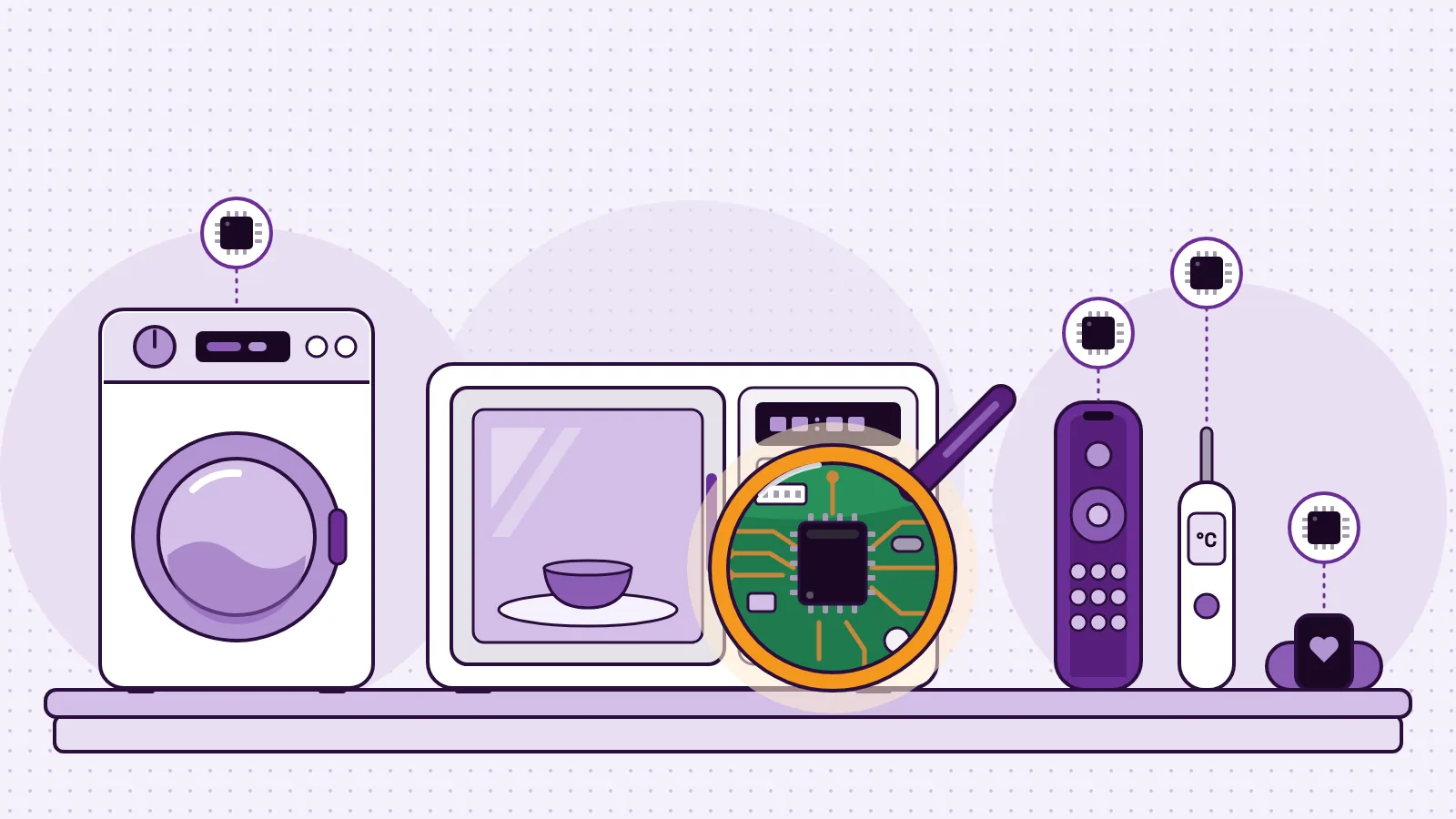
IoT examples are everyday objects that sense something, share it over a network and act on it. The Internet of Things (IoT) is the name for all of these connected things together. Five you may already know are a smart thermostat, a video doorbell, a fitness band, a smart speaker and a smart electricity meter. Each one has a sensor or a moving part, plus a network connection. That pair is what makes a device part of the Internet of Things.
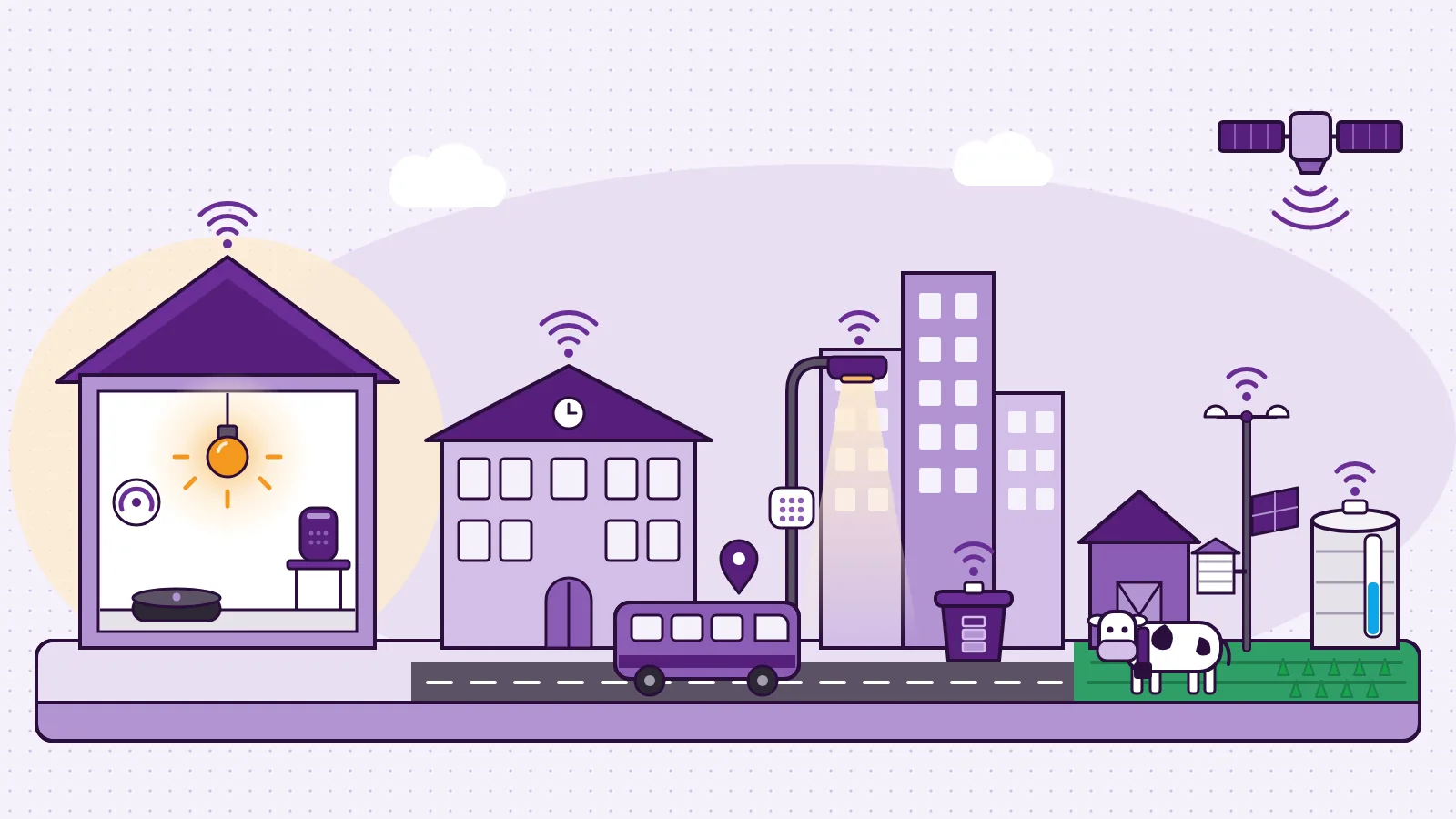
Below are 25 IoT examples, grouped by where you meet them: at home, at school, in the city and on the farm. For each one you see what it senses, how it connects and what it does. Then you can build one yourself: a plant monitor that reads soil moisture, shows it live on a dashboard and warns you when the plant is thirsty.
What is IoT? A one-sentence definition
The Internet of Things is a network of physical objects that measure the world with sensors, share that data over a network and act on it, often with nobody pressing a switch.
The US National Institute of Standards and Technology (NIST) gives a practical test in its report on IoT cybersecurity and privacy risks (opens in a new tab). Every IoT device has at least one transducer and at least one network interface. A transducer is a sensor, which observes the world, or an actuator, such as a door lock, which changes it. A network interface is Wi-Fi, Bluetooth, Ethernet, a phone network (LTE) or Zigbee, for example.
MakerBuddy's first lesson, Electronics, Automation and IoT, puts the same idea as three steps.
| Step | What it adds | Who decides? | Reach it over a network? | Example |
|---|---|---|---|---|
| Electronics | Electricity does something useful | A person | No | A torch, a doorbell |
| Automation | A rule: IF this, THEN that | The rule | No | A washing machine |
| IoT | A network connection | The rule | Yes | A smart bulb, a fitness band |
- Step
- Electronics
- What it adds
- Electricity does something useful
- Who decides?
- A person
- Reach it over a network?
- No
- Example
- A torch, a doorbell
- Step
- Automation
- What it adds
- A rule: IF this, THEN that
- Who decides?
- The rule
- Reach it over a network?
- No
- Example
- A washing machine
- Step
- IoT
- What it adds
- A network connection
- Who decides?
- The rule
- Reach it over a network?
- Yes
- Example
- A smart bulb, a fitness band
So IoT is automation plus connectivity. A streetlight that switches on at dusk is automated. It becomes IoT when it can report a broken lamp to the city (example 17).
Test any device with two questions. Does it sense or act on the physical world? Does it talk over a network? Two yeses make it an IoT device. A kitchen timer fails the second question, and a cloud photo album fails the first.
How every IoT device works: sense, connect, decide, act
Every example below has the same four parts, which our guide to how IoT works, from sensors to networks, dashboards and rules takes further.
- 1
Sense.
A sensor measures heat, light, movement, distance or water in soil. Our visual guide to the types of sensors shows the common ones.
- 2
Connect.
Wi-Fi, Bluetooth, a phone network or even a satellite sends the reading on.
- 3
Decide.
Software compares the reading with a rule. Too warm? Too dry? Someone at the door?
- 4
Act and show.
A motor, relay or buzzer acts, and a screen or app shows you. The guide to actuators and output devices covers this side.
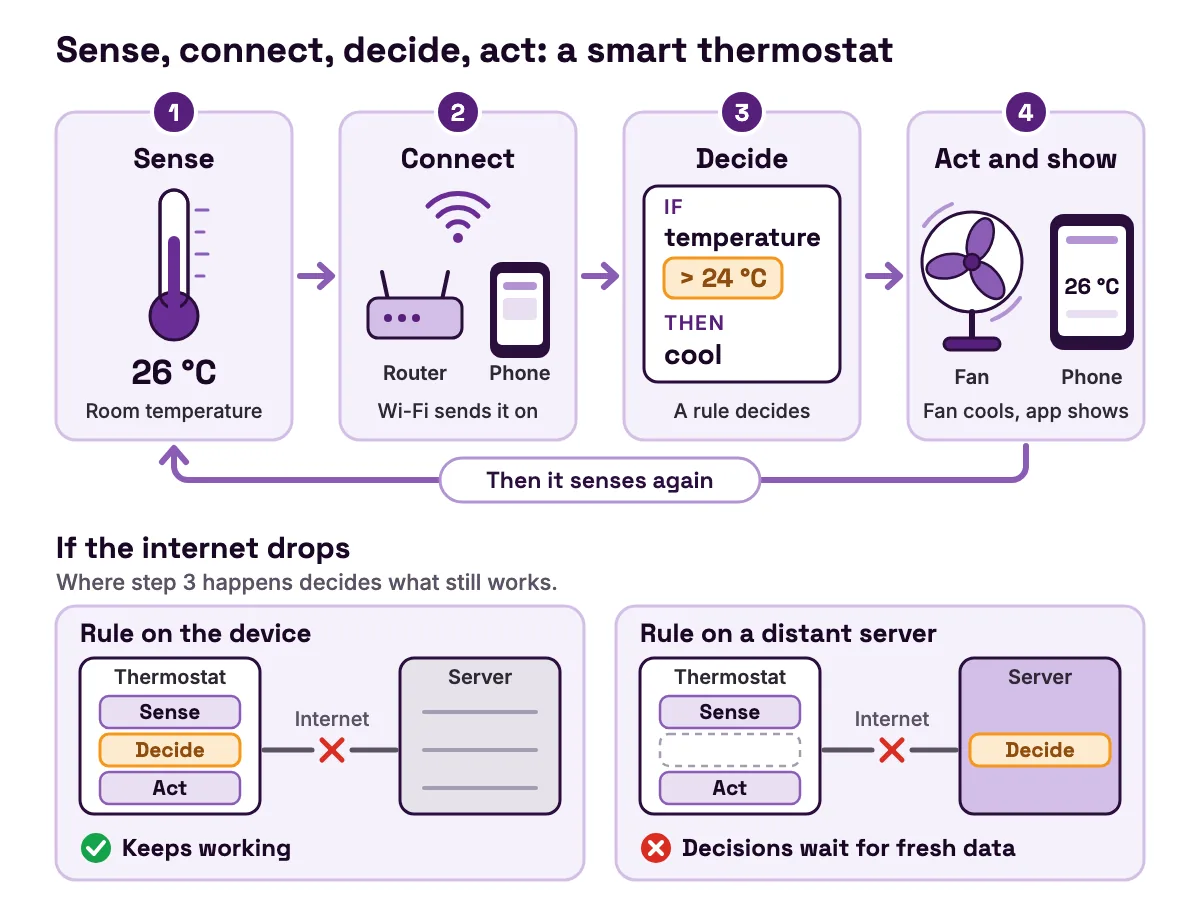
Where step 3 happens decides what still works when the internet drops.
| Where the rule runs | If the connection drops | Example |
|---|---|---|
| On the device | It keeps working | A MakerBuddy rule runs on the board, even with no dashboard open |
| Split between device and online platform | The basics keep working | Virtual-fence collars keep enforcing their boundaries with or without a connection, says North Dakota State University's guide (opens in a new tab) |
| On a central server | Decisions wait for fresh data | San Francisco's SFpark set meter prices from road-sensor data, says the SFMTA evaluation summary (opens in a new tab) |
- Where the rule runs
- On the device
- If the connection drops
- It keeps working
- Example
- A MakerBuddy rule runs on the board, even with no dashboard open
- Where the rule runs
- Split between device and online platform
- If the connection drops
- The basics keep working
- Example
- Virtual-fence collars keep enforcing their boundaries with or without a connection, says North Dakota State University's guide (opens in a new tab)
- Where the rule runs
- On a central server
- If the connection drops
- Decisions wait for fresh data
- Example
- San Francisco's SFpark set meter prices from road-sensor data, says the SFMTA evaluation summary (opens in a new tab)
We go deeper in edge computing vs cloud IoT.
Connecting a device is not always an upgrade. Each connection brings something to look after.
- Privacy. A doorbell camera or smart speaker sends video or sound off the device.
- Security. NIST notes (opens in a new tab) that IoT devices often have different security features from laptops and phones, so organisations may need extra controls. The MakerBuddy board, for one, has no login, so keep it on a trusted classroom network and never open it to the internet. See the school network notes and our guide to IoT security basics for schools and makers.
- Dependence. A device that decides on a company's servers stops being smart when the internet drops or the service closes.
- Safety. Anything that protects people must keep working offline, like a smoke alarm's siren (example 8).
25 IoT examples at a glance
Here are all 25 examples of IoT devices in one table. The network column shows what such devices typically use, and brands differ.
| # | Device | Where | Senses | Network (typical) | Does |
|---|---|---|---|---|---|
| 1 | Smart thermostat | Home | Room temperature | Wi-Fi | Adjusts heating and cooling |
| 2 | Smart speaker | Home | Your voice | Wi-Fi | Answers, switches other devices |
| 3 | Video doorbell | Home | Motion, the button | Wi-Fi | Sends a phone alert with video |
| 4 | Smart lock | Home | A code, phone or card | Bluetooth, Wi-Fi or Thread | Locks and unlocks |
| 5 | Smart plug | Home | Commands | Wi-Fi, Zigbee or Thread | Switches a lamp or fan |
| 6 | Smart light bulb | Home | Commands, schedules | Wi-Fi, Zigbee or Thread | Changes brightness and colour |
| 7 | Robot vacuum | Home | Bumps, stair edges | Wi-Fi | Cleans on a schedule |
| 8 | Smoke and CO alarm | Home | Smoke, carbon monoxide | Wi-Fi | Sounds and alerts your phone |
| 9 | Fitness band | On you | Movement, pulse | Bluetooth | Counts steps, tracks sleep |
| 10 | Classroom CO2 monitor | School | Carbon dioxide | Wi-Fi | Shows when a room needs air |
| 11 | Occupancy-sensing lights | School | Body heat | Building network | Turns off lights in empty rooms |
| 12 | Smart sprinkler controller | School field | Local weather data | Wi-Fi | Waters only as needed |
| 13 | School bus tracker | School | GPS position | Cellular | Shows the bus on a map |
| 14 | ID badge door reader | School | A badge's radio tag | Building network | Unlocks, records entry |
| 15 | Smart electricity meter | City | Electricity used | Utility network | Reports use to the power company |
| 16 | Parking space sensor | City | A parked car | Radio | Shows free spaces |
| 17 | Connected streetlight | City | Daylight, faults | Radio or cellular | Dims, reports broken lamps |
| 18 | Smart waste bin | City | How full it is | Cellular | Calls the collection crew |
| 19 | Air quality sensor | City | Fine particles | Wi-Fi | Feeds a live smoke map |
| 20 | River gauge | City | Water level | Satellite | Feeds flood forecasts |
| 21 | Soil moisture probe | Farm | Water in soil | Radio or cellular | Says when to irrigate |
| 22 | Farm weather station | Farm | Rain, wind, temperature | Radio or cellular | Guides farm decisions |
| 23 | Greenhouse controller | Farm | Temperature, humidity, light | Wired, phone alerts | Runs vents, fans and heaters |
| 24 | Virtual-fence collar | Farm | GPS position | Cellular, LoRaWAN or satellite | Turns cattle from a boundary |
| 25 | Tank level sensor | Farm | Water level | Cellular or LoRaWAN | Alerts when a trough runs low |
- #
- 1
- Device
- Smart thermostat
- Where
- Home
- Senses
- Room temperature
- Network (typical)
- Wi-Fi
- Does
- Adjusts heating and cooling
- #
- 2
- Device
- Smart speaker
- Where
- Home
- Senses
- Your voice
- Network (typical)
- Wi-Fi
- Does
- Answers, switches other devices
- #
- 3
- Device
- Video doorbell
- Where
- Home
- Senses
- Motion, the button
- Network (typical)
- Wi-Fi
- Does
- Sends a phone alert with video
- #
- 4
- Device
- Smart lock
- Where
- Home
- Senses
- A code, phone or card
- Network (typical)
- Bluetooth, Wi-Fi or Thread
- Does
- Locks and unlocks
- #
- 5
- Device
- Smart plug
- Where
- Home
- Senses
- Commands
- Network (typical)
- Wi-Fi, Zigbee or Thread
- Does
- Switches a lamp or fan
- #
- 6
- Device
- Smart light bulb
- Where
- Home
- Senses
- Commands, schedules
- Network (typical)
- Wi-Fi, Zigbee or Thread
- Does
- Changes brightness and colour
- #
- 7
- Device
- Robot vacuum
- Where
- Home
- Senses
- Bumps, stair edges
- Network (typical)
- Wi-Fi
- Does
- Cleans on a schedule
- #
- 8
- Device
- Smoke and CO alarm
- Where
- Home
- Senses
- Smoke, carbon monoxide
- Network (typical)
- Wi-Fi
- Does
- Sounds and alerts your phone
- #
- 9
- Device
- Fitness band
- Where
- On you
- Senses
- Movement, pulse
- Network (typical)
- Bluetooth
- Does
- Counts steps, tracks sleep
- #
- 10
- Device
- Classroom CO2 monitor
- Where
- School
- Senses
- Carbon dioxide
- Network (typical)
- Wi-Fi
- Does
- Shows when a room needs air
- #
- 11
- Device
- Occupancy-sensing lights
- Where
- School
- Senses
- Body heat
- Network (typical)
- Building network
- Does
- Turns off lights in empty rooms
- #
- 12
- Device
- Smart sprinkler controller
- Where
- School field
- Senses
- Local weather data
- Network (typical)
- Wi-Fi
- Does
- Waters only as needed
- #
- 13
- Device
- School bus tracker
- Where
- School
- Senses
- GPS position
- Network (typical)
- Cellular
- Does
- Shows the bus on a map
- #
- 14
- Device
- ID badge door reader
- Where
- School
- Senses
- A badge's radio tag
- Network (typical)
- Building network
- Does
- Unlocks, records entry
- #
- 15
- Device
- Smart electricity meter
- Where
- City
- Senses
- Electricity used
- Network (typical)
- Utility network
- Does
- Reports use to the power company
- #
- 16
- Device
- Parking space sensor
- Where
- City
- Senses
- A parked car
- Network (typical)
- Radio
- Does
- Shows free spaces
- #
- 17
- Device
- Connected streetlight
- Where
- City
- Senses
- Daylight, faults
- Network (typical)
- Radio or cellular
- Does
- Dims, reports broken lamps
- #
- 18
- Device
- Smart waste bin
- Where
- City
- Senses
- How full it is
- Network (typical)
- Cellular
- Does
- Calls the collection crew
- #
- 19
- Device
- Air quality sensor
- Where
- City
- Senses
- Fine particles
- Network (typical)
- Wi-Fi
- Does
- Feeds a live smoke map
- #
- 20
- Device
- River gauge
- Where
- City
- Senses
- Water level
- Network (typical)
- Satellite
- Does
- Feeds flood forecasts
- #
- 21
- Device
- Soil moisture probe
- Where
- Farm
- Senses
- Water in soil
- Network (typical)
- Radio or cellular
- Does
- Says when to irrigate
- #
- 22
- Device
- Farm weather station
- Where
- Farm
- Senses
- Rain, wind, temperature
- Network (typical)
- Radio or cellular
- Does
- Guides farm decisions
- #
- 23
- Device
- Greenhouse controller
- Where
- Farm
- Senses
- Temperature, humidity, light
- Network (typical)
- Wired, phone alerts
- Does
- Runs vents, fans and heaters
- #
- 24
- Device
- Virtual-fence collar
- Where
- Farm
- Senses
- GPS position
- Network (typical)
- Cellular, LoRaWAN or satellite
- Does
- Turns cattle from a boundary
- #
- 25
- Device
- Tank level sensor
- Where
- Farm
- Senses
- Water level
- Network (typical)
- Cellular or LoRaWAN
- Does
- Alerts when a trough runs low
Internet of things examples at home
1. Smart thermostat. A temperature sensor reads the room. ENERGY STAR describes a smart thermostat (opens in a new tab) as a Wi-Fi enabled device that adjusts heating and cooling settings by itself. Many learn your preferences.
2. Smart speaker. Microphones listen for a wake word, then the speaker usually sends your request over Wi-Fi to the maker's computers. It answers, or switches another device such as a plug.
3. Video doorbell. A motion sensor and a camera watch the doorstep. When someone walks up or presses the button, the doorbell sends an alert and live video to your phone.
4. Smart lock. A keypad code, a phone or a card tells the lock who is there, and a small motor turns the bolt. NIST's IoT report (opens in a new tab) names electronic door locks as an example of an actuator.
5. Smart plug. A relay inside, an electrically controlled switch, turns a lamp or fan on and off when an app, a schedule or a speaker says so. It is a sealed product made for mains power, so never build your own from a learning kit's relay.
6. Smart light bulb. A tiny radio and controller inside set the brightness and, in colour bulbs, the mix of red, green and blue. The Matter standard (opens in a new tab) runs on Wi-Fi and Thread and uses Bluetooth Low Energy for setup, so bulbs and plugs from different brands work together.
7. Robot vacuum. Bump, stair-edge and wheel sensors tell the robot where it has been, and many models map your rooms. Wi-Fi lets you start a clean from your phone.
8. Connected smoke and CO alarm. When the smoke or carbon monoxide sensor trips, the siren sounds like any alarm, and your phone gets an alert too. The siren does not need the internet. Only the alert does.
9. Fitness band or smartwatch. An accelerometer feels your movement, and many bands measure your pulse with a small light on your skin. The band sends its data over Bluetooth to a phone app, which acts as its screen.
IoT examples at school
10. Classroom CO2 monitor. People breathe out carbon dioxide, so a rising reading means a room needs fresh air. In January 2022, England's Department for Education said it had delivered over 353,000 CO2 monitors (opens in a new tab) to state-funded education settings. A monitor that only shows its own number is not IoT. A connected one sends readings to a dashboard, so staff see every room at once.
11. Occupancy-sensing lights. A passive infrared (PIR) sensor notices the body heat of people moving, and the lights go off when a room stays empty. The US Department of Energy's guide to wireless occupancy sensors (opens in a new tab) says lighting controls can cut lighting energy use by 10% to 90% or more, depending on the space. The kit's HC-SR501 motion sensor uses the same idea.
12. Smart sprinkler controller. A weather-based controller uses local weather data to decide how much to water and when. The US EPA says a WaterSense-labelled weather-based controller (opens in a new tab) can save an average home nearly 7,600 gallons (about 28,800 litres) of water a year compared with a clock-based one.
13. School bus tracker. A GPS receiver works out where the bus is, and a cellular modem sends the position to a server. Parents see the bus on a map.
14. ID badge door reader. The reader senses the radio tag in a badge, checks the school's list, unlocks the door and records the time. A lost badge is cancelled on the computer, not by changing every lock.
IoT examples in the city
15. Smart electricity meter. The meter measures a home's electricity use and sends the readings to the power company. The US Energy Information Administration counted about 119 million smart meter installations (opens in a new tab) in 2022, about 72% of US electricity meters. They record use at least every hour and share it at least once a day.
16. Parking space sensor. SFpark put sensors in the road under San Francisco parking spaces, to show drivers free spaces and to set meter prices. The SFMTA evaluation summary (opens in a new tab) from June 2014 gives the rule. When a block was 80–100% full, the hourly rate rose by $0.25. At 30–60% full, it fell by $0.25. That is an IF-THEN rule for a whole city.
17. Connected streetlight. A photocell that switches a light on at dusk is automation. A US Department of Energy workshop on outdoor lighting control systems (opens in a new tab) describes the IoT step: networked controllers with remote control and remote monitoring, so a city can change dimming schedules and hear when a lamp fails.
18. Smart waste bin. A sensor in the lid measures how full the bin is and sends that over the phone network. The crew visits full bins and skips empty ones.
19. Air quality sensor. A small air sensor samples the air and reports what it finds. The US EPA's Air Sensor Toolbox (opens in a new tab) calls such sensors lower in cost, portable and generally easier to operate than regulatory-grade monitors. The AirNow Fire and Smoke Map (opens in a new tab) shows fine particle pollution, called PM2.5, and uses a correction equation to make sensor data more accurate.
20. River gauge. A USGS streamgage measures a river's height from the pressure needed to push gas out of a tube under the water. The USGS streamgage fact sheet (opens in a new tab) says it usually records the level every 15 minutes and sends data to a satellite every 1 to 4 hours, or every 15 minutes during high water. The National Weather Service uses the data to forecast floods.
IoT examples on the farm
21. Soil moisture probe. Probes in the soil measure how much water it holds, and the farmer uses the readings to decide when to irrigate and how much water the crop needs. A University of Georgia Extension project paired soil moisture sensors with smartphone irrigation apps (opens in a new tab) in peanut and cotton fields across more than 15 South Georgia counties.
22. Farm weather station. The Oklahoma Mesonet (opens in a new tab) is a network of 120 automated weather stations that send observations to a central facility every 5 minutes, day and night. Its list of benefits (opens in a new tab) includes spraying recommendations, irrigation scheduling, frost protection, and planting and harvesting recommendations.
23. Greenhouse climate controller. Sensors read temperature, humidity and light, and the controller runs vents, fans and heaters to match. If a heater fails at night, a connected controller alerts the grower's phone.
24. Virtual-fence livestock collar. Fences become lines on a map, and each animal wears a GPS collar. NDSU's guide to grazing with virtual fence (opens in a new tab), revised in June 2026, explains that the collar plays a sound as an animal approaches a boundary, then gives an electrical cue if it keeps going. Collars report by satellite, cellular or LoRaWAN.
25. Water tank level sensor. A level sensor, sometimes an ultrasonic one like the kit's HC-SR04, measures the water in a trough. The farmer gets a message when it runs low, instead of driving out to check.
Our guide to smart farming with IoT sensors goes deeper on the farm.
The networks that connect these IoT devices
| Network | Reach | Good for | Examples |
|---|---|---|---|
| Wi-Fi (2.4 GHz) | A home or school | More data, like video | Thermostat, doorbell, the MakerBuddy board, whose ESP32 uses 802.11 b/g/n at 2.4 GHz (ESP32 datasheet (opens in a new tab)) |
| Bluetooth Low Energy | A room | Small data to a nearby phone | Fitness band, smart lock |
| Zigbee and Thread | A house | Many small devices | Bulbs, plugs, sensors |
| Cellular | Wherever phones work | Things that move or sit far from Wi-Fi | Bus tracker, bins, collars |
| LoRaWAN | Up to 15 km in rural areas, says the LoRa Alliance (opens in a new tab), which also claims batteries can last 10+ years | Small readings, far away | Farm sensors, tank levels |
| Satellite | Anywhere with open sky | No other signal | River gauges, remote collars |
- Network
- Wi-Fi (2.4 GHz)
- Reach
- A home or school
- Good for
- More data, like video
- Examples
- Thermostat, doorbell, the MakerBuddy board, whose ESP32 uses 802.11 b/g/n at 2.4 GHz (ESP32 datasheet (opens in a new tab))
- Network
- Bluetooth Low Energy
- Reach
- A room
- Good for
- Small data to a nearby phone
- Examples
- Fitness band, smart lock
- Network
- Zigbee and Thread
- Reach
- A house
- Good for
- Many small devices
- Examples
- Bulbs, plugs, sensors
- Network
- Cellular
- Reach
- Wherever phones work
- Good for
- Things that move or sit far from Wi-Fi
- Examples
- Bus tracker, bins, collars
- Network
- LoRaWAN
- Reach
- Up to 15 km in rural areas, says the LoRa Alliance (opens in a new tab), which also claims batteries can last 10+ years
- Good for
- Small readings, far away
- Examples
- Farm sensors, tank levels
- Network
- Satellite
- Reach
- Anywhere with open sky
- Good for
- No other signal
- Examples
- River gauges, remote collars
NDSU's guide to grazing with virtual fence (opens in a new tab) gives the farm view. Satellite collars work in almost any area unless trees or other things block the sky. Cellular collars need phone signal, which some areas lack. A LoRaWAN tower can cover a 2- to 3-mile radius (about 3 to 5 km) on flat ground with no major obstacles.
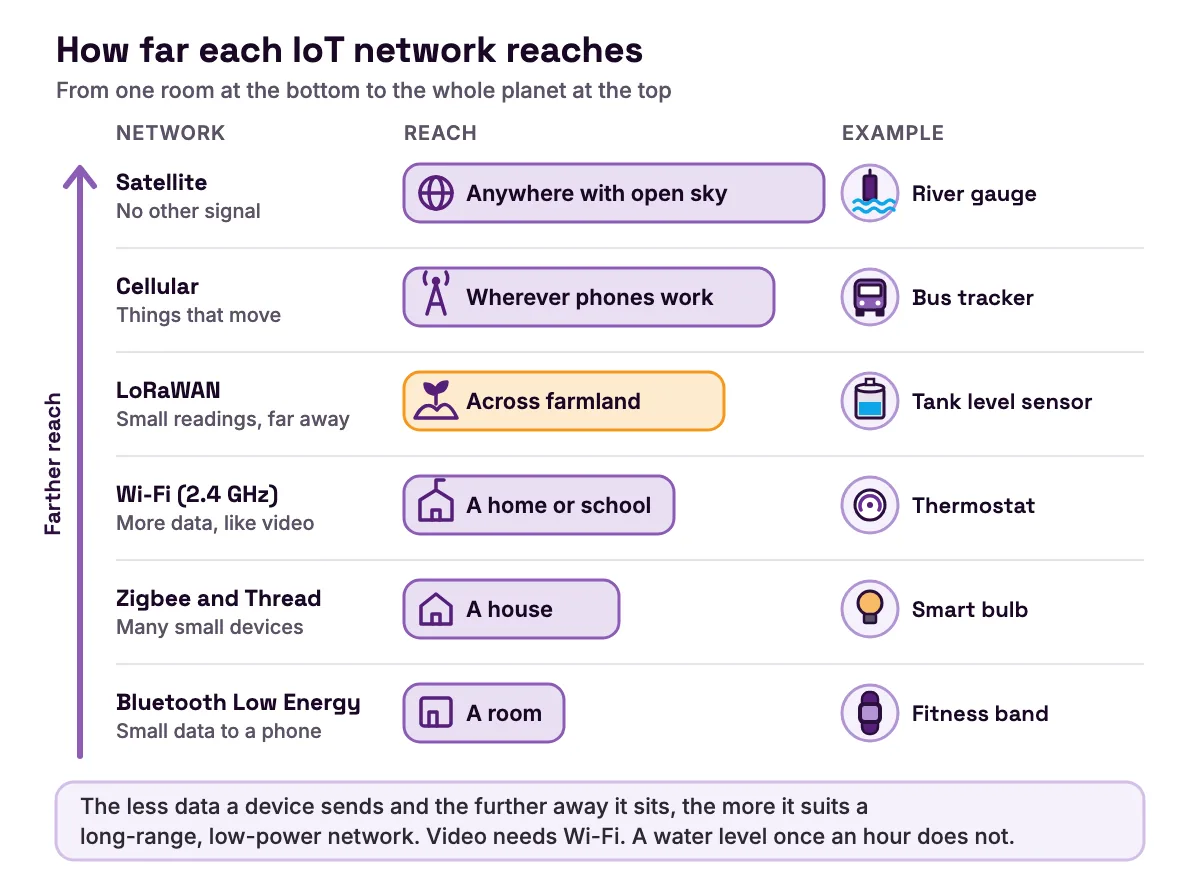
The less data a device sends and the further away it sits, the more it suits a long-range, low-power network. Video needs Wi-Fi. A water level once an hour does not. Wi-Fi is the easiest to learn on, because most schools and homes already have it. Our comparison of Wi-Fi, Bluetooth, Zigbee and LoRa for IoT projects goes further.
Build your own IoT example: a plant monitor on the MakerBuddy kit
This build turns example 21 into a desk-sized IoT device with all four parts: a sensor, a Wi-Fi link, rules that decide and a dashboard that shows you. You need no code. It follows Lesson 18, Smart Agriculture, and the Condition rules from Lesson 26.
MakerBuddy is a learning board built around an ESP32, a small computer with Wi-Fi. You need the board, its capacitive soil moisture sensor (a coated blade, no metal prongs), the text screen, 5 V USB power and two cups of soil, one dry and one damp. You also need 2.4 GHz Wi-Fi (a phone hotspot works) and a computer, iPhone or iPad. Android phones cannot control the board yet.
Step 1: Sense
Unplug the USB cable. Plug the soil sensor into the socket marked 32. It fits only one way, so never force it. Plug the text screen into a socket marked I2C, matching each wire by its printed name: VCC, GND, SDA and SCL. Plug the USB cable back in. Only the blade below its printed line may go into soil or water.
Step 2: Connect
A new board makes its own Wi-Fi network called MakerBuddy_XXXX, with the password 12345678. Join it, open http://192.168.4.1 and enter your Wi-Fi name and password. The steps are in first-time setup, and Lesson 3 teaches them.
Step 3: Show
Open the dashboard for your device (choose your dashboard) and connect to the board. The Soil Moisture card shows a number from 0 to 100. The board reads the sensor once a second, and the card refreshes about every 2 seconds.
Now calibrate. Click the gear on the Soil Moisture card. Hold the blade in dry air, press Start under Dry Calibration, let the number settle and press Save. Dip it in water up to the line and do the same under Wet Calibration. Our guide to calibrating a soil moisture sensor explains why each sensor needs its own numbers.
Here is the maths the board does. It reads a raw value from 0 to 4095, and wetter soil gives a lower raw value. Until you calibrate, it treats 3000 as dry and 1200 as wet. Say the raw reading is 2034:
moisture = (raw - dry) x 100 / (wet - dry)
         = (2034 - 3000) x 100 / (1200 - 3000)
         = -96600 / -1800
         = 53.67
The board drops the fraction, so the card shows 53. Anything drier than your dry value shows 0, and anything wetter than your wet value shows 100. Lesson 18 treats about 0 to 30 as dry soil and about 30 to 60 as moist.
Step 4: Decide
In the Rule Engine tab, use Create Rule to make these two rules.
| Setting | Rule 1: Thirsty plant | Rule 2: Happy plant |
|---|---|---|
| Loop Mode | Condition | Condition |
| Sensor and test | Soil Moisture, Less than (<) 30 | Soil Moisture, Greater or equal (>=) 40 |
| Step 1 | LCD Display, Custom Text: Water me please / Moisture {soil}, Delay (ms) 0 | LCD Display, Custom Text: Plant is happy / Moisture {soil}, Delay (ms) 0 |
| Step 2 | RGB Red, Delay (ms) 0 | RGB Green, Delay (ms) 60000 |
| Step 3 | Buzzer On, Delay (ms) 500 | none |
| Step 4 | Buzzer Off, Delay (ms) 60000 | none |
- Setting
- Loop Mode
- Rule 1: Thirsty plant
- Condition
- Rule 2: Happy plant
- Condition
- Setting
- Sensor and test
- Rule 1: Thirsty plant
- Soil Moisture, Less than (<) 30
- Rule 2: Happy plant
- Soil Moisture, Greater or equal (>=) 40
- Setting
- Step 1
- Rule 1: Thirsty plant
- LCD Display, Custom Text:
Water me please/Moisture {soil}, Delay (ms) 0 - Rule 2: Happy plant
- LCD Display, Custom Text:
Plant is happy/Moisture {soil}, Delay (ms) 0
- Setting
- Step 2
- Rule 1: Thirsty plant
- RGB Red, Delay (ms) 0
- Rule 2: Happy plant
- RGB Green, Delay (ms) 60000
- Setting
- Step 3
- Rule 1: Thirsty plant
- Buzzer On, Delay (ms) 500
- Rule 2: Happy plant
- none
- Setting
- Step 4
- Rule 1: Thirsty plant
- Buzzer Off, Delay (ms) 60000
- Rule 2: Happy plant
- none
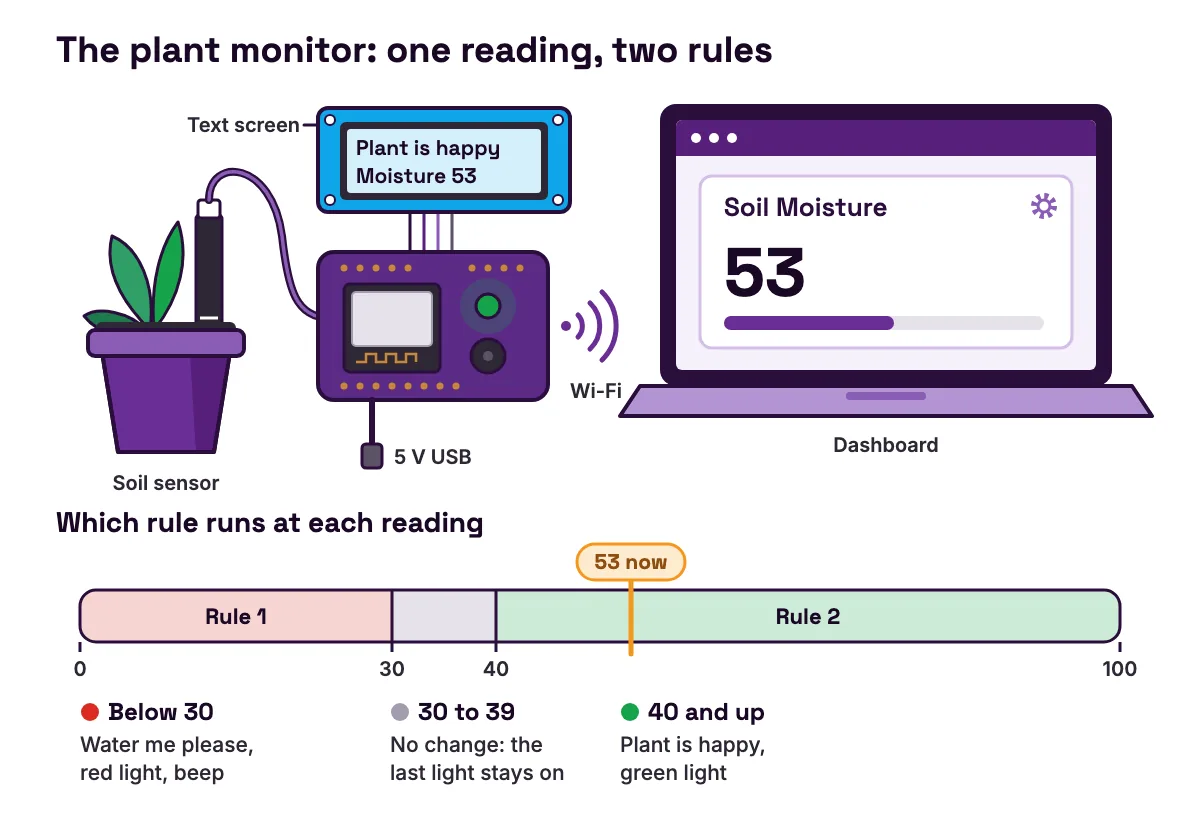
Each choice has a reason.
- 1
Condition mode.
The rule starts once its test has held for 0.3 seconds and repeats while it stays true. Lesson 21 compares all four loop modes.
- 2
Buzzer Off, then 60000 ms.
In a rule, Buzzer On sounds until a Buzzer Off step. Then the plant stays quiet for a minute.
- 3
Two rules.
A rule that stops never switches its outputs off, so rule 2 turns the light green.
- 4
A gap between 30 and 40.
A reading that wobbles near one limit cannot flip the light back and forth. This is called hysteresis.
- 5
Short lines.
Each screen line must fit 16 characters once
{soil}fills in, and the soil value is at most 3 characters wide.
Step 5: Test
Push the blade into the dry soil, up to the line. Within a few seconds, the screen asks for water, the light turns red and the buzzer beeps. Move the blade to the damp soil. Once the reading reaches 40, the light turns green. The rules run on the board, so the monitor keeps working after you close the dashboard. You have built example 21 in miniature: a probe, a network, rules and a screen.
Be honest about the limits. The monitor stays on your local network. Lesson 1 notes that reaching the board from another city, or keeping a long history, needs an extra internet service that MakerBuddy does not use. The board has no clock, and it warns you but does not water the plant.
The MakerBuddy kit includes the board, soil sensor and text screen used here. For more builds, see our ESP32 and Arduino project ideas for students and the list of IoT projects for students, from beginner to capstone.
Common mistakes when you build your first IoT device
The dashboard cannot find the board
Symptom: The board never joins your Wi-Fi, or the dashboard will not connect. Cause: The network is 5 GHz, needs a sign-in page, or is a guest network that stops devices talking to each other. Fix: Use a 2.4 GHz network that needs only a name and password, or a phone hotspot. See what your Wi-Fi needs.
Soil moisture is stuck at 0 or 100
Symptom: The card never moves. Cause: Someone else's calibration numbers, dry and wet saved as the same number (which always reads 0), or a blade not pushed in to the line. Fix: Calibrate both ends with your own sensor and soil, as in the sensor settings.
The buzzer beeps all night
Symptom: The monitor beeps once a minute until someone waters the plant, even at midnight. Cause: A Condition rule repeats its whole cycle while its test stays true, and the board has no clock, so it cannot tell night from day. Fix: Make the last delay longer, for example 600000 ms for ten minutes, or delete the two buzzer steps and rely on the red light and the screen.
FAQ
What is the definition of IoT and examples?
IoT, the Internet of Things, means everyday objects that sense the world, share data over a network and act on it. Examples include smart thermostats, video doorbells, fitness bands, smart meters and soil moisture probes. Each has a sensor or actuator plus a network connection, the test NIST (opens in a new tab) uses.
What are the 5 IoT devices?
There is no official list of five, but these are five that many people meet: a smart thermostat, a smart speaker, a video doorbell, a fitness band and a smart electricity meter. Between them they control, listen, watch, measure and report.
What are 10 examples of IoT devices?
A smart thermostat, smart speaker, video doorbell, smart lock, smart plug, smart light bulb, robot vacuum, fitness band, smart electricity meter and soil moisture probe. The table above adds 15 more.
Is a smart TV an example of IoT?
Yes, when it is connected. NIST's report on IoT risks (opens in a new tab) lists TVs with kitchen appliances, thermostats, door locks and light bulbs as everyday electronics that have become connected IoT devices. A smart TV takes commands from a remote, a phone or your voice and streams over Wi-Fi or a cable, so it passes the two-question test.
Is Alexa an IoT device?
Alexa itself is software: Amazon's voice assistant. The smart speaker it runs on is an IoT device. Its microphones sense your voice, Wi-Fi carries the request, and it can switch other connected things, like plugs and bulbs, which are IoT devices too.
Is a phone an IoT device?
Usually not. NIST's IoT report (opens in a new tab) lists smartphones with laptops and servers as conventional IT devices, and notes that most IoT devices do a single job. A phone is more often the screen and remote control for IoT devices.
Does an IoT device need the internet?
Not always. It needs a network, but that network can be local. A MakerBuddy rule runs on the board, and the dashboard talks to it over your own Wi-Fi with no account. Devices that decide on a company's servers stop being smart when the internet goes down.
Can students build their own IoT device?
Yes. The plant monitor above needs no code: a soil sensor, Wi-Fi, a dashboard and two rules. The 32 free lessons in the MakerBuddy curriculum build up to projects like it for ages 10 and up, starting with Lesson 1 on electronics, automation and IoT. More guides are on the MakerBuddy blog.
Sources
- NIST IR 8228: Considerations for Managing Internet of Things (IoT) Cybersecurity and Privacy Risks (June 2019) (opens in a new tab)
- NDSU Extension AS2293: Grazing With Virtual Fence (revised June 2026) (opens in a new tab)
- ENERGY STAR: Smart Thermostats (opens in a new tab)
- Connectivity Standards Alliance: Matter (opens in a new tab)
- UK Department for Education, The Education Hub: How good ventilation can help stop the spread of COVID-19 in schools (6 January 2022) (opens in a new tab)
- US Department of Energy, FEMP: Wireless Occupancy Sensors for Lighting Controls, an Applications Guide for Federal Facility Managers (opens in a new tab)
- US EPA WaterSense: Weather-Based Irrigation Controllers (opens in a new tab)
- US Energy Information Administration: How many smart meters are installed in the United States, and who has them? (opens in a new tab)
- SFMTA: SFpark Pilot Project Evaluation Summary (June 2014) (opens in a new tab)
- US Department of Energy: Outdoor Lighting Control System Fundamentals (workshop slides, May 2015) (opens in a new tab)
- US EPA: Air Sensor Toolbox (opens in a new tab)
- AirNow: Fire and Smoke Map information (opens in a new tab)
- USGS Fact Sheet 2011-3001: How Does a U.S. Geological Survey Streamgage Work? (opens in a new tab)
- UGA Cooperative Extension: AgWet Irrigation Scheduling by Soil Moisture Sensors and Smartphone Apps (opens in a new tab)
- Oklahoma Mesonet: About the Mesonet (opens in a new tab)
- Oklahoma Mesonet: Benefits (opens in a new tab)
- LoRa Alliance: About LoRaWAN (opens in a new tab)
- Espressif: ESP32 Series Datasheet (opens in a new tab)